
MDM vs MAM is the question CF-Device gets asked on most deployment calls: if you’re setting up software control for a fleet of vehicle tablets, you’ll quickly run into two acronyms that sound similar, overlap, and are often blurred by vendors. They solve different problems, and picking the wrong one either leaves gaps in your control or locks down devices more than you need. If you’re new to the term itself, start with our plain-language guide to mobile device management.
TL;DR
- MDM (Mobile Device Management) = you control the whole device — settings, updates, security, apps, the works
- MAM (Mobile Application Management) = you control only specific apps, leaving the rest of the device alone
- Fleets that own their tablets almost always want MDM — full control of purpose-built hardware
- MAM matters mostly when employees use their own personal devices for work (BYOD)
- CF-Device ships roughly 140,000 company-owned rugged vehicle terminals a year into 33 countries; for hardware deployed and owned like that, MDM is the near-universal answer
The Simplest Way to Tell Them Apart
Think of it as the whole device vs. just the apps:
- With MDM, you’re the landlord of the entire building — you decide the locks, the utilities, who gets in, and what each room is used for.
- With MAM, you only manage a few rooms (specific apps) inside a building someone else owns — you can’t touch the rest.
MDM vs MAM: Side-by-Side Comparison
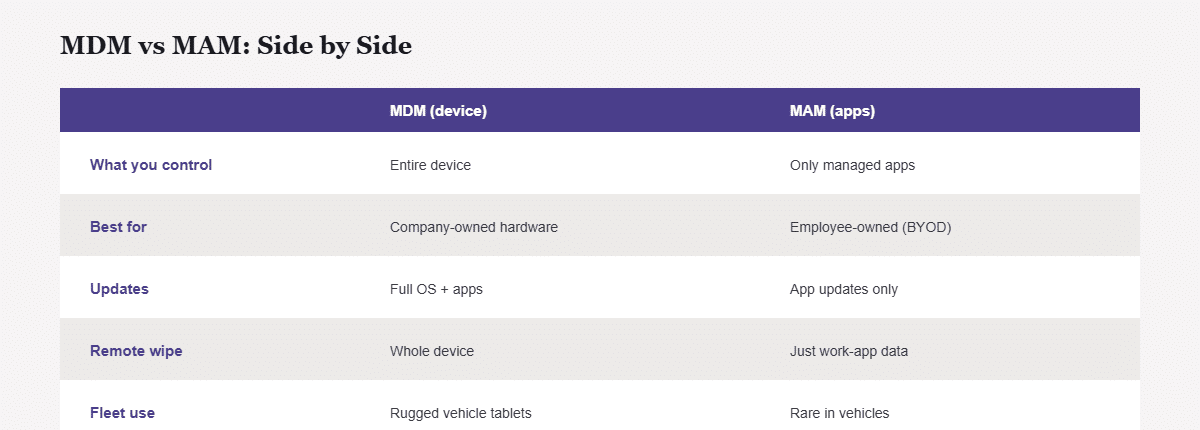
| MDM (device-level) | MAM (app-level) | |
|---|---|---|
| What you control | Entire device | Only managed apps |
| Best for | Company-owned hardware | Employee-owned (BYOD) devices |
| Software updates | Full OS + app control | App updates only |
| Remote wipe | Whole device | Just the work apps’ data |
| Security scope | Device encryption, lockdown | App-level data protection |
| Typical fleet use | Rugged vehicle tablets | Rare in vehicle fleets |
Why Fleets Almost Always Choose MDM
A rugged vehicle tablet isn’t someone’s personal phone — it’s company hardware installed in a truck or tractor to do a specific job. You want to lock it to approved apps (the approach behind kiosk mode and app whitelisting), push updates overnight (see OTA firmware updates and fleet downtime), monitor its health remotely, and wipe it if it’s stolen. That’s full-device control, which is MDM’s whole purpose. MAM’s “only manage the apps” model is built for a problem fleets rarely have (staff using personal phones), so it usually leaves too many gaps for a vehicle deployment. For the full framework on choosing an MDM platform, see our guide to mobile device management solutions for vehicle fleets.
The exception: if some staff access dispatch or reporting from their own phones alongside the vehicle tablets, a MAM layer on those personal devices can protect company data without the company taking over an employee’s private phone. Many setups run both — MDM on owned hardware, MAM on personal devices. Searching the other way round, “MAM vs MDM”, leads to the same answer: the choice follows who owns the device, not which tool is newer.
Enterprise MDM vs. a Vehicle Fleet
Enterprise MDM is usually sold for office phones and laptops that are always on, always on Wi-Fi and carried by a person. A vehicle terminal behaves differently: it powers up and down with the ignition, loses coverage on rural roads, and is managed remotely because nobody can walk over to it. Those differences matter more than the MDM-or-MAM label, which is why the platform you pick should be judged against vehicle conditions, as covered in our MDM management software platform guide.
Mobile Device Management and Security: Where Security Fits In
Whichever model, the security goal is the same: keep company and operational data safe. On owned rugged tablets, secure mobile device management means device encryption, locking the tablet to approved apps only, and the ability to remotely lock or wipe a lost unit — all device-level, all MDM territory. Mobile device management and security are the same job on company hardware, because the device is the thing being protected. This is the same control layer that underpins full fleet management from one terminal.
An Illustrative Deployment Example
Take a logistics company that issues 80 rugged tablets mounted in its trucks (company-owned) and lets 15 office dispatchers check routes on their personal phones. The right setup: MDM on all 80 truck tablets (full control, kiosk lockdown, remote wipe), and a light MAM policy on the 15 personal phones (protect just the dispatch app’s data, leave the rest of the phone private). One company, both tools, each used where it fits.
Common Questions
Is MDM overkill for a small fleet?
No — even 10–20 owned tablets benefit from remote updates and lockdown; the alternative is manually touching each device.
Can I use MAM instead of MDM to save money on company tablets?
Not really — MAM leaves the device itself unmanaged, which defeats the purpose on hardware you own and want to control fully.
Do I ever need both?
Yes — when you mix company-owned vehicle tablets (MDM) with employee personal devices (MAM) in the same operation.
Does choosing MDM mean I’m “spying” on drivers?
MDM manages the device and its software, not the person — on company hardware it’s standard IT practice. Choosing the right hardware to run it on is covered in our rugged vehicle tablet hardware buyer’s guide.
Which CF-Device hardware is this written for?
CF-Device’s VCM series and TANK V2 are company-owned in-vehicle hardware, which is the case where MDM applies. How device management is set up for a given fleet is agreed per project.
Once the control model is settled, the next decision is which platform to run it on — what to compare across MDM products for vehicle fleets is set out in our MDM management software platform guide.
Interested in specs or a quote? Contact our team to discuss which control model fits your fleet.