
CF-Device builds both the terminals and the platform that manages them, which is a useful vantage point on this: “device management software” is the broad category that MDM, MAM, and fleet-specific platforms all sit inside — but the term itself gets used loosely, and buyers often don’t realize how much the specifics matter once you’re managing hundreds of vehicle terminals instead of a handful of office laptops.
TL;DR
- Device management software = any platform that lets you configure, monitor, and control devices remotely
- MDM is the fleet-relevant subset — full device control, not just app-level management (see MDM vs MAM)
- A real device management platform needs to handle vehicle-specific conditions: ignition cycling, weak signal, CAN-bus data
- Device management apps on the terminal itself are the local piece; the platform is the console coordinating all of them
- Picking a device management solution locks you into that vendor’s ecosystem — check for standard protocols before committing
What “Device Management Software” Actually Covers
The phrase is a catch-all. It includes office IT tools for managing phones and laptops, consumer parental-control apps, IoT platforms for smart-home devices, and fleet-grade MDM for vehicle terminals — all technically “device management software,” but built for completely different problems. For a fleet buyer, most of that category is irrelevant; what matters is the subset built for hardware operating in vehicles, not desks. Which hardware classes that actually covers — mounted tablets, screenless controllers, shared handhelds — is broken down in MDM Devices: What Fleet Hardware an MDM Platform Actually Manages.
The Core Capabilities to Look For
| Capability | What It Does | Why It Matters for Vehicles |
|---|---|---|
| Remote configuration | Push settings to devices without physical access | No technician visits per vehicle |
| App/software updates | Deploy new versions fleet-wide | Consistent software across every terminal |
| Health monitoring | Real-time device status dashboard | Catch failures before they cause downtime |
| Remote lock/wipe | Secure a lost or stolen device | Protects data without physical recovery |
| Kiosk/app restriction | Lock device to approved apps only | Prevents misuse of company hardware |
Where Generic Platforms Fall Short
A device management platform built for office phones assumes constant WiFi, predictable power (always plugged in or charged), and no integration with vehicle systems. Vehicle terminals break all three assumptions: they power-cycle with ignition, they lose signal in dead zones, and useful deployments need to read CAN-bus vehicle data alongside standard device telemetry. A platform that doesn’t account for these three differences will report false failures (device “offline” when the vehicle is simply parked with ignition off) and miss the vehicle-specific data that makes a fleet deployment actually useful.
Device Management Apps vs. the Platform
It’s worth separating two related things: the device management app running locally on each terminal (the client that enforces policy and reports status) and the platform — the central console an administrator actually uses. Evaluating a vendor means checking both: does the on-device app run efficiently without draining resources needed for other terminal functions, and does the platform’s dashboard actually surface the data that matters for a vehicle fleet (location, ignition state, CAN-bus health) rather than generic device stats built for office hardware.
A Deployment Example
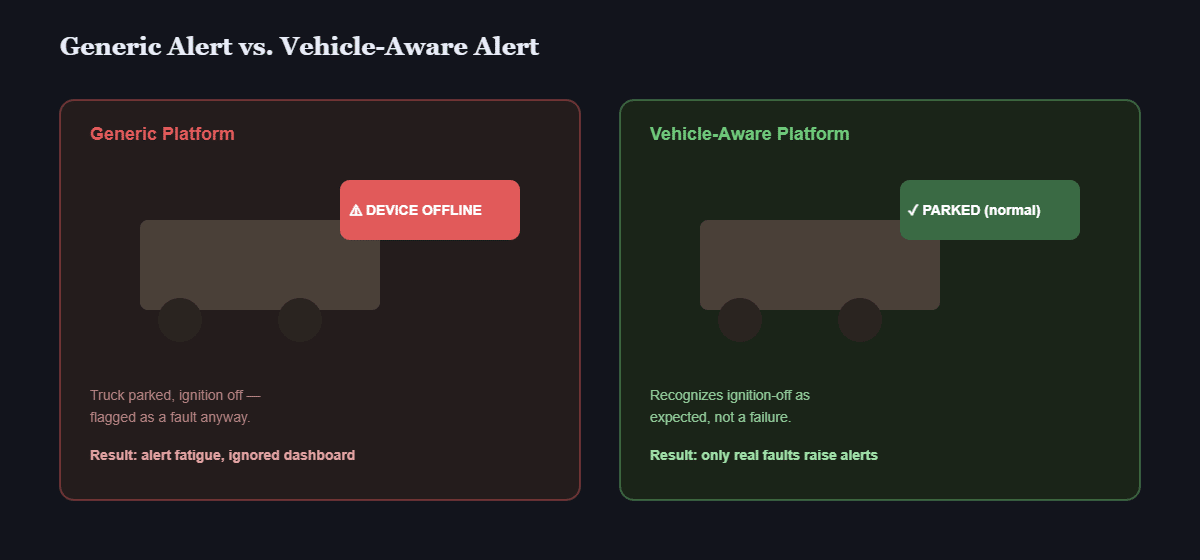
Consider a construction equipment rental company evaluating three device management platforms before choosing one. Two were generic enterprise tools that treated every device the same way — reporting “connectivity lost” alerts constantly because they didn’t recognize ignition-off states as expected, not a fault. The third platform, built with vehicle fleets in mind, distinguished between “device off (vehicle parked)” and “device unreachable (actual problem)” — cutting false alerts and letting the IT team actually trust the dashboard instead of ignoring it. This is an illustrative scenario rather than a customer case study.
Choosing a Device Management Solution: What to Confirm
- Does it distinguish normal vehicle power states (ignition off) from actual device failures?
- Can it read and report CAN-bus or GNSS data alongside standard device health metrics?
- Which management platforms and protocols does it support, and can you move to another later without replacing the hardware?
- Can it scale from a pilot deployment (10-20 units) to a full fleet without a platform migration?
Other Names for the Same Question
An enterprise device management solution built for office laptops will report a parked vehicle as offline, which is exactly the gap this guide is about.
Mobile device management platforms differ in how they handle parked vehicles, and transit device management software is the same problem with fixed routes and shared terminals.
Which Device Management Guide Should I Read Next?
This guide belongs to the mobile device management hub. Pick the next one by the question you still have open:
| If your question is… | Read |
|---|---|
| I am new to device management | What is mobile device management? |
| How do I compare platforms? | MDM software: what to look for, MDM management software platform guide, MDM solutions for vehicle fleets |
| What do I need beyond the feature checklist? | MDM solution: enrolment and inventory |
| How do OTA updates and remote diagnostics work? | MDM remote device management and OTA, OTA and fleet downtime, remote diagnostics |
| How do I lock down the terminals? | Kiosk mode and app whitelisting |
| We already run Samsara or Geotab | MDM behind Samsara and Geotab |
| How do software and hardware work together? | Automated fleet management |
Common Questions
Is device management software the same thing as MDM?
MDM is one type of device management software — specifically the kind that manages the entire device rather than just individual apps (see MDM vs MAM for the distinction).
Can I use a free or generic device management app for a vehicle fleet?
Technically yes, but generic platforms usually lack vehicle-specific awareness (ignition states, CAN-bus data), leading to false alerts and missed operational data.
What’s the risk of picking the wrong platform early?
Migrating device management platforms after a fleet is deployed is disruptive — every terminal needs re-enrollment, which is why evaluating vehicle-specific capability upfront matters more than initial price.
Does device management software slow down the terminal itself?
A well-built device management app runs as a lightweight background service; poorly optimized ones can noticeably impact performance — worth testing on a pilot before full deployment.
For the full breakdown of MDM’s core capabilities on vehicle terminals, see MDM for Fleet Tablets, and for how this fits alongside DMS, AVM 360°, and ISOBUS VT on one terminal, see One Tablet, Four Systems. For the fleet-wide evaluation framework, see our mobile device management solutions hub.
Interested in specs or a quote? Contact our team to discuss device management for your fleet.