

One tablet four systems is CF-Device’s answer to how most fleet technology is sold, system by system: a driver-monitoring camera from one vendor, a surround-view kit from another, a separate telematics box and a dedicated display for implement control. MDM, DMS, 360° AVM and ISOBUS VT are designed to share one rugged vehicle tablet, one display, one power connection and one management interface. Which of them a given terminal runs, and how many at once, depends on the model and configuration. This page is the hub for CF-Device’s safety and integrated-software articles.
TL;DR
- Four systems — MDM, DMS, CF AVM 360° and ISOBUS VT — are designed to share one rugged vehicle tablet
- Consolidation removes cab clutter, duplicate cabling and data split across vendors
- MDM is the backbone: DMS, AVM and ISOBUS report and update through it
- One display, one power feed and one management console replace four separate devices
- The hardware barely changes between industries; the software mix is what adapts
- Camera inputs and NPU capacity decide how many systems a model can run: the VCM M10 takes up to eight AHD cameras and carries a 6 TOPS NPU
Why One Tablet Four Systems, Not Four Separate Devices?
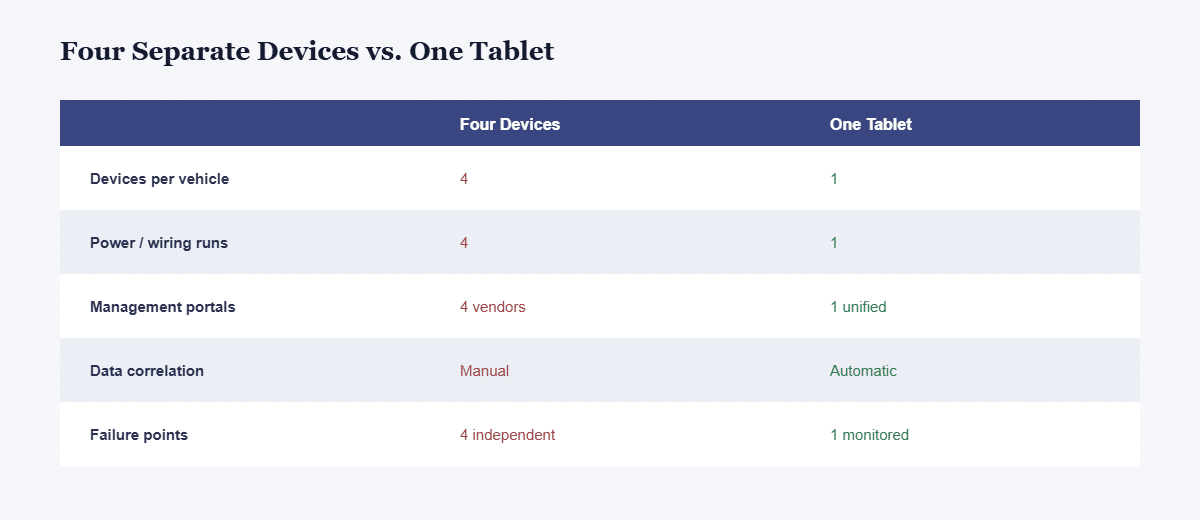
The traditional approach bolts a separate box on for each function: a telematics tracker, a dash-cam DMS, an AVM camera controller and an implement display. Each has its own power draw, wiring run, failure mode and management portal. CF-Device offers the four as coordinated software on one rugged terminal, which reduces that to a single install, one data stream and one support relationship.
| Four separate devices | One tablet, four systems | |
|---|---|---|
| Devices per vehicle | 4 | 1 |
| Power and wiring runs | 4 | 1 |
| Management portals | 4 (separate vendors) | 1 (unified) |
| Data correlation | Manual, across platforms | One dashboard |
| Failure points | 4 independent | 1, managed and monitored |
| Cab space | High clutter | Single display |
MDM: The Management Layer
CF-Device’s MDM (mobile device management) platform is the backbone that ties the others together. It handles remote enrolment, OTA firmware and application updates, device health monitoring and remote diagnostics, so a fleet manager can push an update or troubleshoot a fault on a tablet installed hundreds of kilometres away. See MDM remote device management and, for the evaluation framework, the mobile device management hub.
MDM is not a peer to the other three; it is the layer they report through. DMS events, AVM calibration status and ISOBUS session logs can surface in the same MDM dashboard, which is what makes the four behave as one platform rather than four apps sharing a screen. Unsure whether you need full device control or app-level management? See MDM vs MAM.
DMS: Driver Behaviour in Real Time
CF-Device’s DMS (driver monitoring system) uses the in-cab camera to watch for fatigue, distraction, phone use and smoking, and triggers an in-cab alert when it detects one. Because it runs on the same hardware as the rest of the platform, events can be logged through the same MDM dashboard. In CF-Device’s range DMS is listed on the VCM M10; confirm support for other models before specifying. Full detail: DMS fatigue and distraction alerts.
360° AVM: Eliminating Blind Spots
CF-Device’s AVM (around view monitor) stitches multiple AHD camera feeds into one top-down surround view, with one-touch calibration in about ten seconds and AI-based pedestrian detection on top. Camera count depends on the model: from four AHD inputs on suited models up to eight on the VCM M10 and VCM S10-2 PRO, while models with two inputs do not cover all four sides. The per-model figures are in the AVM 360° guide. In yards and warehouses, where forklifts, people and stacked inventory share tight space, AVM and DMS are often specified together. Full breakdown: AVM 360° surround view.
ISOBUS VT: Implement Control Without a Second Screen
For agricultural fleets, ISOBUS VT (ISO 11783-6 Virtual Terminal) lets one terminal run the control interface of ISOBUS-compliant implements regardless of manufacturer, so a farm with mixed-brand equipment does not need a dedicated screen per implement. Every VCM model supports CF ISOBUS VT or is compatible with it; confirm the version for your model and the compatibility of your implement before ordering. The standard is explained in What Is ISOBUS VT.
How Do the Four Systems Share One Platform?
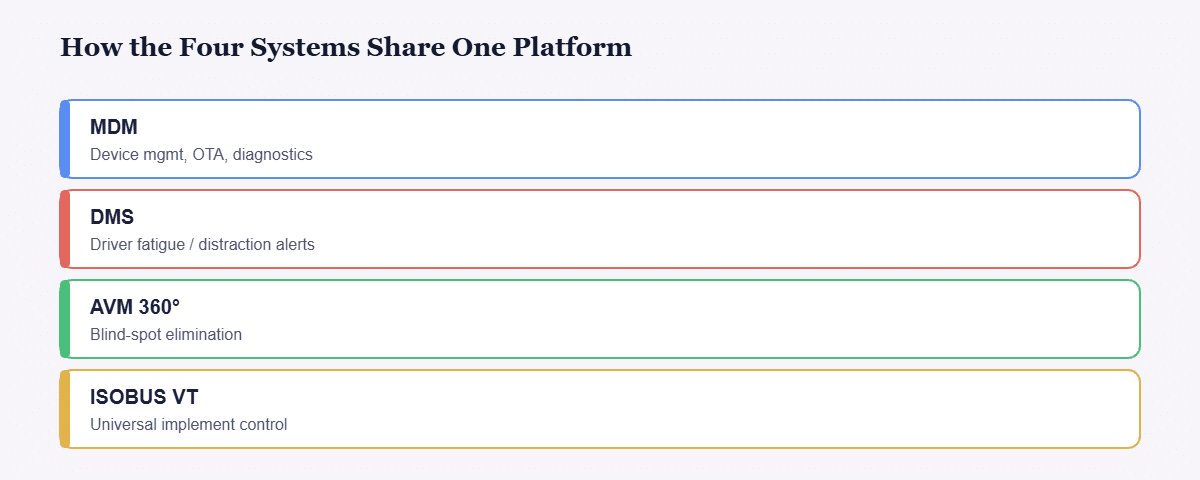
| System | Primary role | Through MDM | Typical industry |
|---|---|---|---|
| MDM | Device management, OTA, diagnostics | The layer itself | All |
| DMS | Driver fatigue and distraction alerts | Events logged to the dashboard | Transit, logistics |
| AVM 360° | Blind-spot elimination | Calibration and status monitored | Mining, warehousing |
| ISOBUS VT | Universal implement control | Version-managed over the air | Agriculture |
Can All Four Systems Run at the Same Time Without Performance Issues?
On terminals with enough processing headroom, yes. DMS and AVM are the most compute-intensive of the four, which is why CF-Device’s flagship VCM M10 carries a 6 TOPS NPU alongside an eight-core CPU. On-device AI capacity, not CPU speed, is the spec to confirm for concurrent operation. RTK or ISOBUS guidance together with AVM 360° surround view is supported on the same terminal. The NPU is explained in 6 TOPS NPU and AI vision and what is an NPU.
What Does a Four-System Deployment Look Like?
Consider a mixed agriculture and logistics operation on one terminal family: tractors use ISOBUS VT for implement control and AVM around wide implements, delivery trucks run DMS for driver fatigue on long routes, and every unit is enrolled, updated and monitored through one MDM console. When a terminal in a remote field reports a fault, the manager diagnoses it remotely rather than dispatching a technician. This is an illustrative scenario rather than a customer case study.
Do I Have to Buy All Four Systems, or Can I Start With One?
You can start with a subset and add others later, provided the terminal supports the camera inputs and processing headroom you will need. Before a phased rollout, check whether the chosen model has the camera and NPU capacity for what you plan to add in year two, not only year one. Camera inputs and AI capacity are compared across the range in the rugged vehicle tablet buyer’s guide.
Other Names for the Same Question
Some searchers type the combination as mdmdms; what they usually want is dms monitoring and device management on one terminal. A telematics tablet device that carries all four systems is what this page describes.
Which Safety and Integration Guide Should I Read Next?
| If your question is… | Read |
|---|---|
| How do I catch driver fatigue and distraction? | DMS driver monitoring |
| How do I remove blind spots on large vehicles? | AVM 360° surround view |
| What do passenger-carrying fleets need? | Smart transportation: DMS and AVM |
| How do I make a forklift safer? | Forklift safety system |
| What are the layers of a safety programme? | Fleet safety monitoring: four layers |
| What compute does AI vision need? | 6 TOPS NPU, what is an NPU |
| How is power handled across all of this? | Rugged vehicle tablet buyer’s guide |
| How do I run implements from one terminal? | What is ISOBUS VT |
For the whole range see the Rugged Vehicle Tablet Complete Guide. For how these systems map to industries, see the field-by-field use cases guide, the applications hub and GPS tracking for fleet vehicles. The hardware decision is in the 10-inch Android and Linux tablet hub.
Why Does Running These Together Matter?
Each system solves one operational problem. Running them together on shared hardware addresses cab clutter, cabling complexity and fragmented data, and gives fleet managers one dashboard and one view of vehicle health, driver behaviour and implement status.
Common Questions
Is the MDM platform included, or licensed separately from DMS, AVM and ISOBUS?
This is agreed per project. Some deployments bundle MDM with the terminal and others license per module; confirm the terms in writing during procurement.
Does running DMS and AVM together need two separate sets of cameras?
Yes. DMS uses a driver-facing in-cab camera and AVM uses exterior perimeter cameras. They serve different views and do not share a lens.
Which CF-Device models support all four systems?
It depends on camera inputs, computing tier and the module set for each model. The VCM M10 (6 TOPS NPU, up to eight AHD cameras) is the flagship for AI workloads such as DMS, and every VCM model supports CF ISOBUS VT or is compatible with it. Camera inputs range from two to eight across the range, so the AVM part in particular needs a model with at least four. Confirm the combination you need on the model page or with our team before specifying.
Interested in specs or a quote? Contact our team to discuss which VCM configuration fits the systems your fleet needs.