
A 10-inch rugged android tablet from CF-Device’s 10.1″ VCM models — the M10, V10-2, V10 PRO, S10-2, S10-2 PLUS and S10-2 PRO — is IP65 sealed (IP67 on the V10-2), operates up to +70°C, runs from the vehicle’s DC supply and lists third-party vibration and shock results. A 10-inch rugged android tablet is the default form factor in vehicle computing because it is large enough for split-screen data and small enough for most cabs. But Android is only half the decision: many industrial deployments specify a Linux tablet stack — often a debian linux tablet userland — for long-term control of the software, and the right choice depends on what your fleet’s software actually requires.
TL;DR
- The 10-inch class is the default vehicle-mount size: readable, mountable in most cabs, and available in six CF-Device VCM models
- Android suits app-driven fleets; a Linux stack suits custom industrial software and long lifecycle control
- Five of the six 10.1″ VCM models run both: Android 14.0 / Linux 6.1 on the M10, Android 11.0 / Linux 5.10 on the V10-2, S10-2 PLUS and S10-2 PRO, and Android 6.0.1 / Linux 3.10 on the S10-2. The V10 PRO is Android-only (Android 9.0)
- Supply voltage differs by model: 5–36V DC on the M10, S10-2, S10-2 PLUS and S10-2 PRO, 9–36V DC on the V10-2 and V10 PRO
- Consumer Linux tablets (the archos linux tablet era) proved demand but not durability; vehicle-grade hardware is a different category
- Start every vehicle tablet project from environment and software requirements, not screen size
Is a 10-Inch Tablet a Good Size for Vehicle Use?
Across agriculture, mining, logistics and construction, the 10.1″ display is the balance point: 7″ panels give up data density for compactness, and 12.1″ panels need cab space that smaller machines do not have. All six CF-Device 10.1″ models carry a display of at least 750 cd/m² at 1024×600 (V10 PRO, S10-2, S10-2 PRO) or 1280×800 (M10, V10-2, S10-2 PLUS), enough for dispatch, navigation, implement control and camera monitoring on one screen. That balance is why the 10-inch class has the widest model choice in the rugged vehicle category.
How Big Is a 10-Inch Tablet, and Will It Fit My Cab?
A 10.1″ panel is about 25.7 cm (10.1 Zoll, in German-language datasheets) across the diagonal. The screen diagonal is not the device size, though, and the body dimensions are what a mount has to be specified against:
| Model | Body (W × H × D) | Weight |
|---|---|---|
| VCM M10 | 270.9 × 173.5 × 33.2 mm | 1.3 kg |
| VCM V10-2 | 248.9 × 167.5 × 29.85 mm | 0.99 kg |
| VCM S10-2 PLUS | 281 × 181 × 37.5 mm | 1.5 kg |
| VCM S10-2, S10-2 PRO, V10 PRO | 281 × 181 × 42 mm | 1.5 kg |
For a quick clearance check, a 281 × 181 mm body is a little smaller than a landscape sheet of A4 (297 × 210 mm). Two practical points follow. The S10-2, S10-2 PRO and V10 PRO share the same footprint and can swap in the same bracket, but their wiring is not interchangeable. And the S10-2 PLUS is 4.5 mm thinner than the S10-2 and S10-2 PRO, so a change of model means re-checking the mounting depth. The full sizing method is in how to choose the right tablet screen size for your vehicle.
What Is the Difference Between a Rugged Android Tablet and a Debian Linux Tablet?
| Rugged Android Tablet | Debian Linux Tablet | |
|---|---|---|
| Software ecosystem | Large app ecosystem, familiar UI | Custom industrial applications, full stack control |
| Development | Standard Android SDK | Qt and native toolchains, direct hardware access |
| Update model | Tied to the Android version on the device | Long-term maintainable, version-pinned by the integrator |
| Typical buyer | Fleet operators, dispatch-driven use | System integrators, OEM machinery builders |
| Lifecycle control | Moderate | Maximum |
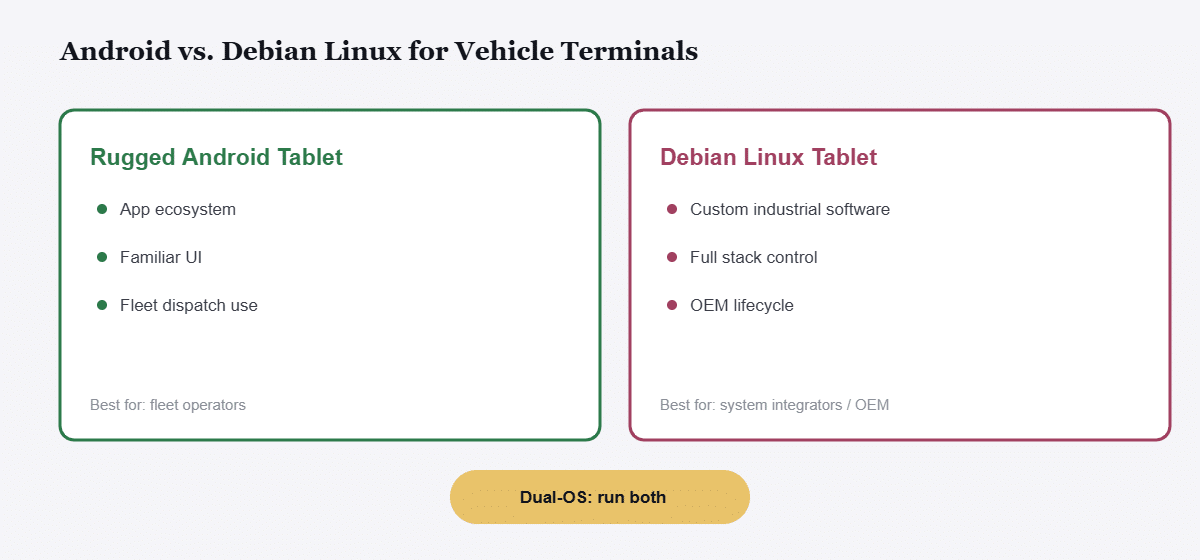
A fleet running dispatch apps, navigation and telematics dashboards fits Android naturally. An OEM building machine-control software that must run unchanged for a decade — grading assistance, spraying control, crane positioning — often specifies a tablet debian-style Linux environment for the stability and auditability an industrial lifecycle demands. What “Linux tablet” means across consumer and industrial contexts is covered in our Linux tablet for vehicles guide, and the distribution choice (Debian against Mint and others) in Debian vs Mint for industrial vehicle tablets.
Can One Tablet Run Both Android and Linux?
Yes — on most of the 10.1″ range. CF-Device maintains its own Android and Linux builds, and its Linux builds are Debian-based, so one hardware qualification can serve both software strategies. Which versions you get depends on the model:
| Model | Android | Linux kernel | Dual OS |
|---|---|---|---|
| VCM M10 | 14.0 | 6.1 | Yes |
| VCM V10-2 | 11.0 | 5.10 | Yes |
| VCM S10-2 PLUS | 11.0 | 5.10 (Qt 5.15.7) | Yes |
| VCM S10-2 PRO | 11.0 | 5.10 (Qt 5.15.7) | Yes — chosen at the factory, reflashable later |
| VCM S10-2 | 6.0.1 | 3.10 | Yes |
| VCM V10 PRO | 9.0 | — | No, Android only |
A fleet can deploy Android for operators today and, on models that allow it (confirm per model; the S10-2 PRO is listed as reflashable), move specific machines to Linux later without re-qualifying hardware or respecifying power and certification. Check the Android version against your application first: the S10-2 and V10 PRO are older platforms, and a current app may need a newer release. The architecture behind the switch is explained in dual Android/Linux architecture on rugged vehicle tablets.
Which Tablet Is Best for Linux in a Vehicle?
For vehicle use the answer is narrower than the general Linux tablet question, because three requirements rule out almost every consumer device: the unit has to accept vehicle DC power rather than USB charging, it has to expose CAN bus to the operating system, and it has to hold a kernel version steady for the life of the machine. Within CF-Device’s 10.1″ range, the VCM M10 carries the newest kernel (Linux 6.1) and the VCM S10-2 PLUS explicitly lists SocketCAN with J1939, CANopen and ISO 15765, which is what a Linux application reading the machine bus needs.
The practical test for any vendor is whether it publishes a kernel version for each model alongside the hardware specification. A best linux tablet list assembled from consumer hardware cannot answer that, because consumer vendors do not commit to it. CAN integration itself is covered in CAN bus and J1939 integration.
What Happened to Consumer Linux Tablets Like the Archos Models?
Searches for an archos linux tablet and similar legacy devices reflect a real, persistent demand: users have wanted open, Linux-native tablets since the earliest consumer attempts. What those devices never solved is the environment: no IP-rated sealing, no tested shock and vibration resistance, no wide-voltage vehicle power input, no −30°C to +70°C operating range. An industrial Linux tablet is not a consumer tablet with Linux installed; it is vehicle-grade hardware (CAN bus, ignition detection, RTK GNSS options, and ISOBUS VT on selected models) that exposes a Linux stack. The same distinction applies to “tablet debian” searches — see Tablet Debian: choosing a Debian-based rugged vehicle tablet PC and, for the x86 against ARM question behind the hardware, Debian tablet PC: industrial vs consumer hardware.
Can I Install Debian on a Consumer Tablet Instead of Buying an Industrial One?
Technically sometimes, but the result still lacks the four things that matter in a vehicle: wide-voltage DC input to survive ignition spikes, native CAN bus to read the machine, IP-rated sealing against dust and water, and tested vibration and shock ratings. There is also no universal compatibility list for installing Debian on tablets, because bootloader locks and drivers vary by device. CF-Device supplies Debian-based Linux builds for its own boards, which is a different proposition from flashing an unsupported consumer unit. Whether it is searched as a debian tablet, a tablet debian or a Debian tablet PC, the answer is the same: a vehicle needs vehicle-grade hardware first, and the operating system second.
Which 10-Inch CF-Device Model Fits Which Job?
| Model | Display | NPU | OS | Cameras | CAN / Ethernet | Supply, IP |
|---|---|---|---|---|---|---|
| VCM M10 | 1280×800 | 6 TOPS | Android 14 / Linux 6.1 | Up to 8 AHD, 720p or 1080p | 2 CAN; dual Ethernet (Gigabit + 10/100) | 5–36V, IP65 |
| VCM V10-2 | 1280×800 | 0.8 TOPS | Android 11 / Linux 5.10 | 2 AHD, expandable to 4 | 2 CAN (3 optional); 100M | 9–36V, IP67 |
| VCM S10-2 PLUS | 1280×800 | 0.8 TOPS | Android 11 / Linux 5.10 | Up to 8 AHD (720p×4 + 1080p×4) | Up to 4 CAN, SocketCAN; 100M (conflicts with full 4-CAN) | 5–36V, IP65 |
| VCM S10-2 PRO | 1024×600 | 0.8 TOPS | Android 11 / Linux 5.10 | Up to 8 AHD | Up to 4 CAN; 100M (off when all 4 CAN are used) | 5–36V, IP65 |
| VCM S10-2 | 1024×600 | None | Android 6.0.1 / Linux 3.10 | 2 or 4 CVBS | 1 or 2 CAN; 100M optional | 5–36V, IP65 |
| VCM V10 PRO | 1024×600 | None | Android 9.0 only | 2 inputs (type to be confirmed) | 1 or 2 CAN (J1939, CANopen, ISO 15765); 2 RS232, 1 RS485; 100M | 9–36V, IP65 |
In short: the M10 is the choice for on-device AI and the most camera inputs, the S10-2 PRO and PLUS for CAN-heavy machines, the V10-2 where IP67 and dual-SIM connectivity matter, and the S10-2 and V10 PRO as the older-platform options (the V10 PRO adds two RS232 ports and one RS485 port on a 1 or 2 CAN configuration). For all fifteen VCM and TANK models side by side, see the VCM model comparison chart. The pairing of hardware with AI workloads is explained in NPU and 6 TOPS AI vision on rugged tablets.
How Do I Specify a 10-Inch Rugged Tablet for a Vehicle Project?
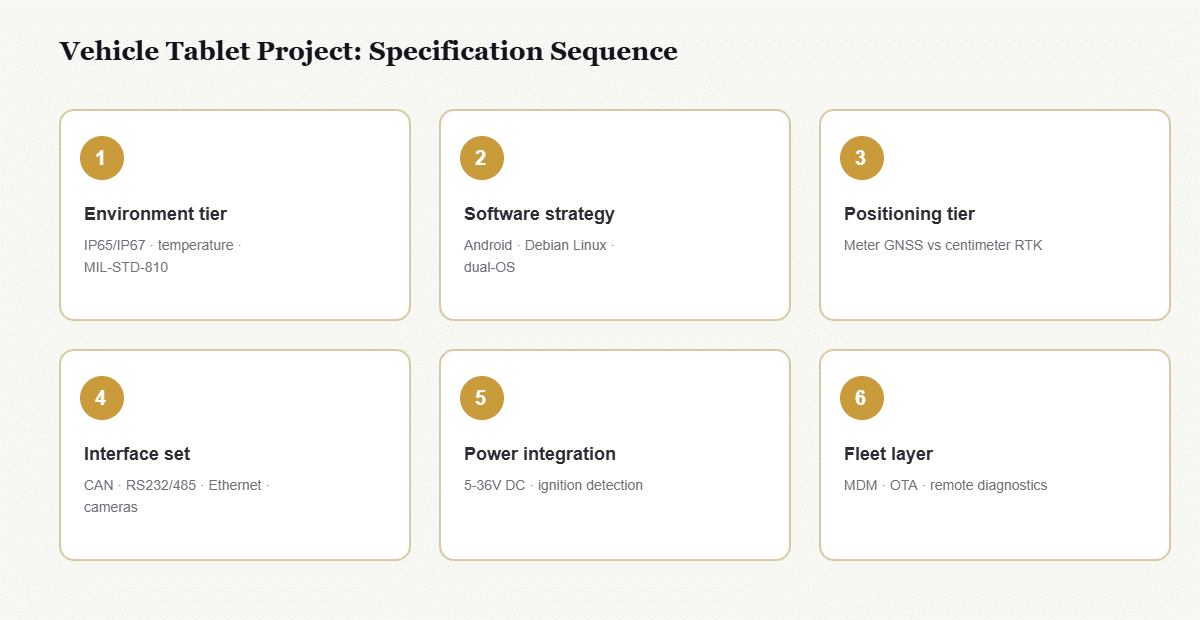
Every tablet project for vehicle deployment should resolve these in order:
- Environment tier — IP65 (road, dust) against IP67 (submersion, washdown, mining), operating temperature, and vibration exposure; see IP65 vs IP67 and IP67 and MIL-STD-810 explained
- Software strategy — Android apps, a Linux custom stack, or dual-OS to keep both open
- Positioning tier — meter-level GNSS for tracking against centimetre-level RTK for guidance and implement control; see GNSS positioning and RTK
- Interface set — CAN channels, RS232/RS485, Ethernet and camera inputs; see RS232 vs RS485 and automotive Ethernet
- Power integration — wide-voltage DC input, ignition detection and delayed power-down; see wide-voltage 5–36V DC input
- Fleet layer — MDM compatibility for OTA updates and remote diagnostics at scale; see mobile device management for fleets
Screen size, the spec most projects start with, is the last decision, constrained by cab space after everything above is fixed.
What Does a Dual-OS Fleet Deployment Look Like in Practice?
An agricultural machinery OEM ships tractors with Linux-based auto-steer software on 10.1″ terminals, while the same farm’s logistics trucks run Android dispatch apps on the same terminal family. One hardware qualification, one mounting standard, one MDM console, two operating systems: the dual-OS 10-inch platform is what makes that consolidation possible. CF-Device’s VCM series is built on this premise — a shared rugged platform with the OS and modules chosen per deployment. This is an illustrative scenario rather than a customer case study.
Does Dual-OS Mean Both Systems Run at the Same Time?
No. Typical deployments select one OS per device role, with the alternative available on the same hardware. The value is procurement and lifecycle flexibility rather than simultaneous operation: on models that support it, a terminal qualified once can be reflashed to the other stack later without changing mounts, wiring or power specification. Check reflashing per model before you rely on it. The exception is the V10 PRO, which runs Android only.
Where Should I Start When Choosing Rugged Vehicle Hardware?
This page is the hub for CF-Device’s 10-inch and operating-system decisions. The guides below go deeper on each branch.
Android or Linux
Linux tablet for industrial vehicles explains what a Linux tablet means in vehicle work; Debian vs Mint compares distributions; Tablet Debian and Debian tablet PC cover the consumer-against-industrial split; and the dual-OS architecture guide covers how both systems share one device.
Size and Grade
Choosing a screen size works through cab fit; 10 inch android tablet: consumer vs industrial grade shows why a case does not make a consumer tablet rugged; and best 10-inch rugged Android tablets compared sets the models side by side.
Choosing the Hardware Around It
What is an onboard computer? separates the four products sold under that name; Truck computer works through the in-cab terminal specification; Embedded computer: the four forms places a vehicle terminal among embedded computers; Rugged industrial tablet separates the four device types; Project tablets covers field and fleet use; and Rugged tablet manufacturers shows how to tell a real maker from a reseller.
Buying and Wider Context
For the buyer’s-checklist view of these same decisions, see the rugged vehicle tablet hardware buyer’s guide and the Rugged Vehicle Tablet Complete Guide. To see how this hardware pairs with software and deploys across industries, read MDM, DMS, AVM 360° and ISOBUS VT and the applications hub, or start from the CF-Device homepage.
Common Questions
Is a 10-inch rugged android tablet better than a 12-inch for vehicle use?
Neither is universally better: 10.1″ fits more cab types and costs less, while 12.1″ adds display area for surround-view monitoring and split-screen implement control. Cab space and camera requirements decide.
Which CF-Device models come in the 10-inch class?
Six: the VCM M10 (6 TOPS NPU flagship), V10-2 (dual-SIM, IP67), V10 PRO, and the S10-2 family (S10-2, S10-2 PLUS and S10-2 PRO). All use 10.1″ displays of at least 750 cd/m², differing in computing tier, camera inputs, CAN channels and operating system rather than form factor.
Is there a rugged Linux tablet available in 2025 and 2026?
Yes, in the industrial vehicle-terminal category rather than consumer hardware. CF-Device’s 10.1″ range ships Linux 6.1 on the VCM M10, Linux 5.10 on the V10-2, S10-2 PLUS and S10-2 PRO, and Linux 3.10 on the S10-2, alongside Android on the same hardware; the Linux builds are Debian-based. Confirm the exact Debian release and kernel for your model with our team. The VCM V10 PRO is Android-only.
Does a Debian tablet PC need x86, or is ARM enough?
ARM is sufficient for the overwhelming majority of vehicle applications and draws far less power, which matters on a continuously powered terminal. x86 becomes necessary only where legacy Windows-derived binaries must run unmodified. The trade-off is covered in Debian tablet PC: industrial vs consumer hardware.
What happened to consumer Linux tablets like the Archos models?
The consumer Linux tablet segment largely faded, but the demand moved: industrial vehicle terminals now ship Android and Linux on the same hardware, serving the open-platform need with vehicle-grade sealing, power and CAN bus.
How do I scope a tablet project for a mixed fleet?
Follow the six-step sequence above, starting from the harshest environment in the fleet. Hardware qualified for the worst case can serve the whole fleet, while the reverse is not true.
Which 10-inch model has the most camera inputs?
The VCM M10, S10-2 PLUS and S10-2 PRO each take up to eight AHD cameras; the M10 supports 1080p on all eight, while the S10-2 PLUS and S10-2 PRO mix 1080p and 720p channels.
Interested in specs or a quote? Contact our team to discuss the right OS and configuration for your deployment.