

An onboard computer is any computing unit installed permanently in a vehicle or machine to run its systems. That definition is broad enough to cover four genuinely different products — which is why procurement conversations about “an onboard computer” frequently end with two parties discussing different machines. CF-Device builds two of those four: integrated cab terminals (the VCM range) and screenless compute units (TANK V2).
TL;DR
- The term covers trip computers, ECUs, cab terminals, and screenless compute units — only the last two are what fleets and OEMs specify
- The first real decision is integrated display vs. separated compute box, and it drives installation and service costs
- An onboard computer differs from an industrial PC mainly in power input, vibration rating, and vehicle bus interfaces
- Interface count, not processor speed, is usually the spec that determines whether a unit fits the job
- CF-Device’s onboard units are rated IP65–IP67, MIL-STD-810, ISO16750, 5–36V DC input, −30°C to +70°C
Four Things the Term Refers To
In a passenger car, “onboard computer” usually means the trip computer — the dashboard readout showing fuel economy and range. In automotive engineering it often means an ECU, a sealed controller running one subsystem with no display at all. Neither is what a fleet or machinery builder is shopping for.
The two that matter commercially are the onboard terminal — an operator-facing unit combining compute and display in one housing — and the screenless onboard unit, where the computing hardware is separate from whatever display the operator looks at.
In short: an industrial onboard computer is a vehicle-mounted compute unit with machine-bus interfaces, sold either with a display attached or without one.
Integrated Display or Separated Compute Unit?
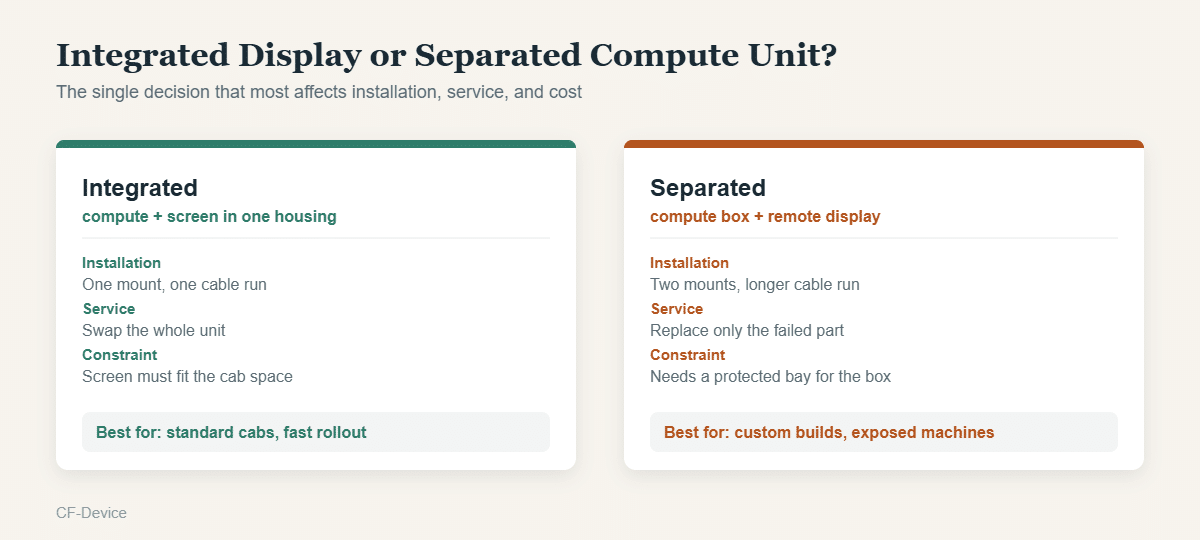
This is the first real fork in the decision, and it’s structural rather than a matter of preference. An integrated unit is one part number, one mount, one cable run — faster to deploy across a fleet of similar vehicles and simpler to stock as a spare. CF-Device’s VCM range covers this form factor from 7″ to 12.1″.
A separated unit exists for cases the integrated form can’t serve: a machine with no protected cab space large enough for a screen-plus-compute housing, a vehicle that already has a display fitted, or a build where the compute hardware needs to sit somewhere physically secure while the screen goes where the operator can see it. The tradeoff is a longer install and a second mounting point. That product class is covered in TANK V2: the screenless rugged vehicle computer.
What Separates It From an Industrial PC
An embedded computer built for a factory floor and one built for a vehicle look similar on a datasheet and fail differently in service. Three specifications account for most of the difference.
| Industrial PC (fixed install) | Onboard computer (vehicle) | |
|---|---|---|
| Power | Stable mains supply | 5–36V DC, spikes on ignition, ignition-sense wiring |
| Vibration | Incidental | Continuous, MIL-STD-810 tested |
| Bus interfaces | Ethernet, serial | CAN bus (J1939, ISO 11783) as standard |
| Temperature | Controlled environment | −30°C to +70°C, uncontrolled |
The power side is where substitutions usually fail first. Vehicle electrical systems deliver voltage that swings during cranking and load changes, and a unit expecting clean supply either shuts down or degrades over months. CF-Device specifies 5–36V DC input with ignition detection, reverse-polarity protection, and delayed power-off across the VCM range for this reason — the design detail is covered in wide-voltage input for vehicle terminals.
Both sit inside the wider embedded computer category, which arrives in four physically different forms — module, single-board, box PC, and panel terminal — and the form decides how much of the engineering, certification and firmware work stays with you. That comparison is set out in embedded computer: the four forms and which one goes in a vehicle.
Why Interfaces Decide the Spec, Not the Processor
Buyers coming from IT procurement habitually compare CPU cores and RAM. On an onboard computer those figures matter far less than the interface list, because the workload is usually one fixed application rather than general-purpose computing.
What actually constrains a deployment is whether the unit has enough CAN channels to reach every bus on the machine, enough serial ports for legacy peripherals, and enough camera inputs for the monitoring setup. A unit two CAN channels short is unusable regardless of how fast its processor is, and the channel count can’t be added later. CF-Device’s VCM V12 PRO and S10-2 PRO carry up to four SocketCAN channels for exactly this reason. The protocol side is detailed in our CAN bus and J1939 integration guide, choosing between the two serial standards in RS232 vs RS485, and the high-bandwidth layer for camera and OTA traffic in automotive Ethernet.
Is an Onboard Computer the Same as a Vehicle-Mounted Computer?
A vehicle-mount tablet is one form of onboard computer — the integrated-display kind. The term also covers screenless compute units, which no one would call a tablet. CF-Device builds both from the same platform: the VCM series ships with displays from 7″ to 12.1″, while TANK V2 provides the same computing, CAN, and connectivity capability with no built-in screen, driving an external 10.1″ or 12.1″ touchscreen over HDMI instead.
The naming is worth pinning down, because CF-Device receives enquiries for the same product under at least six labels. An in-vehicle computer, an in vehicle PC, a vehicle mounted computer, a vehicle mount computer, a vehicle-mount terminal and a heavy-duty vehicle computer all describe the same class of hardware: a compute unit fixed in the cab, powered from the machine’s electrical system, reading the machine’s own bus. The hyphen and the word order vary by market and by catalogue; the specification does not.
Two labels in that list do carry extra meaning worth checking. A vehicle mount touch computer implies a touchscreen is included rather than driven externally — relevant when comparing an integrated terminal against a screenless unit. And an embedded box computer usually means the screenless form specifically: no display, mounted out of sight, driving a separate monitor. CF-Device’s TANK V2 is that form factor; everything in the VCM range is the integrated kind.
A Deployment Example
A specialty vehicle builder fitting compact utility machines needed compute for implement control and telematics, but the cabs had no surface large enough to mount a 10-inch terminal without blocking a sightline. Their initial plan was a 7-inch integrated unit, accepted as a compromise on readability.
The separated approach solved it differently: the compute unit went inside an equipment bay behind the seat, and a slim display mounted on an existing bracket at eye level. Same computing capability, no sightline conflict, and a failed display no longer means replacing the compute hardware with it.
Specifying One: The Order to Work In
- Form factor — integrated or separated, based on available cab space
- Interfaces — count the CAN channels, serial ports, and camera inputs the machine actually needs
- Environmental rating — ingress and temperature range matched to where the unit physically sits
- Power — voltage range covering the vehicle’s system, with ignition-sense behaviour defined
- Operating system — Android for app-driven work, embedded Linux for machine control, or both
- Compute — last, once everything above is fixed
Working in this order avoids the common outcome of selecting on processor and price, then discovering the unit is one interface short of the job. The full sequence including display and positioning tiers is set out in our rugged vehicle tablet hardware buyer’s guide.
Managing Onboard Computers Once They’re Deployed
An onboard computer that never leaves its vehicle still needs its software kept current, and screenless units in particular can’t be serviced by walking up and tapping a screen. CF-Device’s TANK V2 uses five dual-colour status LEDs (power, WiFi, GNSS, cellular, CAN) so installers can read system state with no display attached, while remote management handles everything beyond that — covered in MDM devices: what fleet hardware a platform actually manages. In the field, these units are the compute layer behind the deployments described in top use cases for rugged vehicle tablets.
Common Questions
Can an onboard computer replace a machine’s existing ECU?
No — an ECU runs one closed subsystem with safety-certified firmware. An onboard computer sits alongside it, reading and sending messages over the bus rather than replacing that function.
Do I need a separated unit if the cab has room for an integrated one?
Usually not. Integrated is simpler to install and stock — separated exists for space, security, or existing-display constraints, not as a general upgrade.
How long should an onboard computer last in service?
Properly rated units are specified for the machine’s service life rather than a consumer refresh cycle — commonly five to ten years, which is why parts availability and OS support horizon matter at purchase time.
Which CF-Device model is the screenless onboard computer?
TANK V2 — IP65-rated, MIL-STD-810 and ISO16750 certified, with dual CAN (including CAN FD), Gigabit Ethernet, USB 3.0 Type-C, HDMI output, up to 6 AHD camera inputs, 5G SA/NSA, and built-in hardware encryption.
Interested in specs or a quote? Contact our team to discuss onboard computer options for your vehicles.