
A rugged tablet for fleet management is the hardware layer everything else depends on: fleet management platforms are only as good as the data feeding them, and that data originates at the vehicle terminal. For fleet managers, the terminal is the single point where location, driver behaviour, vehicle health and communication converge. CF-Device builds that layer as the VCM range and the screenless TANK V2.
TL;DR
- GNSS, CAN-bus diagnostics, driver monitoring and 4G/5G communication can converge on one terminal; which functions a model offers depends on the model
- Consolidating hardware cuts several vendor relationships and failure points down to one
- MDM compatibility is what separates a fleet-ready terminal from a one-off installation
- Wide-voltage input, ignition detection and IP65 or higher sealing let hardware survive years of duty, not one season
- The decision order is power, interfaces, sealing, mount, connectivity and management layer; screen size comes late
What Data Does a Rugged Tablet for Fleet Management Collect?
- GNSS tracking: real-time vehicle location for route monitoring and dispatch
- Vehicle diagnostics: CAN-bus integration surfaces engine and system data that flags maintenance needs early
- Driver behaviour: DMS monitoring adds a safety layer that pure GPS tracking cannot provide (DMS is listed on the VCM M10; confirm it for other models)
- Communication: 4G/5G connectivity keeps dispatch and drivers in constant contact, with dual-SIM on the VCM V10-2 for regions with inconsistent coverage
- The same consolidated approach extends to public-sector fleets, as in municipal waste collection and public works vehicle tracking.
Fleet Management Hardware: What One Terminal Replaces
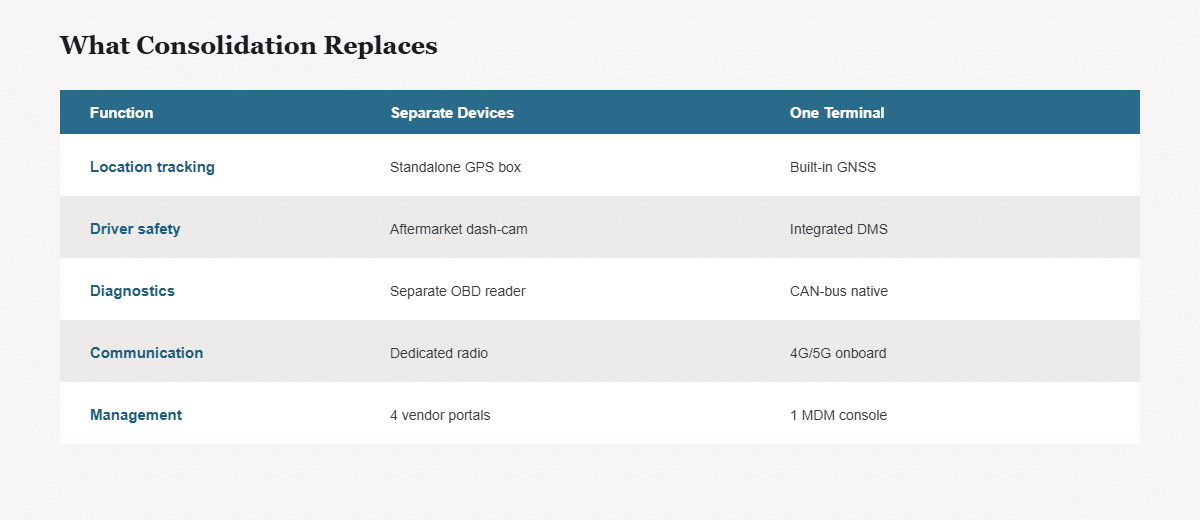
Searches for fleet management hardware and fleet management system hardware usually mean the same question: what has to sit in the vehicle for the software to work. The answer is a set of devices that a single terminal can consolidate:
| Function | Separate-device approach | One-terminal approach |
|---|---|---|
| Location tracking | Standalone GPS box | Built-in GNSS |
| Driver safety | Aftermarket dash-cam | Integrated DMS on models that list it |
| Diagnostics | Separate OBD reader | Native CAN bus |
| Communication | Dedicated radio or modem | 4G/5G onboard |
| Management | Several vendor portals | One MDM console |
Why Consolidate Fleet Hardware Onto One Terminal?
Fleets that run separate hardware for tracking, dash-cam recording and driver communication end up managing three vendor relationships and three points of failure instead of one. A single fleet management tablet, meaning a rugged vehicle-mount terminal that handles those functions, simplifies both procurement and maintenance: fewer devices to install, power and service across every vehicle.
Best Tablet for Fleet Management: What to Check First
Searches for the best tablet for fleet management usually want a ranked list. A fleet management tablet is not chosen on screen size or brand, though: five checks separate a unit that survives a fleet rollout from one that does not. Does it run on the vehicle’s supply with ignition sense? Does it have the CAN channels the vehicles need? Is the sealing right for the cab? Does it hold a connection on your routes? And can it be managed remotely once it is installed? The named-model comparisons are in the best tablets for truck drivers for road fleets and the best mobile data terminals for fleets for mixed sectors.
How Do You Manage a Fleet of Terminals at Scale?
MDM (Mobile Device Management) compatibility is what separates a fleet-ready terminal from a one-off installation. It lets IT teams push configuration changes, monitor device health and manage software updates across dozens or hundreds of vehicles from a central console, without a technician visiting each one. For how MDM works alongside DMS, AVM and ISOBUS VT on the same device, see One Tablet, Four Systems.
Can I Use a Consumer Tablet for Fleet Management?
Consumer tablets retrofitted into vehicle mounts fail faster under vibration, temperature swings and inconsistent power than hardware designed for vehicle installation from the start. Wide-voltage input (5–36V or 9–36V depending on the model), ignition detection and IP65 or higher sealing are what let a terminal survive years of fleet duty rather than a single season. The hardware side of that decision is covered in our rugged vehicle tablet hardware buyer's guide, and the same terminal role recurs across the deployments in our top use cases for rugged vehicle tablets in 2026. Business owners evaluating hardware for the first time should also see our best tablet for business owners buying guide. For how fleet management sits alongside precision agriculture and business-vehicle deployment as one connected field, see our applications hub.
What Is a Fleet Management System, Exactly?
CF-Device separates this into two layers, because the term is used for both and the distinction decides what you actually buy. A fleet management system is the software: the dashboard where routes, driver hours, fuel, maintenance schedules and compliance records live. A fleet terminal is the hardware in the cab that produces the data those dashboards run on.
Buyers searching for a fleet management system usually find software vendors, then discover the software needs a device in every vehicle that the vendor does not make. CF-Device builds that device layer: 140,000+ terminals shipped annually into 33 countries, rated IP65 to IP67 depending on the model, with third-party vibration and shock results listed on the datasheets. Which software platforms those terminals run cleanly on is set out in rugged tablets compatible with fleet management platforms.
What Is the Difference Between a Fleet Terminal and a GPS Tracker?
A GPS tracker reports position. A fleet terminal reports position and reads the vehicle, shows the driver something, and takes input back. The practical difference shows up in what each can tell you when something goes wrong:
| Standalone GPS tracker | Fleet terminal | |
|---|---|---|
| Location | Yes | Yes, GPS/BDS/GLONASS |
| Engine data | No, or via separate OBD dongle | Native CAN bus, J1939 |
| Driver interaction | None, no screen | Dispatch, navigation, job status |
| Driver monitoring | No | DMS on models that list it |
| Remote management | Firmware only, if any | MDM: configuration, OTA, diagnostics |
| Install | Hidden box, no sightline needed | Mounted in cab, sightline matters |
A tracker is the right answer for trailers, containers and unpowered assets. A terminal is the right answer wherever there is a driver whose work the fleet needs to direct. The tracker-side decision is covered in GPS tracking devices for fleet vehicles and dispatch and, asset by asset, in fleet tracking hardware: GPS trackers vs vehicle terminals.
Fleet Tracking With a Mobile Data Terminal
In practice, fleet tracking with mobile data terminal hardware means one fixed, vehicle-mounted device (a mobile data terminal) that tracks position and also carries dispatch, forms and driver messaging, so one device does what a tracker plus a handheld would otherwise do. Searches for a telematics tablet device point at the same thing. What a mobile data terminal is and why fleets adopt one is explained in mobile data terminals in fleet logistics, and which models fleets actually deploy is compared in the best mobile data terminals for fleets.
How Do I Choose a Fleet Terminal?
CF-Device works through it in this order, because deciding on price or screen size first is what produces a unit that will not clear a mirror or turns out to be one CAN channel short:
- Power — wide-voltage DC input covering the vehicle’s system, with ignition-sense behaviour defined
- Interfaces — count the CAN channels, serial ports and camera inputs the job actually needs
- Sealing and temperature — IP65 for enclosed cabs, IP67 where washdown or standing water is possible
- Mount and sightline — measured against the cab, with the bracket rated to the same vibration standard as the terminal
- Connectivity — native cellular, dual-SIM where routes cross carrier coverage boundaries
- Management layer — how the fleet updates and audits the units once deployed
Item six is the one fleets discover late: eighty terminals cannot be updated by visiting each cab. Standardising on one platform (one mount, one power specification, one OS image) is what makes remote management possible at all. Specific models compared across road fleets are in the best tablets for truck drivers.
Which Fleet Guide Should I Read Next?
Pick the next guide by the question you still have open:
| If your question is… | Read |
|---|---|
| Tracker or terminal for each asset? | Fleet tracking hardware |
| How do software and hardware fit in an automated fleet? | Automated fleet management |
| How do I manage the devices at scale? | Mobile device management hub, MDM for fleet tablets |
| Which platforms do these terminals run? | Compatible fleet management platforms |
| Which mobile data terminal? | Best mobile data terminals for fleets |
| What about public-sector fleets? | Municipal fleet route tracking |
Common Questions
Does consolidating hardware onto one terminal create a single point of failure?
It shifts the risk profile rather than eliminating it, but one well-supported rugged terminal with MDM monitoring is typically more reliable and easier to service than three separate lower-grade devices.
Is MDM only useful for very large fleets?
No. Even fleets of 10–20 vehicles benefit from remote configuration and health monitoring, avoiding unnecessary technician dispatches.
What is the risk of using a consumer tablet in a vehicle mount instead of a purpose-built terminal?
Vibration, temperature swings and inconsistent vehicle power shorten consumer hardware lifespan significantly. Wide-voltage input and IP65 or higher sealing are specifically engineered to prevent this failure mode.
How many vehicles before a fleet needs a formal management platform?
There is no hard threshold, but manual tracking usually becomes impractical between 20 and 50 vehicles depending on route complexity.
Can one terminal serve a mixed fleet of trucks, vans and heavy equipment?
One platform can; one screen size usually cannot. CF-Device’s approach is to qualify the platform against the harshest vehicle in the fleet, then fit the appropriate size per cab: 7″ for day cabs and compact machines, 10.1″ as the fleet standard, 12.1″ where multi-camera or implement control is involved.
Which CF-Device models are used for fleet management?
The VCM S10-2 (10.1″) as a common fleet configuration, the VCM V10-2 for dual-SIM routes crossing carrier boundaries, the VCM V7-2 (7″) for compact cabs, and TANK V2 where the cab has no panel space and the compute unit must sit separately from the display. Supply voltage is 5–36V or 9–36V depending on the model, all with ignition sense, and operating temperature is −30°C to +70°C.
Interested in specs or a quote? Contact our team to discuss terminals for your fleet.