
The best tablets for warehouse use are the ones mounted on the vehicles, and CF-Device’s VCM S10-2 and M10 are the models most often specified for warehouse and yard vehicles — forklifts, tow tractors, AGVs — which operate in a uniquely demanding indoor environment: constant starts and stops, tight turning radii, shared space with foot traffic, and vibration from repeated pallet handling all day, every day.
TL;DR
- Indoor doesn’t mean less rugged — IP65 and MIL-STD-810 remain essential for warehouse duty cycles
- Terminals connect to WMS over WiFi for real-time pick lists and inventory data
- AVM 360° reduces collisions in narrow aisles and blind corners around racking
- MDM becomes essential once fleets scale to dozens or hundreds of vehicles
Why Indoor Doesn’t Mean Less Rugged
It’s a common misconception that indoor equipment needs less durable hardware than outdoor fleets. In practice, warehouse vehicles often accumulate more operating hours and more physical shock (repeated pallet impacts, dock-plate transitions) than road vehicles — IP65 protection and MIL-STD-810 shock resistance remain essential, not optional, the same certification standard covered in our IP67 & MIL-STD-810 durability guide. This is also why a consumer 10-inch tablet in a protective case doesn’t survive forklift duty, as covered in 10 inch android tablet: consumer vs industrial grade.
Tablets for Warehouse Use: Real-Time Inventory and Task Data
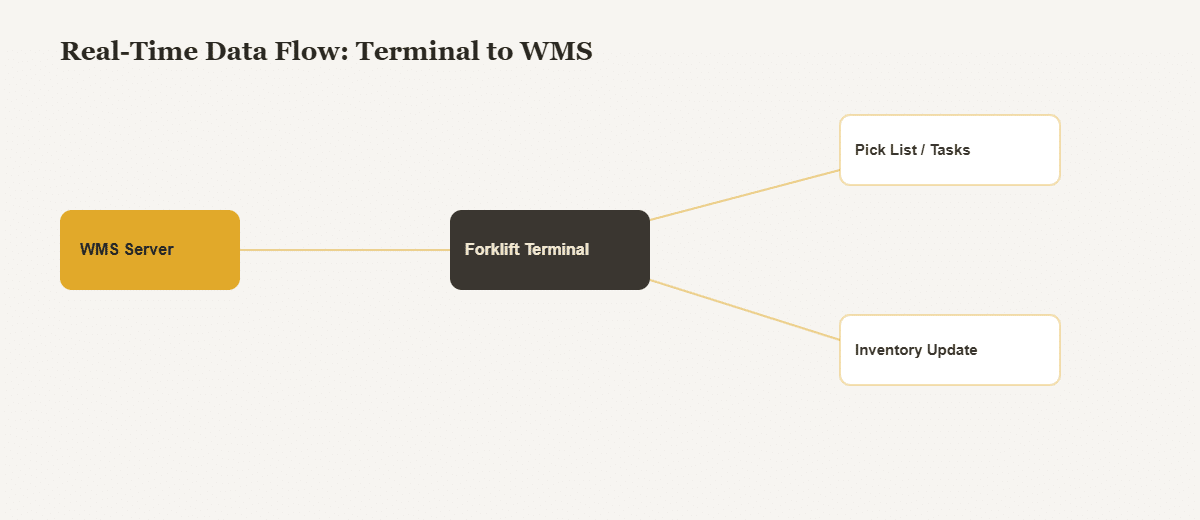
A terminal mounted on a forklift or tow tractor typically connects to the warehouse management system (WMS) over WiFi, displaying pick lists, task assignments, and inventory data in real time — turning the vehicle into an active node in the warehouse’s data flow rather than a passive tool.
Warehouse Computer, Forklift Computer System and Forklift Tablets
A warehouse computer on a forklift is a vehicle-mounted terminal: fixed to the machine, powered from the truck’s battery, running your warehouse application on Android. The same hardware is sold as a forklift computer system, forklift computers, forklift tablets or forklift mounted tablets, and warehouse computer systems usually means several of them managed as one fleet. None of these names says anything about durability, so the four numbers that matter are IP rating, MIL-STD-810 test method, operating temperature and DC input voltage.
Buyers also search for tablets for warehouse use, a tablet for warehouse work, a mobile terminal for warehouse management and a forklift vehicle terminal. They are one decision: whether the device is carried by a picker or mounted on the truck. For a smart warehousing tablet on the truck, the sections below apply; for a handheld, see a specialist, since CF-Device does not build handhelds.
| Device | Power | Best for |
|---|---|---|
| Fixed warehouse computer | Mains | Dock office, packing station |
| Handheld scanner | Internal battery | Picker on foot (CF-Device does not build handhelds) |
| Forklift-mounted tablet | Truck battery through a wide-voltage DC input | Driver stays on the truck all shift |
Specify the power first. CF-Device’s VCM terminals take a wide-voltage DC input with ignition sense (5–36V on both the VCM S10-2 and the VCM M10), which covers 12V, 24V and 36V truck systems. A 48V traction battery sits outside that range and needs a step-down converter in the supply line — a design-stage decision rather than something to discover on the first day of installation.
Then match the model to the job. The VCM S10-2 is the entry-level 10.1″ unit: IP65, −30°C to +70°C operating range, two RS232 ports, one RS485 port, optional 100M Ethernet and two or four CVBS camera inputs. Two limits are worth checking against your application: it runs Android 6.0.1, and its Wi-Fi is 2.4 GHz only. The VCM M10 runs Android 14 with Wi-Fi 6 on both the 2.4 GHz and 5 GHz bands, accepts up to eight AHD cameras, and its physical-button and glove-friendly options should be confirmed for your cab, which matters for drivers who keep gloves on all shift in a freezer. For a cab with no space for a panel, the screenless TANK V2 drives an external 10.1″ or 12.1″ display over HDMI.
The full comparison across the range is in the rugged vehicle tablet hardware buyer’s guide, and the screen-size decision for a forklift cab is covered in how to choose the right tablet screen size for your vehicle.
Visibility in Tight Spaces
AVM 360° surround view addresses one of the most common warehouse incident causes: collisions in narrow aisles and blind corners around racking. Models like the VCM S10-2 PLUS, with up to 6 camera inputs, are built specifically for this kind of tight-space coverage. The same blind-spot problem shows up in passenger transit vehicles, where AVM 360° protects pedestrians around buses rather than pallets around racking.
Fleet-Wide Management
As warehouses scale to dozens or hundreds of material-handling vehicles, MDM remote-management compatibility becomes essential — IT and operations teams need to push software updates and monitor terminal health across the entire indoor fleet without physically visiting each vehicle, cutting unnecessary truck-roll dispatches for issues that can be resolved remotely.
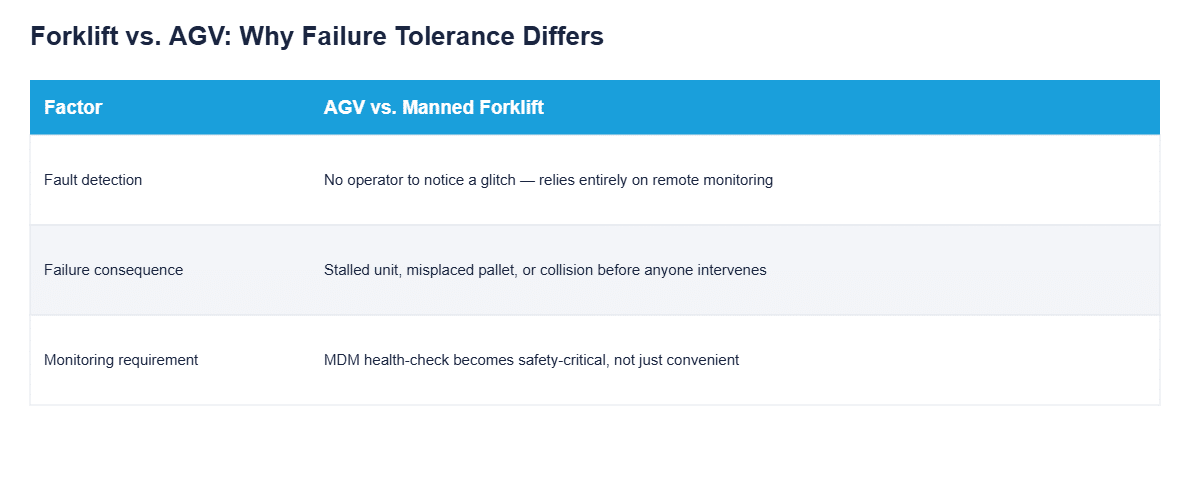
Why AGVs Raise the Bar on Reliability
Autonomous guided vehicles change the failure calculus compared to operator-driven forklifts: when a manually-driven forklift’s terminal glitches, the operator notices immediately and can work around it. An AGV running the same task has no human in the loop to catch a silent fault — a terminal that drops its WMS connection, misreads a task queue, or reboots mid-cycle can cause a stalled unit, a misplaced pallet, or a collision before anyone intervenes. This is why AGV deployments increasingly treat terminal-level MDM monitoring not as a convenience but as the mechanism that catches a degrading unit before it causes a physical incident on the floor.
The Practical Case
Warehouse operations that treat vehicle terminals as an extension of their WMS — not a separate add-on — get faster pick times, fewer inventory errors, and fewer safety incidents, all from the same piece of rugged hardware, the same integrated-platform approach detailed in One Tablet, Four Systems and in our broader look at rugged terminals for logistics and transportation.
Which Warehouse Guide Should I Read Next?
| If your question is… | Read |
|---|---|
| Pedestrian detection and speed control on forklifts? | Forklift safety system |
| Tracker or terminal for each asset? | Fleet tracking hardware |
| Which mobile data terminal? | Best mobile data terminals for fleets |
| Which tablet size fits the cab? | Choosing a tablet screen size |
Common Questions
Do AGVs need the same rugged certification as manually-driven forklifts?
Yes — AGV-mounted terminals face the same vibration and impact exposure as operator-driven equipment, so IP65/MIL-STD-810 requirements apply equally.
Can one terminal handle both WMS connectivity and AVM 360° simultaneously?
Yes, on terminals with sufficient onboard processing — both functions run independently without conflicting.
How does MDM help once a warehouse scales past a handful of vehicles?
It lets IT teams push firmware/software updates and diagnose device issues remotely, avoiding a physical visit to every unit.
Why does terminal reliability matter more for AGVs than manned forklifts?
Because there’s no operator to notice and work around a fault in real time — a silent terminal issue on an AGV can escalate directly into a stalled unit or collision.
Where the deployment is specifically about safety — pedestrian detection, speed governance and driver monitoring rather than task work — the three systems involved are broken down in our guide to the forklift safety system.
Interested in specs or a quote? Contact our team to discuss warehouse fleet deployment.