

MDM remote diagnostics exists to avoid a familiar and expensive scenario: when a rugged vehicle tablet fails in the field, the default response is dispatching a technician — a “truck roll” that costs hours and takes a vehicle out of service. CF-Device’s VCM terminals are managed through an MDM platform so that most faults can be triaged remotely first, and only confirmed hardware failures justify a visit.
TL;DR
- Remote diagnostics let IT teams identify device faults (software crash, connectivity loss, hardware fault) without a site visit
- Most tablet issues in the field are software-level and fixable via remote reboot, config push, or OTA update
- Truck rolls should be reserved for confirmed hardware failures — remote diagnostics filters out the rest
- MDM platforms with device health monitoring can flag failing devices before they cause a fleet outage
- Remote work cannot fix power, cabling or screen faults, so the escalation path has to end at a technician
The Real Cost of a Truck Roll
A technician dispatch to diagnose a single malfunctioning tablet in a fleet vehicle typically involves travel time, vehicle downtime, and labor cost that often exceeds the value of the fix itself — especially when the underlying issue turns out to be a frozen application or a misconfigured setting, not a hardware fault. Multiply that across a fleet of dozens or hundreds of vehicles and unnecessary truck rolls become a significant recurring operating cost, the same downtime economics covered in our fleet management guide. Truck roll reduction is therefore one of the clearest returns on putting an MDM layer under a fleet of vehicle tablets, as set out in the software hub for vehicle fleet MDM.
What MDM Remote Diagnostics Actually Catches
An MDM remote-management platform gives IT staff visibility into device health without physically touching the unit:
- Device online/offline status and last-seen timestamp
- Storage usage and application crash logs, plus supply-voltage readings on the models that report them
- Firmware and OS version, flagging units that need OTA updates
- Network connectivity status (Wi-Fi/4G/5G signal, last successful sync)
MDM Device Health Monitoring: Reading the Signals Before the Device Goes Dark
The most useful part of MDM device health monitoring is what it records before a fault, not after. A tablet that goes silent leaves a last-known state: how long ago it last reported, whether storage was nearly full, whether the app had been crashing, whether the connection was already weak. Reading that history is what turns “the tablet is dead” into a short list of likely causes. A device that stopped reporting while the vehicle was parked points to connectivity or power; one that reported repeated crashes before going offline points to software; one that rebooted repeatedly right around engine starts points to the supply rather than the firmware. None of these needs a visit to narrow down.
Device Fleet Remote Access: What You Can and Cannot Do Remotely
Device fleet remote access covers a defined set of actions, and it helps to be clear about both sides. Remotely, most MDM platforms can reboot a unit, reinstall or update an application, push a configuration change, and deliver an OTA update, which together resolve the large majority of software-level faults; the update side is covered in OTA firmware updates and fleet downtime, and locking a unit back to its approved app in kiosk mode and app whitelisting. What remote access cannot do is repair hardware: a failed power input, a loose or damaged connector, a cracked screen or a broken mount all end with a technician. Whether a platform also offers remote screen viewing or file access depends on the product and the licence, so confirm that with the vendor rather than assuming it. For the broader platform picture, see MDM for fleet tablets.
The Triage Workflow
Instead of dispatching immediately on a fault report, a fleet with MDM in place can triage remotely first: check the device’s last logged status, attempt a remote reboot or config push, and confirm whether the fault clears. Only faults that persist after this remote pass — indicating an actual hardware issue — justify a technician visit. This single change in workflow is often what separates fleets that scale device deployment smoothly from those that get buried in support tickets as fleet size grows, an approach detailed further in automated fleet management. The same triage logic applies to hardware built for continuous duty, covered in our rugged vehicle tablet hardware buyer’s guide.
Building a Remote-First Escalation Path
A well-run fleet doesn’t leave the “dispatch or don’t” decision to guesswork — it defines a fixed escalation sequence before a truck roll is ever authorized:
- Check last-known health data — storage, connectivity, crash logs and supply readings from before the device went unresponsive
- Attempt a remote reboot or config push — resolves the majority of software-level faults without touching the vehicle
- Confirm connectivity independently — rule out a network dead zone before assuming the device itself has failed
- Escalate to a technician only if the fault persists — at this point, a hardware issue is the most likely remaining explanation
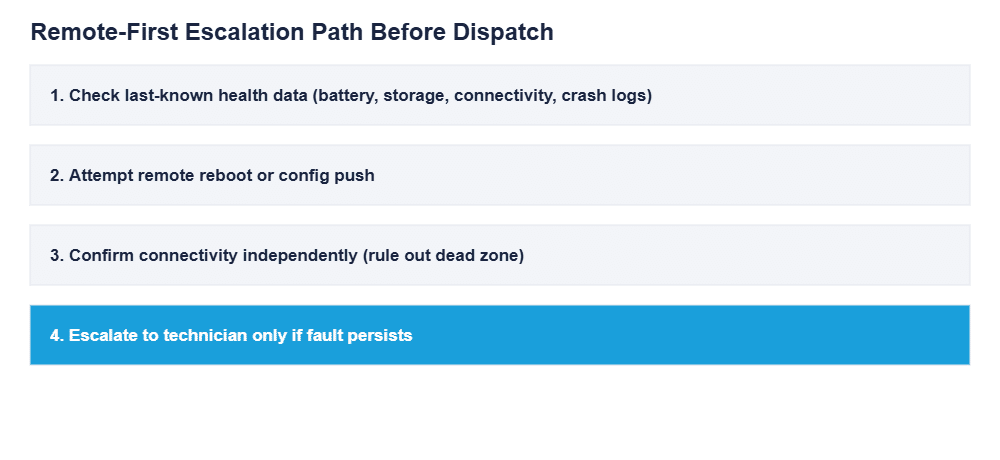
Fleets that skip straight to dispatch on every fault report end up sending technicians to fix problems that a remote reboot would have resolved in minutes — the escalation sequence above exists specifically to filter those cases out before they become a truck roll.
Common Questions
Can MDM actually fix a tablet remotely, or just diagnose it?
Both — most MDM platforms support remote reboot, application reinstall, configuration push, and OTA firmware updates, which resolve the majority of software-level issues without a site visit.
How does MDM know a device has failed versus simply being offline (out of signal range)?
MDM platforms track last-seen timestamps and device health logs before disconnection, so IT teams can distinguish a device that dropped signal briefly from one that stopped reporting after a crash or fault.
Is remote diagnostics only useful for large fleets?
It scales down too — even a fleet of 10-20 vehicles benefits from cutting a single unnecessary technician dispatch, and the operational habit of triaging remotely first pays off as the fleet grows.
Should every fault report go through the full escalation sequence before dispatch?
Yes — skipping steps to dispatch faster usually costs more overall, since most faults resolve at the remote-reboot stage without needing a technician at all.
What can remote diagnostics not fix?
Anything physical: a failed power input, a loose connector, a damaged cable, a cracked screen or a broken mount. Remote diagnostics narrows those down quickly, but the repair itself needs a technician, which is why the escalation path ends there.
Interested in specs or a quote? Contact our team to see how MDM integrates with your fleet’s rugged vehicle tablets.