

Automated fleet management sounds like a software category, but automation only works as well as the hardware feeding it real-time, reliable data from every vehicle. CF-Device builds that hardware half, which is a useful vantage point on what an automated fleet actually needs underneath the dashboard.
TL;DR
- Automation depends on continuous data flow: location, diagnostics, driver behaviour, device health
- MDM automates fleet-wide software updates and configuration without manual per-vehicle work
- Driver monitoring automates safety alerting without constant human watching (on models that list it)
- Automated fleet solutions fail when the underlying hardware cannot reliably supply data
- Automation value scales with fleet size: small fleets see convenience, large fleets see necessity
What “Automated” Actually Means in Fleet Management
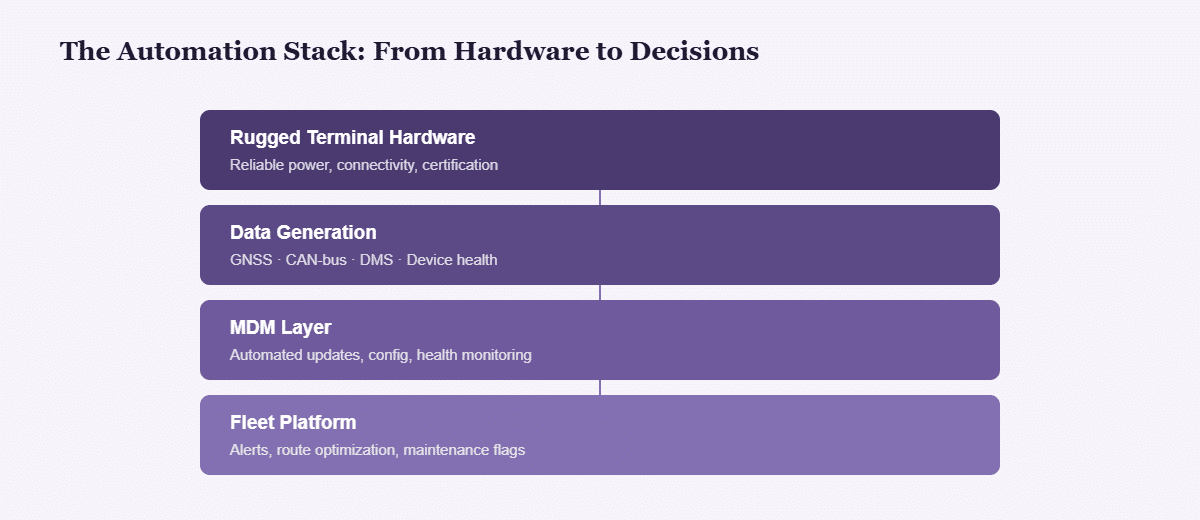
An automated fleet management system is not one piece of software; it is a data pipeline. Vehicle terminals generate positioning, diagnostic and behavioural data continuously, and platforms use it to trigger alerts, optimise routes or flag maintenance without a person manually checking each vehicle.
Fleet Automation, Fleet Management Automation and Automated Fleet Solutions
Searches for fleet automation, fleet management automation, automated fleet solutions and fleet management technologies all describe the same pipeline from different ends. Software vendors talk about the top of it (alerts, routing, reports); the hardware determines whether anything reaches the top. The tracking side of the pipeline is broken into layers in fleet vehicle GPS tracking systems: the four layers behind the dashboard.
The Automation Stack
| Layer | Function |
|---|---|
| Rugged terminal hardware | Reliable power, connectivity, certification |
| Data generation | GNSS, CAN bus, driver monitoring where fitted, device health |
| MDM layer | Automated updates, configuration, health monitoring |
| Fleet platform | Alerts, route optimisation, maintenance flags |
Each layer depends on the one below it functioning continuously. A break at the hardware layer (dropped connectivity, terminal failure) breaks automation at every layer above it, regardless of how sophisticated the platform software is.
Where Automation Breaks Down
Automated fleet solutions are only as reliable as their weakest data source. A terminal that drops connectivity, fails to log driver events, or needs manual configuration per vehicle undermines the whole premise, which is why hardware reliability matters as much as software capability. Terminals built with wide-voltage power design and ignition detection, like the dual-SIM VCM V10-2, exist specifically to keep that data pipeline uninterrupted.
A Practical Example: Automation at Two Fleet Sizes
A 5-vehicle delivery fleet without automation means a manager manually calling drivers for status, checking a spreadsheet for maintenance schedules, and reviewing dash-cam footage only after an incident is reported. That is manageable, if inefficient. A 200-vehicle fleet running the same manual process is not just less efficient, it is operationally impossible: no manager can manually track 200 vehicles’ locations, 200 maintenance schedules and 200 drivers’ behaviour patterns. At that scale automation is not a luxury upgrade; it is the only way the fleet functions at all. This is an illustrative comparison rather than a customer case study.
MDM as Automation Infrastructure
MDM remote management automates the operational side of fleet hardware: pushing software updates, monitoring device health, and flagging failing units automatically rather than requiring IT staff to check each vehicle manually. This is what separates a fleet genuinely running automated management from one relying on manual spreadsheet tracking.
Driver Monitoring as Automated Safety Monitoring
DMS driver monitoring automates a function that used to depend entirely on manager oversight or after-the-fact incident review: it continuously evaluates driver behaviour and triggers alerts without requiring a human to be watching in real time. DMS is listed on the VCM M10; confirm it for other models.
The Fleet Telematics Solution Layer
Combining GNSS positioning, CAN-bus diagnostics, driver monitoring and connectivity into one fleet telematics solution running on integrated terminals is what allows fleet management platforms to actually automate decisions, rather than just displaying raw data for a human to interpret. Which functions one terminal can combine depends on the model.
What to Evaluate Before Calling a Fleet “Automated”
- Does the platform trigger alerts without a human reviewing raw data first?
- Can software updates and configuration changes reach every vehicle without a technician visit?
- Does the system distinguish real anomalies from noise (for example a brief signal drop versus an actual device failure)?
- Is data logged locally during connectivity gaps, or lost entirely?
Which Fleet Guide Should I Read Next?
This guide belongs to the mobile device management hub. Pick the next one by the question you still have open:
| If your question is… | Read |
|---|---|
| What does one fleet terminal do? | Fleet management terminal |
| How does the data reach the dashboard? | Fleet vehicle GPS tracking systems |
| Tracker or terminal for each asset? | Fleet tracking hardware |
| How do I manage the terminals? | MDM remote device management |
| Which platforms do these terminals run? | Compatible fleet management platforms |
Common Questions
Can a fleet automate management with existing consumer-grade hardware?
Poorly. Automation depends on consistent, reliable data, and consumer hardware’s higher failure rate under vehicle conditions undermines the data continuity automation requires.
Does automated fleet management eliminate the need for fleet managers?
No. It shifts their role from manually checking status to reviewing exceptions and alerts the system surfaces, a higher-value use of their time.
How does MDM differ from a fleet telematics platform?
MDM manages the terminal hardware and software itself (updates, health, configuration); a telematics platform consumes the data that hardware produces for fleet-level decision-making. The two work together, not interchangeably.
At what fleet size does automation become necessary rather than optional?
There is no fixed threshold, but most operators find manual tracking becomes impractical somewhere between 20 and 50 vehicles, depending on route complexity and reporting requirements.
What does a complete automated fleet solution actually include?
An automated fleet solution is four layers, and a gap in any one of them stops the automation above it: vehicle-grade hardware that stays powered and connected, a data layer reading the machine’s own bus rather than inferring from movement, a management platform that can push configuration without a site visit, and the business system that consumes the output. CF-Device supplies the first two and the MDM layer; the fourth is your TMS, ERP or farm-management platform. Buyers who evaluate only the software layer tend to discover the gap at the hardware end well into the deployment.
Interested in specs or a quote? Contact our team to discuss automated fleet management hardware.