

Tablet screen size is quoted as the screen diagonal: a 10-inch tablet measures 10 inches across it, which is 25.4 cm — or 25.7 cm for the 10.1″ panels CF-Device uses across its VCM range. The diagonal is only the screen, though: the body of a rugged vehicle tablet is larger, and the body is what has to fit your cab. CF-Device builds the VCM range in four size classes — 7″, 8″, 10.1″ and 12.1″ — because no single size fits every cab.
TL;DR
- Screen size is measured diagonally, corner to corner of the glass — not width or height
- A “10 inch tablet” is 25.4 cm (10 Zoll) on the diagonal; CF-Device’s 10.1″ panels measure 25.7 cm
- 7″ suits tight cabs, 10.1″ is the all-round default, 12.1″ suits data-heavy work such as surround view or implement control
- Check the device dimensions in the datasheet before ordering a mount — the housing is larger than the screen
- Hold a sheet of A4 (297 × 210 mm) at the mounting position as a quick clearance check
How Is Tablet Screen Size Measured?
Screen size is the distance from one corner of the display glass to the opposite corner, in inches — not the bezel or the frame. Run a tape measure from the bottom-left corner of the glass to the top-right corner. Three numbers get confused in catalogues, so ask which one a listing quotes:
- Diagonal — the single figure in the name (7″, 10.1″, 12.1″). It tells you readability.
- Panel dimensions — the width and height of the glass.
- Device dimensions — the outer housing. On a rugged unit this is larger because of the sealed bezel and corner bumpers, and it is the figure that decides whether the unit mounts.
How Big Is a 10-Inch Tablet in Centimetres?
A 10-inch screen is 25.4 cm on the diagonal. Buyers in German-speaking markets will see the same unit written as 10 Zoll, and one Zoll is exactly 2.54 cm, so 10 Zoll is 25.4 cm and 10,1 Zoll is 25.7 cm. Listings that say 10in, 10 in tablet, ten inch tablet or tablet PC 10 inch all describe the same class.
| Size class | Diagonal | Zoll (DE) | Panel, 16:10 (approx.) |
|---|---|---|---|
| 7″ | 17.8 cm | 7 Zoll | — |
| 8″ | 20.3 cm | 8 Zoll | — |
| 10.1″ | 25.7 cm | 10,1 Zoll | about 216 × 135 mm |
| 12.1″ | 30.7 cm | 12,1 Zoll | about 259 × 162 mm |
The panel figures assume a 16:10 panel, the format of the 1280×800 screens; a 16:9 panel of the same diagonal is wider and shorter. For anything that decides mounting, use the device figures in the datasheet instead.
10 Inch Tablet Dimensions: What Actually Has to Fit
An A4 sheet turned sideways is 297 × 210 mm. The VCM M10, a 10.1″ unit, measures 270.9 × 173.5 × 33.2 mm and weighs 1.3 kg, so its whole body sits inside that outline; the 7″ VCM V7-2 measures 200 × 134 × 32.52 mm at 0.685 kg. Holding a sheet of A4 at the intended mounting position is a quick way to check clearance for a 10.1″ unit before ordering. A 12.1″ unit is closer to the edge of the sheet, and the mount adds to every figure.
| 10.1″ model | Body (W × H × D) | Weight |
|---|---|---|
| VCM M10 | 270.9 × 173.5 × 33.2 mm | 1.3 kg |
| VCM V10-2 | 248.9 × 167.5 × 29.85 mm | 0.99 kg |
| VCM S10-2 PLUS | 281 × 181 × 37.5 mm | 1.5 kg |
| VCM S10-2, S10-2 PRO, V10 PRO | 281 × 181 × 42 mm | 1.5 kg |
The S10-2, S10-2 PRO and V10 PRO share one footprint, so they take the same bracket, but their wiring is not interchangeable. The S10-2 PLUS is 4.5 mm thinner than the S10-2 and S10-2 PRO, so re-check the mounting depth when changing model.
Matching Size to the Job
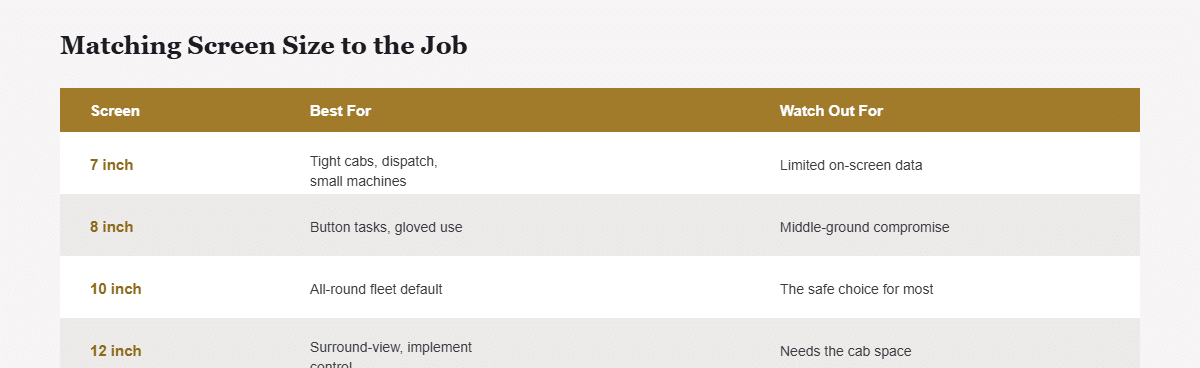
| Screen | Fits | Best for | CF-Device models |
|---|---|---|---|
| 7″ | Tight, compact cabs | Basic tracking, dispatch, small machines | V7-2, V7A-2, V7 PRO, S7 |
| 8″ | Mid-size cabs | Button-operated tasks, gloved use | V8 PRO (9 physical buttons) |
| 10.1″ | Most vehicles | All-round default, fleet standard | M10, V10 PRO, V10-2, S10-2 family (S10-2, PLUS, PRO) |
| 12.1″ | Roomy cabs | Surround view, implement control, split screen | V12 PRO, V12, V12-2 |
The screenless TANK V2 drives an external 10.1″ or 12.1″ display where the cab has no room for an integrated panel. This size-to-task matching is also why a project tablet specified for field and fleet work cannot be chosen from a generic spec sheet.
Why the 10-Inch Tablet Is the Fleet Default
The 10-inch class is big enough to read route information, camera views or an implement screen at a glance from a moving seat, and compact enough for most cabs at a lower cost than a 12″ unit. It is also the class with the widest CF-Device model choice: the VCM M10, V10 PRO, V10-2 and the S10-2 family. Buyers see it listed as a tablet PC 10 inch, a 10 in tablet or an android tablet 10 inch; the panel is the same whatever the catalogue calls it. At that size the difference between a consumer and an industrial unit is substantial, as set out in 10 inch android tablet: consumer vs industrial grade, and the models are compared side by side in best 10-inch rugged Android tablets. The operating-system side of the same decision is in the 10-inch rugged Android and Debian Linux tablet hub.
A Real Example
A mixed-fleet buyer measured cabs before ordering. Compact orchard tractors got 7″ tablets, which was all the space allowed. Road trucks got 10″ units that read easily and fit the dash. Wheel loaders running surround-view cameras got 12″ units, because the stitched camera image needed the screen area. One fleet, three sizes, each matched to cab space and task. Because all three came from the same VCM platform, the fleet still runs one mounting standard and one MDM console; the power input should still be checked per model, as it differs across the range.
The same site-fit thinking applies on construction sites, where cab space varies machine to machine — see tablets for the construction industry.
Other Names for the Same Question
How do you measure tablet screen size? Along the diagonal of the display, corner to corner, not along an edge or across the body. A 10 inch tablet size in cm is about 25.7 cm on the diagonal, and a 10 inch screen size in a rugged tablet is quoted the same way, so the housing around it is always larger than the figure suggests.
Common Questions
Is a 10 inch tablet measured across or diagonally?
Diagonally — corner to corner of the screen glass, never edge to edge. A 10.1″ panel is roughly 216 × 135 mm rather than 10 inches in either direction, and the finished device is larger again once the rugged housing is added.
How do I know a tablet will fit before I buy it?
Measure the mounting space in the cab (height × width × depth) and compare it with the device’s full body dimensions plus its mount. The datasheet lists these under a heading such as “mechanical” or “physical”.
Can I just use the biggest screen everywhere to be safe?
No. An oversized tablet can block the sightline or a control, and costs more. A 12.1″ unit in a compact orchard tractor obstructs the view the operator needs most, while a 7″ unit on a wheel loader running six-camera surround view cannot show the stitched image usefully.
Is 10.1 inch different from 10 inch?
No. 10.1″ is the exact diagonal of most panels in this class, and both are marketed as 10 inch.
Does a bigger screen drain more power?
Somewhat, but on a vehicle-powered tablet it is rarely the deciding factor; fit and readability matter more.
Which CF-Device models come in each size class?
7″: VCM V7-2, V7A-2, V7 PRO, S7. 8″: VCM V8 PRO. 10.1″: VCM M10, V10 PRO, V10-2, S10-2, S10-2 PLUS, S10-2 PRO. 12.1″: VCM V12 PRO, V12, V12-2. TANK V2 is screenless.
For how screen size sits alongside durability, power and connectivity in a full purchase decision, see the rugged vehicle tablet hardware buyer’s guide.
Interested in specs or a quote? Contact our team to discuss the right screen size for your vehicles.