

CF-Device hears “we need tablets for our construction sites” more than any other opening line, and it is a requirement that splits into four genuinely different products once you look at who is holding them. A unit bolted into an excavator cab and a unit a supervisor carries around a site have almost nothing in common beyond running the same operating system — different power, different mounting, different durability, different screen.
TL;DR
- Machine-mounted units need vehicle power and CAN bus; handhelds need battery and drop rating
- Survey and layout work is the only role that genuinely requires centimetre-level RTK GNSS
- Site-office plan review needs screen area more than ruggedness
- Consumer tablets typically fail in a predictable sequence within the first year on a site
- Buying one spec for all four roles overspends on two and underspecifies the other two
Role One: Machine-Mounted
Excavators, dozers, rollers, and loaders need a permanently installed terminal wired into the machine’s electrical system. The defining requirements here are wide-voltage DC input (plant equipment runs 12V and 24V systems, with voltage spikes on ignition), a CAN bus connection to read machine data, and vibration certification for a unit that will be shaken for thousands of hours.
Screen size matters here too, but for a specific reason: grade and depth-assistance displays need enough area to show the blade or bucket position clearly at a glance while the operator is watching the work — the application detailed in our excavator slope grading guide, with compaction monitoring covered in road roller and dozer monitoring.
In short: a machine-mounted construction tablet is a vehicle component, specified like one — power, bus, vibration — not like a computer.
Role Two: Site Supervisor
A supervisor walking a site needs a handheld device: all-day battery, a screen readable outdoors, a housing that survives being dropped onto compacted fill, and glove-operable touch. What they don’t need is CAN bus or wide-voltage input — those add cost for capability that never gets used in this role.
The most common complaint in this role isn’t durability, it’s visibility. A consumer tablet at 300–500 cd/m² is effectively blank in open sun, which means the device gets left in the truck and the workflow reverts to paper. Sunlight readability is the specification that determines whether the deployment gets used at all.
Role Three: Site Office
Plan review, drawing markup, and progress reporting happen in a trailer or container office. This is the one role where a rugged unit is often unnecessary — screen area for reading drawings matters more than ingress protection, and the device is powered from mains or a dock rather than a battery.
Buyers searching for the best tablet for construction drawings are usually describing this role specifically, and it’s the one case where a larger consumer or semi-rugged device can be the correct answer. Recognising that avoids paying industrial prices for a device that lives on a desk.
Role Four: Survey and Layout
Stakeout, as-built verification, and layout work are the only construction roles that genuinely require centimetre-level RTK GNSS positioning. This role also typically needs external antenna support and pole or tripod mounting, which is a hardware requirement most terminals don’t provide.
It’s worth being precise about this, because RTK gets specified across whole fleets when only a few units need it. The accuracy tiers and what each one is actually for are set out in our GNSS positioning guide.
Why Consumer Tablets Don’t Last a Season
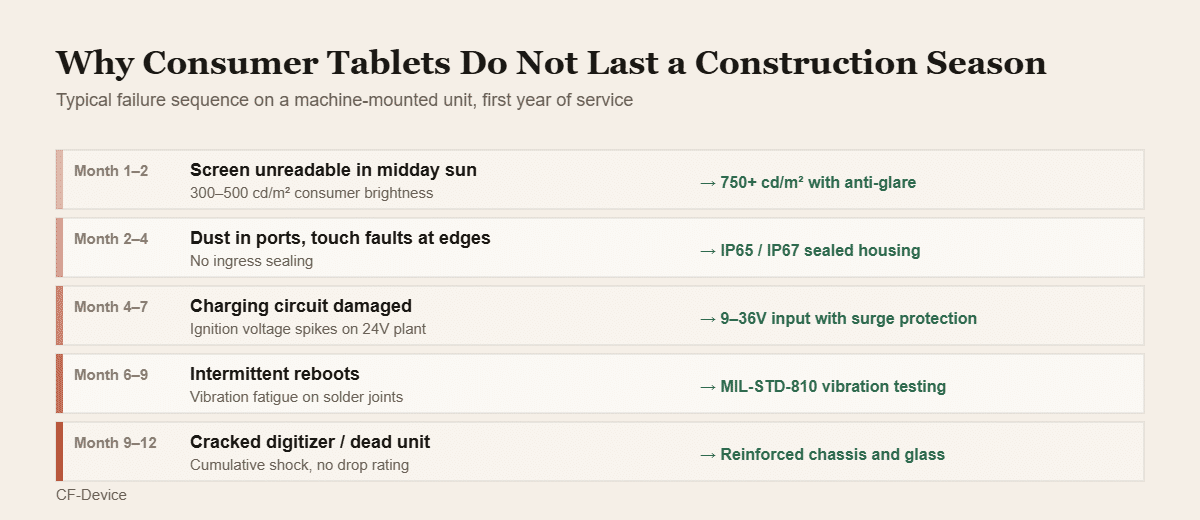
The failures are rarely dramatic. What actually happens is a sequence: the screen becomes unusable in sun, dust works into the ports, the charging circuit takes damage from plant voltage spikes, vibration fatigues solder joints into intermittent reboots, and cumulative shock finishes the unit. Each step is survivable individually; together they take out a fleet of consumer devices inside a year.
The specification differences that prevent this are covered in 10 inch android tablet: consumer vs industrial grade, and the certification standards behind them in IP65 vs IP67.
Matching Spec to Role
| Requirement | Machine | Supervisor | Office | Survey |
|---|---|---|---|---|
| Wide-voltage DC input | Essential | No | No | No |
| CAN bus | Essential | No | No | No |
| IP65+ sealing | Essential | Essential | Optional | Essential |
| Vibration certification | Essential | Useful | No | Useful |
| All-day battery | No (vehicle powered) | Essential | No | Essential |
| Sunlight-readable display | Essential | Essential | No | Essential |
| Centimetre RTK GNSS | For grade work | No | No | Essential |
| Large screen (12″+) | Useful | No | Useful | No |
Screen size deserves separate thought per role rather than a fleet-wide decision, since cab space varies by machine — the sizing logic is in android tablet 10 inch size guide.
A Deployment Example
A civil contractor running 40 machines and 12 site staff initially standardised on one semi-rugged handheld model for everyone — simplest procurement, one spare pool. Within eight months the machine-mounted units were failing on vibration and voltage, while the office units were over-specified for a device that never left a desk. The revised deployment used three specs instead of one: vehicle-mount terminals wired into the plant, handhelds for supervisors, and standard tablets in the site office. Total spend was lower than the single-spec approach, because the money went where the environment demanded it.
Managing a Mixed Construction Fleet
Running three hardware specs across a site raises a management question: keeping software, configuration, and updates consistent across devices that aren’t identical. Central device management handles this without a technician visiting each unit — covered in MDM devices: what fleet hardware a platform actually manages. Fleet-level tracking of the machines themselves is covered in rugged tablets for construction fleet tracking.
Common Questions
Can one tablet model cover all four construction roles?
Technically yes, but it means overspending on the office role and underspecifying the machine-mounted one — the power and bus requirements of a machine install can’t be met by a handheld.
Do site supervisors need CAN bus capability?
No — CAN bus is only relevant to a device wired into a machine’s network, so paying for it on a handheld adds cost without function.
Is a rugged case enough to protect a consumer tablet on a jobsite?
It helps with drops only. Sunlight readability, ingress sealing, voltage tolerance, and vibration resistance are all internal to the device and can’t be added externally.
Which construction roles justify centimetre-level RTK?
Survey and layout work, and machine grade-control applications. Supervisor and office roles don’t benefit from it.
How long should a rugged construction tablet last in service?
Properly specified units are designed for multi-year deployment with parts availability across a stated lifecycle, rather than the annual replacement cycle consumer hardware follows.
Construction is one of several operating environments that force the same specification questions — a cross-sector view for owners buying across field, warehouse and fleet use is set out in our guide to the best tablet for business owners.
Interested in specs or a quote? Contact our team to discuss terminals for your construction fleet.