

Construction fleet tracking is the practice of collecting location, run-hours and machine-health data from every excavator, loader and truck on site through a cab-mounted rugged tablet. A construction site is one of the hardest places to keep track of anything: machines move between sites, crews rotate, and dust, drops, and vibration destroy ordinary tablets in weeks. A tablet built for the job turns scattered equipment into something you can actually see and manage.
TL;DR (in plain terms)
- Construction fleet tracking = knowing where your machines are, how they’re used, and when they need service
- Ordinary consumer tablets don’t survive a construction site — dust, drops, and vibration kill them fast
- A rugged construction tablet handles GPS tracking, machine data, and crew coordination on one device
- Look for testable numbers, not adjectives: IP65-IP67 sealing, MIL-STD-810 shock and vibration, 750 cd/m² or brighter screens, and a 5-36V or 9-36V DC machine supply
- The payoff: less lost equipment, fewer breakdowns, and machines that aren’t sitting idle
What “Construction Fleet Tracking” Actually Means
It’s three things at once:
- Location — where every machine and vehicle is right now, and which site it’s assigned to
- Usage — how many hours a machine ran, whether it’s being over- or under-used
- Health — engine and system data that warns you a service is due before something breaks mid-job
A CF-Device VCM terminal mounted in the machine is what collects and sends all three back to the office: GPS for location, CAN bus for hours and engine health, and cellular for the trip back to dispatch.
Construction Equipment Tracking: What the Terminal Reports and What Needs the Platform
Construction equipment tracking and equipment run hours tracking depend on two different parts, and buyers often assume one product does both. The terminal in the cab supplies the data: a GNSS position, a time stamp, and whatever the machine itself reports over CAN, which is where run hours and engine faults come from. Whether a given machine reports run hours at all is set by the machine, so confirm it with the equipment maker before counting on it. The map, the hour totals, the service alerts and the idle-machine reports come from the fleet platform that receives that data. A good terminal makes the platform’s data complete and dependable; it does not replace the platform. For how the layers divide, see fleet management from one terminal.
Why an Ordinary Tablet Won’t Do
The same five failure modes keep coming up on construction sites, and a construction site is brutal on electronics in all of them:
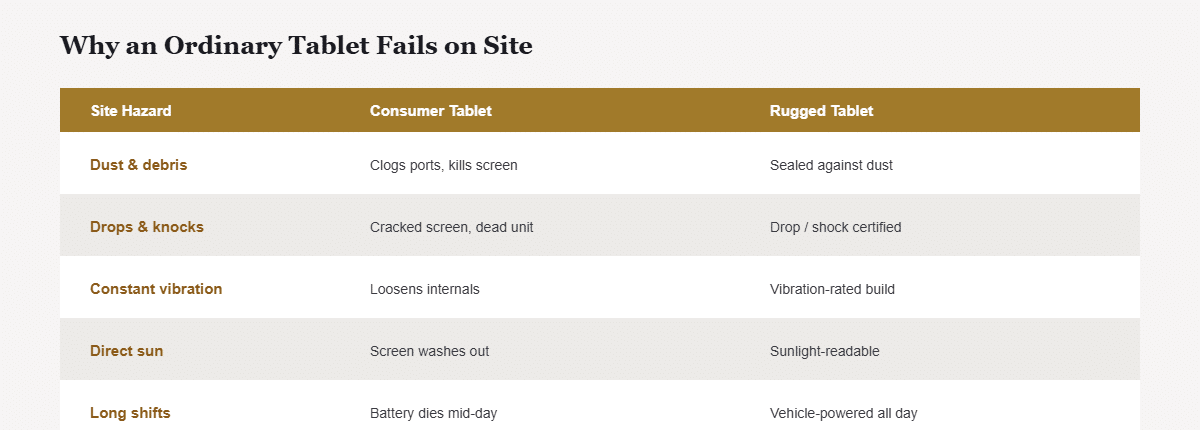
| Site hazard | What it does to a consumer tablet | What a rugged tablet does |
|---|---|---|
| Dust & debris | Clogs ports, kills screen | Sealed against dust ingress |
| Drops & knocks | Cracked screen, dead unit | Drop/shock certified |
| Constant vibration | Loosens internals, early failure | Vibration-rated build |
| Direct sun | Screen washes out, unreadable | Sunlight-readable display |
| Long shifts | Battery dies mid-day | Vehicle-powered, all-day |
Buying a cheap tablet and replacing it every few weeks costs more in downtime and replacements than a rugged unit that lasts years. The gap is wider than most buyers expect: an industrial unit and a consumer one can share a screen size and an Android version and still be entirely different products, as set out in 10 inch android tablet: why the industrial version is a different product.
What to Look For in a Construction Fleet Management Tablet
- Durability certification (dust-tight, drop- and vibration-tested) — non-negotiable on site
- Sunlight-readable screen — you’ll be outdoors all day
- Vehicle power — runs off the machine’s electrical system, no dead batteries
- The right screen size — big enough to read from the seat, sized to fit the cab (see 10 inch tablet size guide)
- Connectivity — reliable cellular so tracking data actually reaches the office
This whole category of hardware — mounted, rugged, built for job-site use rather than office use — is what’s generally meant by a project tablet, and the same checklist applies whether it’s tracking a construction crew or an agricultural fleet. Machine-mounted units are only one of four distinct roles on a site, though — supervisors, site office, and survey crews each need a different spec, as set out in tablet for the construction industry: four jobsite roles, four different specs. A rugged tablet for construction fleets is the machine-mounted one; the full spec sequence behind it is in the rugged vehicle tablet hardware buyer’s guide.
Who Actually Owns Fleet Tracking Day to Day
In CF-Device’s deployments, fleet tracking tends to fail in practice not because the hardware is wrong, but because nobody owns checking it. A dispatcher glancing at a map once a week catches almost nothing useful; a foreman who reviews machine hours and location every morning catches a stalled excavator or a service alert before it becomes a missed deadline. The tablet does the collecting, but the value only shows up once someone on the team treats that data as part of the daily routine — deciding who checks it, how often, and what triggers a follow-up call is as much a part of “construction fleet tracking” as the hardware itself.
An Illustrative Example
Picture a mid-size contractor running 30 machines across four sites that keeps losing track of which excavator is where and gets surprised by breakdowns. After fitting rugged tablets: dispatch can see every machine’s location and hours on one screen, service alerts come in before failures, and idle machines get reassigned instead of sitting unused. Fewer breakdowns, less idle equipment, and no more driving between sites just to find a machine — the same visibility covered in fleet management from one terminal. The in-cab monitoring that sits beside tracking on a roller or dozer is covered in compaction and grading monitoring for road rollers and bulldozers.
Common Questions
Do I need a rugged tablet, or can I use a normal one in a case?
A case helps with drops but doesn’t seal against dust or handle vibration and sunlight — purpose-built rugged tablets are validated against all of these together.
What screen size is best for construction machines?
Usually 10″ as an all-round default; 12″ if you’re running camera or grade-control views that need more screen area.
Can one tablet track the machine’s engine data too?
Yes, where the machine outputs it — rugged tablets can read machine data over the standard vehicle data connection (CAN bus), flagging service needs early. What a given machine reports is set by the machine, so confirm it before deployment.
Will tracking work if a site has poor cell coverage?
That depends on the platform software running on the terminal. Many platforms log data locally and sync when coverage returns, so you don’t lose records in dead zones; confirm that behaviour with your platform vendor.
Who on the team should be reviewing the tracking data?
A foreman or dispatcher checking location, hours, and alerts daily catches problems early — tracking data left unreviewed provides little practical value.
Which CF-Device models are used for construction fleet tracking?
The VCM S10-2 (10.1″) is the general-purpose choice for excavators, loaders and site trucks; the VCM V12 (12.1″) fits where grade-control or multi-camera views need the extra screen area. Both are rated IP65, tested to MIL-STD-810, have 750 cd/m² screens, and operate from -30°C to +70°C. The S10-2 runs on 5-36V DC and the V12 on 9-36V DC, so check the supply against your machines. Other VCM models differ on sealing and supply, so confirm them on the datasheet.
For how the same tracking approach applies across other industries, see our field-by-field guide to rugged vehicle tablet use cases.
Interested in specs or a quote? Contact our team to discuss tablets for your construction fleet.