
A GPS tracking device for fleet vehicles is easy to buy: every unit on the market can put a dot on a map. The harder question is what happens after the dot appears — does the data change what a dispatcher does next, or does it sit as a background map nobody checks? CF-Device builds vehicle-mount terminals rather than hidden tracker boxes, so this guide is candid about when a tracker is enough and when the terminal is the better tracking device. It is also the hub for CF-Device’s fleet and logistics articles, with a reading guide below.
TL;DR
- Raw GPS position is only useful once it becomes a decision: reroute, reassign, follow up
- A dedicated tracking device beats phone-app tracking on reliability: no dependence on a driver’s phone battery or an open app
- Real-time tracking matters most for exceptions (idle time, route deviation, ETA drift), not routine positions
- Small fleets need the same tracking logic as large ones; the scale changes, the need does not
- A vehicle-mount terminal with built-in GNSS can handle tracking and dispatch together; a hidden tracker suits assets that need no screen
What Actually Happens Between a GPS Ping and a Decision
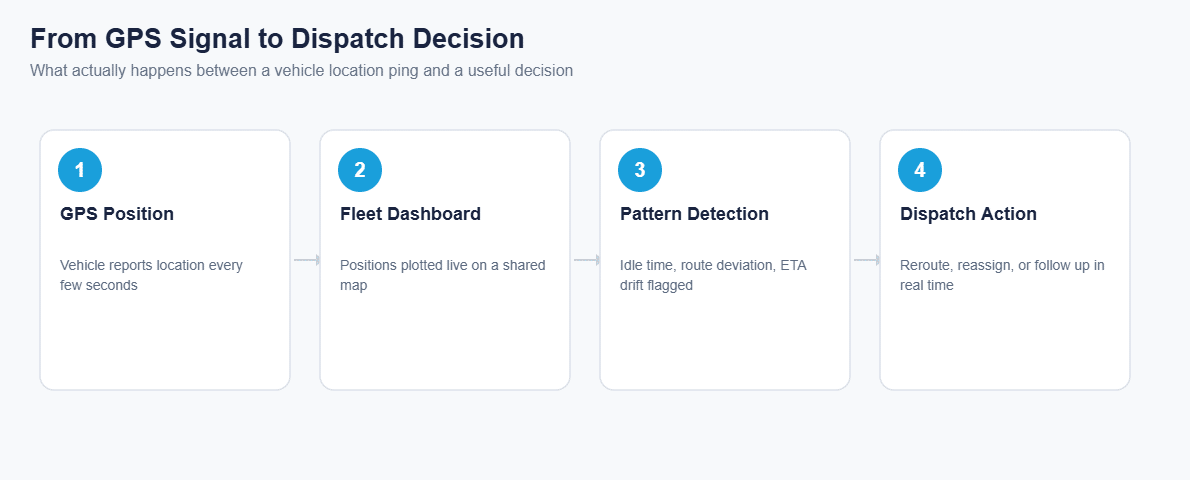
A GPS tracking device is only the first step. The position is just a coordinate; the value comes from what the fleet system does with it once it arrives: plotting it on a shared dashboard, comparing it with an expected route or schedule, and surfacing the exceptions that need a person’s attention. A system that stops at the dot is not doing the job a fleet needs. The four layers that carry a position from satellite to dashboard, and the one most buyers skip, are in fleet vehicle GPS tracking systems: the four layers behind the dashboard.
Dedicated GPS Tracking Device for Fleet Vehicles vs. Phone-App Tracking
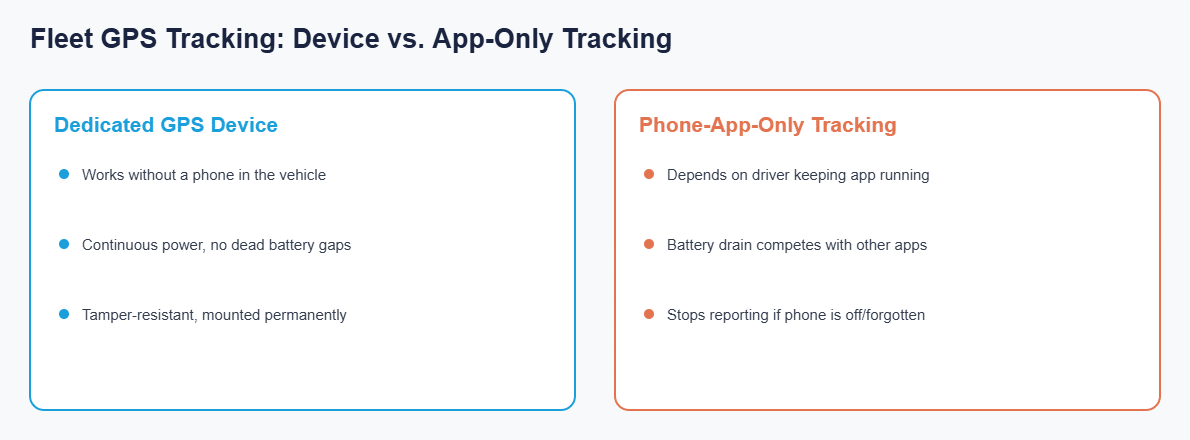
A driver’s phone running a tracking app looks free, but it depends on the app staying open, the phone staying charged and the phone staying in the vehicle. A device mounted permanently in the vehicle removes all three failure points: it reports continuously off the vehicle’s own power, whatever the phone is doing.
What “Real-Time” Actually Needs to Mean
Real-time fleet tracking is marketed as a headline feature, but the update rate matters less than what triggers an alert. A dispatcher does not need to watch a truck tick by every few seconds. They need to know when a vehicle sits idle for 20 minutes when it should be moving, drifts off its route, or runs late enough that a customer needs a call before they ask. The exceptions are what a GPS fleet management system should surface, not the routine positions between them.
Does a Small Fleet Need a GPS Tracking Device Too?
Vehicle tracking for small business fleets is often treated as an expense for large operations. In practice the same problems (a lost driver, a vehicle stopped somewhere unexpected, a customer asking “where is my delivery”) hit a 5-vehicle fleet as hard as a 500-vehicle one. At small scale the setup and monthly overhead have to stay proportionate, which is where a tracking capability built into the terminal that already runs dispatch and navigation keeps cost and complexity down.
Tracker or Terminal: Which Tracking Device Fits the Vehicle?
| Question | Hidden tracker | Vehicle-mount terminal |
|---|---|---|
| Does the driver need a screen? | No | Yes: dispatch, navigation, forms |
| What does it report? | Position and basic events | Position plus machine data (CAN bus), cameras, driver monitoring on suitable models |
| Second device and subscription? | Yes, if you also need dispatch | Not necessarily |
| Fits which assets? | Trailers, containers, light vehicles | Trucks, machines, buses, forklifts |
The split is worked through asset by asset in fleet tracking hardware: GPS trackers vs vehicle terminals and the hardware trade-off in Fleet GPS Tracking Hardware. For trucking fleets the same terminal usually carries the logging requirement too, which changes what you specify: see the best tablet for ELD logs.
How Does Location Data Connect to the Rest of the Vehicle’s Software?
Location data is most useful when it is not siloed in a standalone tracker. The same GNSS position that feeds a fleet map can reach MDM remote fleet management, so one dashboard can show a vehicle’s location and its device health together. How the platform side fits is covered in the mobile device management hub and rugged tablets compatible with fleet management platforms.
Other Names for the Same Question
Buyers also call this fleet management hardware. The position source is only one part of it, alongside the terminal in the cab, the connectivity and the platform the data lands in.
Real time fleet tracking matters most for exceptions such as unexpected idle time or route deviation, not for the routine positions in between.
Which Fleet Guide Should I Read Next?
This page is the hub for CF-Device’s fleet, logistics and in-cab terminal articles. Pick the one that matches your question:
| If your question is… | Read |
|---|---|
| What does fleet management cover end to end? | Fleet management: one terminal, full operational visibility, automated fleet management |
| What are the layers behind a tracking dashboard? | Four layers behind the dashboard |
| Tracker box or terminal? | GPS trackers vs vehicle terminals, Fleet GPS tracking hardware |
| What is a mobile data terminal? | What is a mobile data terminal, MDT by sector, best mobile data terminals |
| What is an onboard computer? | What is an onboard computer |
| Which tablet for truckers and ELD? | Best tablets for truck drivers, Best tablet for ELD logs, Truck computer |
| What is a “project tablet”? | Project tablets for field and fleet use |
| Logistics and transportation specifically | Logistics and transportation |
| Which platforms work with my tablets? | Compatible fleet management platforms, MDM behind Samsara and Geotab |
For how fleet tracking sits among agriculture, construction, mining and transit, see the applications hub and the field-by-field use cases guide. For which terminal to buy, see the rugged vehicle tablet buyer’s guide, and for the whole range, the Rugged Vehicle Tablet Complete Guide.
Common Questions
Is phone-app tracking good enough for a small fleet?
It works until the app is closed, the phone dies or the driver leaves it at home. A dedicated device removes that dependency, even for a few vehicles.
How often does a GPS tracking device need to report position?
Often enough to catch meaningful deviations, typically every 30 seconds to a few minutes. What matters more is which events trigger an alert, not the raw update rate.
Do I need separate tracking hardware if my vehicles already have a dispatch tablet?
Not necessarily. A vehicle-mount terminal with built-in GNSS can handle tracking and dispatch together, avoiding a second device and subscription. Check GNSS accuracy and the models available on the model page.
What should trigger an alert in a fleet tracking system?
Unexpected idle time, route deviation and ETA drift are the three exceptions worth surfacing. Routine, on-schedule positions do not need active attention.
Interested in specs or a quote? Contact our team to discuss GPS tracking options for your fleet.