

A truck computer, also searched as a truck onboard computer, is a vehicle-mount in-cab terminal installed permanently in a cab and powered from the truck’s own electrical system — not a tablet in a bracket. CF-Device manufactures this class of hardware as the VCM range, and the specification that separates it from a consumer device is not the processor: it is the power input, the vibration rating, and the fact that it reads the truck’s own network.
TL;DR
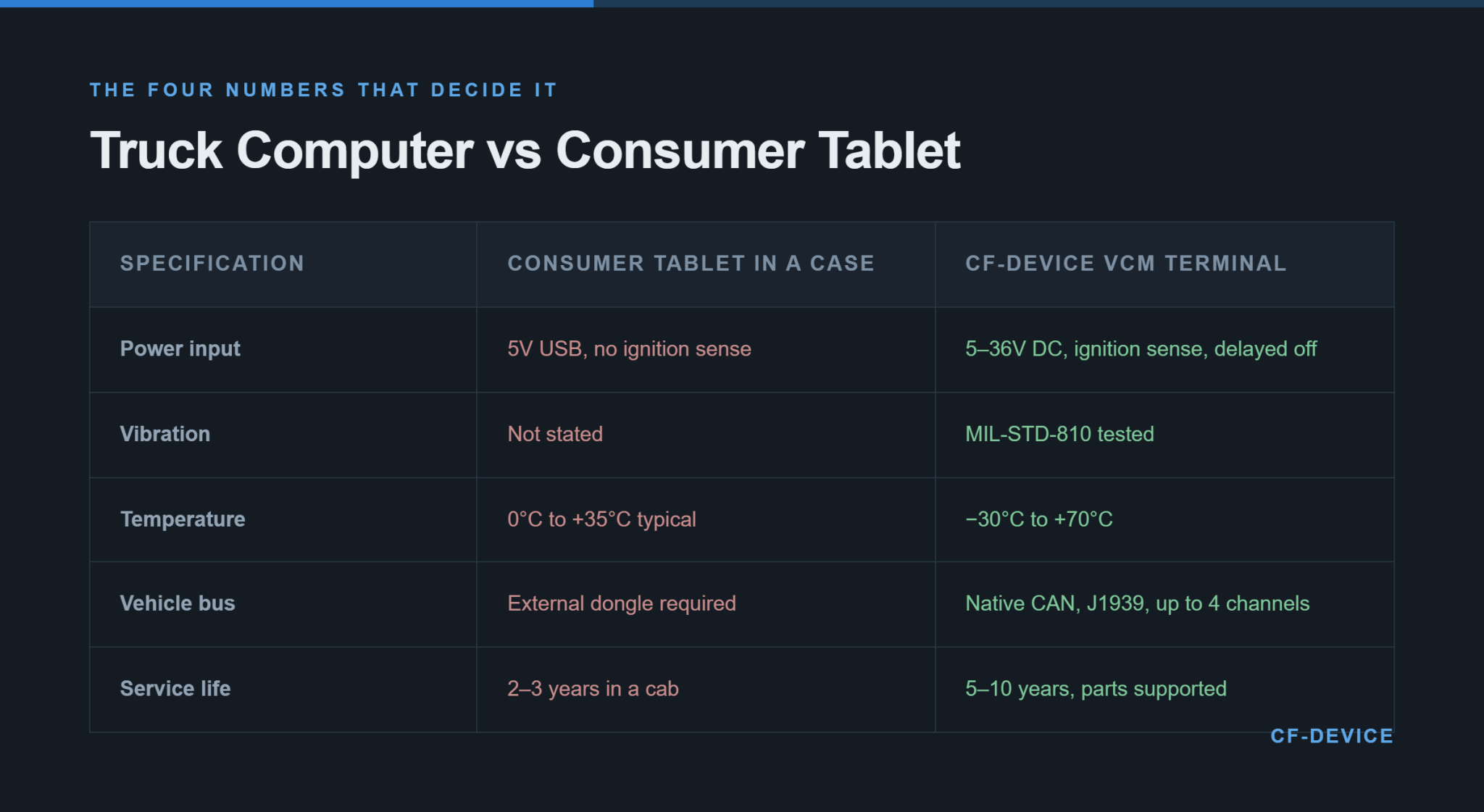
- CF-Device’s VCM truck terminals are rated IP65–IP67 by model, tested to MIL-STD-810, accept wide-voltage DC (5–36V or 9–36V by model) with ignition sense, and operate from −30°C to +70°C
- The defining trait of a truck computer is power, not toughness — it runs off the vehicle and wakes with the engine
- Native CAN bus and J1939 turn the terminal from a screen into an instrument reading engine hours and fault codes
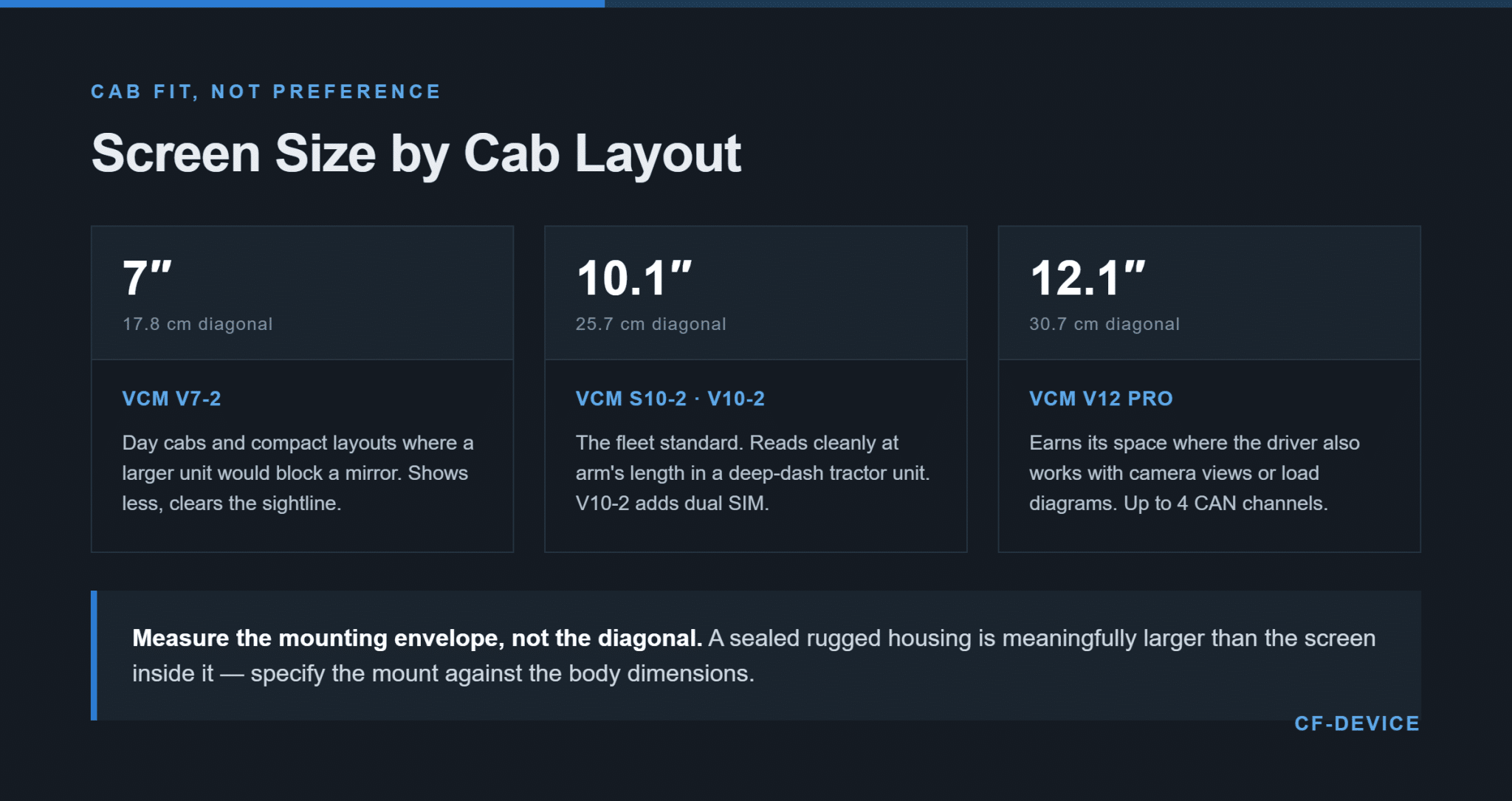
- Screen size is decided by cab sightlines, not by preference — 7″ to 12.1″ across the range
- Interface count, not processor speed, is usually the spec that decides whether a unit fits the job
I. What Separates a Truck Computer From a Tablet
CF-Device publishes four numbers on every VCM unit, and those four are what make the difference concrete: an ingress rating (IP65 or IP67), the shock and vibration standard the unit was tested against (MIL-STD-810), a numeric operating temperature range, and a DC input voltage range. A consumer tablet in a rugged case states none of them.
The practical consequence shows up in how each device behaves over a year in a cab rather than on a bench. A truck computer is mounted once and left; it powers from the vehicle, sleeps and wakes with the ignition, and survives continuous low-frequency vibration that a handheld device never encounters. Where this form factor sits inside the wider category of vehicle computing is set out in what is an onboard computer.
II. Power: The Spec That Kills Most Substitutions
CF-Device builds wide-voltage DC input with ignition detection into the VCM range (5–36V or 9–36V by model; reverse-polarity protection and delayed power-off are listed on selected models, so check the datasheet), because this is where cheaper substitutions fail first and least visibly. A truck’s supply voltage swings during cranking and load changes; a device expecting clean power either cuts out under load or degrades over months until the battery no longer holds.
Ignition sense is the part buyers most often leave out of a specification and most often regret. Without it, the terminal either drains the truck’s battery when the engine is off, or has to be powered manually by the driver every morning — and a device a driver has to remember to switch on is a device that will occasionally be off.
III. Reading the Truck, Not Just Showing a Screen
The step that turns a display into a useful terminal is direct access to the vehicle network. CF-Device’s VCM range carries native CAN channels (J1939, CANopen and ISO 15765 are listed on the VCM S10-2), so the unit reads engine hours, fuel data, fault codes and load status from the truck itself rather than inferring them from an external dongle. Every dongle removed is one connector, one power feed and one failure point removed with it.
For fleets running higher channel counts — multiple buses, trailer telemetry, or camera systems alongside the bus — the VCM V12 PRO and S10-2 PRO carry up to four CAN channels. The protocol side is detailed in our CAN bus and J1939 integration guide, and the serial interfaces for legacy peripherals in RS232 vs RS485.
IV. Which Screen Size Fits a Truck Cab?
CF-Device builds the VCM range from 7″ to 12.1″ because cab geometry, not preference, decides this. In a tractor unit with a deep dash, a 10.1″ terminal reads cleanly at arm’s length and clears the mirror sightline; in a compact or day-cab layout the same unit can block a mirror, and the 7″ VCM V7-2 is the correct answer even though it shows less. A 12.1″ unit earns its space only where the driver is also working with camera views or load diagrams.
The measurement that matters is the mounting envelope, not the diagonal — a rugged housing is meaningfully larger than the screen inside it. The full sizing method, including how the diagonal is measured and what to check against the cab, is in how to choose the right tablet screen size for your vehicle.
V. What Cargo and Long-Haul Work Adds
Cargo work adds two requirements to the base specification. The first is sealing: a terminal in a cab whose doors are open in rain for much of the working day is exposed to more water than a spec sheet assumes, and CF-Device treats IP65 and IP67 as separate product decisions rather than interchangeable ratings — the distinction is set out in IP65 vs IP67.
The second is connectivity continuity. Long-haul routes cross carrier coverage boundaries, and a single-SIM terminal accumulates upload gaps that a second SIM closes automatically; CF-Device’s VCM V10-2 carries dual-SIM capability for this case. How the resulting data feeds into dispatch and logistics operations is covered in our logistics and transportation fleet terminal guide and in mobile data terminals in fleet logistics.
VI. Specification Order for a Truck Fleet
- Power — voltage range covering the truck’s system, with ignition-sense behaviour defined
- Interfaces — count the CAN channels, serial ports and camera inputs the job actually needs
- Environmental rating — ingress and temperature range matched to where the unit physically sits
- Screen size and mount — measured against cab sightlines and structural mounting points
- Connectivity — native cellular, dual-SIM where routes cross coverage boundaries
- Compute — last, once everything above is fixed
Working in this order avoids the common outcome of choosing on processor and price, then finding the unit is one CAN channel short or will not clear a mirror. The same sequence applied across the full hardware range is in our rugged vehicle tablet hardware buyer’s guide, and the platform-level view in the complete guide to rugged vehicle tablets.
VII. Managing a Truck Fleet’s Terminals After Rollout
A terminal that never leaves its truck still needs its software kept current, and a fleet of eighty cannot be updated by visiting each cab. CF-Device’s units are managed remotely for configuration, firmware and device health — the layer that handles this is covered in MDM for fleet tablets. Standardising on one platform is what makes that possible: one mount, one power specification, one OS image across the fleet. CF-Device ships in excess of 140,000 units annually into 33 countries on that model, and the full hardware sequence sits in the rugged Android and Debian Linux vehicle hardware hub.
IX. Which Guide Should I Read Next?
| If your question is… | Read |
|---|---|
| Which tablets for truck drivers are on the market? | 10 best tablets for truck drivers |
| Do I need logging as well? | Best tablet for ELD logs |
| Tracker or terminal? | Fleet tracking hardware: trackers vs terminals |
| Which of the four device types? | Rugged industrial tablet: the four types |
| Bus, fire or utility vehicles | 10 best mobile data terminals for fleets |
X. Frequently Asked Questions
Is a truck computer the same as a vehicle-mount tablet?
In practice yes — a truck computer is the vehicle-mount tablet class specified for road transport. CF-Device’s VCM range covers the same platform from 7″ to 12.1″, with TANK V2 as the screenless variant for cabs with no panel space.
Can one terminal handle navigation, logging and camera views at once?
Yes, where the unit has the interface count and display area for it. This is the usual reason a fleet moves from a 7″ to a 10.1″ or 12.1″ unit — not more processing power, but more screen to divide between tasks.
How long should a truck computer last in service?
Five to ten years is the realistic planning figure against two to three for consumer hardware in the same conditions. What matters more than the lifespan is parts availability, so a unit failing in year six can be repaired rather than triggering a fleet-wide replacement.
Which CF-Device models are used in truck fleets?
The VCM S10-2 (10.1″) as the common fleet standard, the VCM V10-2 for dual-SIM long-haul routes, the VCM V7-2 (7″) for compact cabs, and the VCM V12 PRO (12.1″) where multi-camera or four-CAN configurations are needed. Supply range differs by model (5–36V or 9–36V DC), and all detect ignition and operate from −30°C to +70°C.
Interested in specs or a quote? Contact our team to discuss in-cab terminals for your truck fleet.