
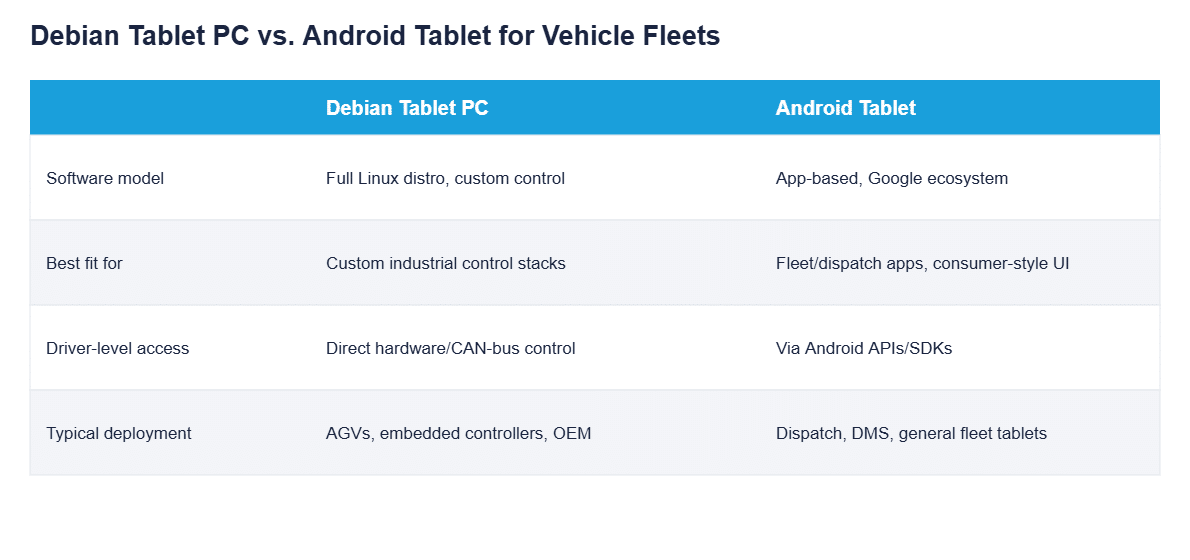
“Tablet Debian” is what buyers searching for a Debian-based tablet actually type. CF-Device ships Debian-based Linux builds on its own VCM hardware from the factory, but for a vehicle fleet the real question behind the search is different: is a full Linux distribution or an Android interface the right software foundation for the terminal in each vehicle?
TL;DR
- “Tablet Debian” searches are usually looking for a tablet that runs Debian Linux as its core operating system, not an Android device
- A Debian-based tablet gives direct OS-level control, which suits custom industrial software stacks
- A consumer Debian tablet and a rugged Debian vehicle tablet are not the same category of hardware
- On most CF-Device 10.1″ models Android and Debian-based Linux are both available on the same hardware, chosen for each deployment; they do not run side by side
- Choosing between them depends on whether the fleet needs custom control or app-based fleet software
What “Tablet Debian” Actually Means for Vehicle Hardware
Most searches phrased as “tablet debian” are looking for a tablet that runs Debian Linux as its core operating system, not a bundled Android device with a Linux-sounding name. For vehicle-mount terminals this distinction matters because Debian gives an integrator direct OS-level access: custom drivers, direct CAN-bus control, and industrial software stacks that do not fit neatly into Android’s app-sandboxed model.
Debian or Android: Why Fleets Choose One or the Other
A Debian-based tablet is the right fit when a deployment needs deep hardware control: direct GPIO access, custom embedded control loops, or integration with proprietary industrial protocols that an Android app layer would only reach indirectly. Android is the better fit when the priority is running standard fleet dispatch, DMS or AVM applications quickly, using a familiar mobile app ecosystem instead of building a custom Linux application from scratch.
A Consumer Debian Tablet Is Not a Rugged Debian Tablet
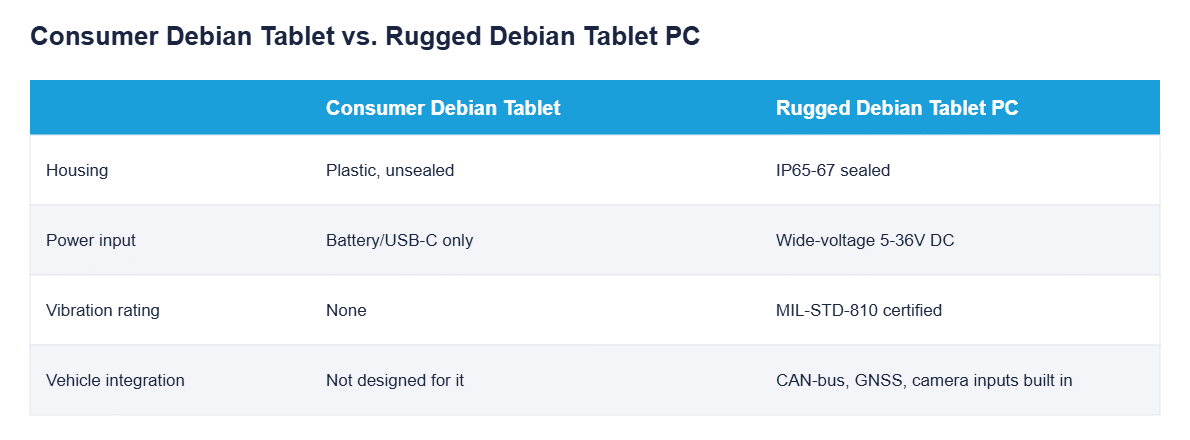
A meaningful share of “debian tablet” search results point to consumer-grade hobbyist hardware: devices built for developers or Linux enthusiasts, not vehicle installation. None of that category is built to survive vibration, dust, or a vehicle’s fluctuating electrical system, which is a completely separate requirement from the operating system running on it.
Can I Install Debian on a Tablet I Already Own?
Putting Debian on a tablet you already own is sometimes possible, but there is no universal compatibility list: bootloader locks and drivers vary by device, and the result still has no vehicle power input, CAN bus, sealing or vibration testing. CF-Device supplies Debian-based builds for its own boards, which is a different proposition from flashing an unsupported consumer unit. The comparison is worked through in the 10-inch rugged Android and Debian Linux tablet guide.
Android and Debian on the Same Terminal
Rather than forcing a single-OS decision for the whole fleet, CF-Device builds both operating systems for most of its 10.1″ models. The operating system is chosen for each deployment, and on supported models it can be reflashed later; it is not a toggle in daily use, and the V10 PRO is Android only. The version each model ships is set out in Dual Android/Linux Architecture. This matters for integrators who need Debian for a custom control layer on some machines while other machines in the same fleet run Android-based fleet software, all on one qualified hardware platform.
Where This Shows Up in Deployments
Debian-based terminals suit AGV and warehouse-automation work, where a fixed, controlled Linux environment is easier to validate and maintain across a standardised fleet than a general-purpose mobile OS. The indoor fleet context is covered in our Smart Warehousing guide.
Choosing Between Debian and Android for Your Fleet
The decision usually comes down to who is building the software. An in-house or OEM engineering team building custom control logic will lean Debian; a fleet operator deploying off-the-shelf dispatch, DMS or AVM software will lean Android. A fleet doing both can use the same hardware family for each, as long as the chosen models support both. For distro-level choices within Debian-based deployments, see our Debian vs. Mint distro guide.
A Deployment Example
Consider an AGV integrator building custom navigation and obstacle-avoidance logic for a warehouse fleet. It prototypes on a consumer Debian tablet, which works on a bench but fails within weeks on the vehicles because vibration loosens connections the consumer hardware was never rated for. Moving the same Debian software stack onto a vehicle-rated terminal fixes the reliability problem without changing the control software, because the operating system and application were never the issue; the hardware housing them was. This is an illustrative scenario rather than a customer case study.
Which Linux Guide Should I Read Next?
This guide belongs to the rugged tablet hardware hub. Pick the next one by the question you still have open:
| If your question is… | Read |
|---|---|
| What does “Linux tablet” mean in an industrial setting? | Linux tablet for industrial vehicles |
| What about a Debian tablet PC and x86 vs ARM? | Debian tablet PC: industrial vs consumer |
| Which distribution: Debian or Mint? | Debian vs Mint for vehicle tablets |
| How do both operating systems share one platform? | Dual Android/Linux architecture |
| Why not a consumer tablet? | 10 inch Android tablet: industrial vs consumer |
| Which 10-inch model? | Best 10-inch rugged Android tablets |
Common Questions
Can a Debian tablet run standard fleet dispatch software?
Yes, but it typically requires custom-built software rather than off-the-shelf Android apps, since Debian does not run the Android app ecosystem natively.
Is Debian more secure than Android for vehicle terminals?
Neither is inherently more secure. Security depends more on how the deployment is configured (locked-down permissions, MDM enrolment) than on the base operating system.
Does a rugged Debian tablet cost more than an Android equivalent?
Ask for a quote per configuration. The bigger cost difference usually comes from the custom software development needed on the Debian side compared with using existing Android apps.
Can I switch a terminal from Android to Debian later?
On supported models, yes: most CF-Device 10.1″ models can be reflashed between Android and Debian-based Linux, and the S10-2 PRO is chosen at the factory and reflashable later. The V10 PRO is Android only, so confirm the model before you plan a switch.
Interested in specs or a quote? Contact our team to discuss Debian-based terminal options for your fleet.