

CF-Device runs an MDM platform for the terminals it builds, so this is written from the fleet side rather than the office side. Mobile device management (MDM) is software that lets one person configure, monitor, update, and secure every device in an organisation from a single console, without physically touching any of them. For a fleet running tablets in vehicles, that’s the difference between driving to 40 trucks and clicking once.
TL;DR
- MDM is remote control over a group of devices: settings, software, security, and health monitoring
- It exists because the alternative — visiting each device by hand — doesn’t scale past a handful of units
- Most MDM writing assumes office phones; vehicle fleets have different needs entirely
- The value isn’t the feature list — it’s the site visits, downtime, and inconsistency it removes
The Definition, Without the Jargon
Strip away the acronyms and MDM answers one question: how do you make a change to fifty devices at once?
Each managed device runs a small piece of software — an agent — that checks in with a central server. An administrator makes a change in the console: install this app, apply this setting, lock this unit. The next time each device checks in, it receives the instruction and applies it. That’s the whole mechanism. Everything else vendors describe is a variation on that loop.
In short: MDM turns a fleet of individually-configured devices into one thing you administer centrally.
What It Actually Does, in Four Categories
- Configuration — network settings, permitted apps, screen behaviour, language. Set once, applied everywhere, and re-applied if someone changes it locally
- Software delivery — installing, updating, or removing applications and firmware without physical access
- Security — enforcing lockdown so a device only runs approved software, and remotely locking or wiping a unit that goes missing
- Monitoring — reporting which devices are healthy, which are offline, and which need attention
The lockdown piece has its own name — kiosk mode — and matters more in vehicles than offices, because a terminal that runs one approved application is a terminal nobody uses for anything else. That mechanism is covered in kiosk mode and app whitelisting for fleet tablets.
Where the Value Actually Shows Up
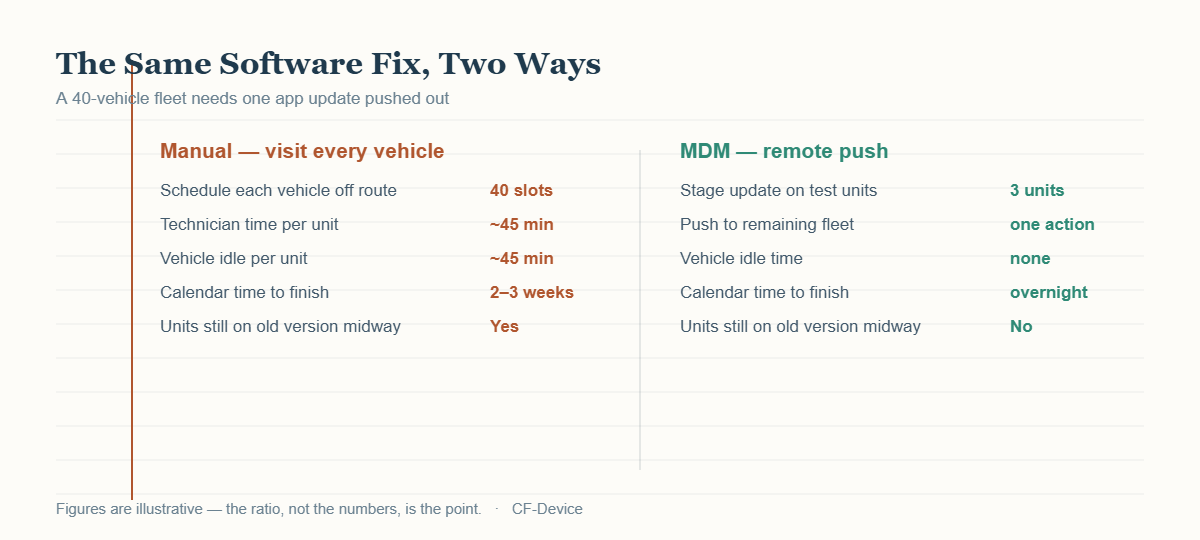
Vendors sell MDM on feature lists. Fleets buy it because of the arithmetic above. A software fix that takes three weeks to roll out manually means three weeks where part of the fleet is running the broken version and part is running the fixed one — and someone has to track which is which. The remote path removes that entirely, and the time saved is the smaller half of the benefit; consistency is the larger half.
The same logic applies to diagnosis. When a terminal misbehaves, an engineer who can read its logs remotely often resolves the issue without anyone driving anywhere — the case made in detail in remote diagnostics: reducing truck rolls for fleet tablets.
Why Vehicle Fleets Are a Different Case
Nearly all writing about MDM assumes the devices are employee phones and laptops sitting in offices. Three assumptions from that world break in vehicles.
- One device, one person. Office MDM assigns a device to a named employee. A vehicle terminal belongs to the vehicle, and whoever is driving that day uses it
- Always connected. Office devices sit on Wi-Fi. Vehicles cross tunnels, rural gaps, quarry pits — offline is routine, not a fault
- Always powered. A laptop is charged or plugged in. A vehicle terminal powers down with the ignition, every single shift
That third point causes the most practical damage. A platform that doesn’t understand ignition state reports every parked vehicle as an unreachable device, generating an alert list nobody reads — at which point real faults get missed too. Which hardware classes a fleet platform has to recognise, and how it should distinguish parked from faulted, is covered in MDM devices: what fleet hardware a platform actually manages.
MDM Is Not the Same as Fleet Tracking
These get confused constantly, and they answer different questions.
| Fleet tracking | MDM | |
|---|---|---|
| Watches | The vehicle | The device in the vehicle |
| Answers | Where is it, is it on route? | Is the hardware working and current? |
| Typical user | Dispatcher, operations | IT, maintenance |
| Fails without it | Route visibility | Software consistency |
A fleet needs both, and they often run on the same hardware, but a tracking platform will not tell you that eleven terminals are three firmware versions behind. The tracking side is covered separately in our fleet vehicle GPS tracking systems guide.
A Worked Example
A regional service company ran 22 vans with tablets for job dispatch, managed by hand. Over eighteen months the fleet drifted: four different app versions in circulation, three tablets with the wrong depot Wi-Fi credentials, and two that a driver had installed personal apps onto. Nobody had done anything wrong — each individual change had a reason at the time, and no one was tracking the cumulative state.
Enrolling all 22 into an MDM platform took an afternoon. The immediate result wasn’t a dramatic cost saving; it was that all 22 became identical and stayed identical, because the configuration was now enforced rather than remembered.
When You Don’t Need It
Worth saying, since most articles on the subject are written by vendors: with three or four devices, manual management is genuinely fine. You know each unit, you can check them in an afternoon, and drift doesn’t accumulate because there’s little to drift.
The crossover is somewhere around ten to fifteen devices — the point where you stop being able to hold the current state of every unit in your head. Beyond that, the question changes from whether to use MDM to which deployment model fits, compared in our mobile device management solutions hub.
Common Questions
Does MDM let an employer see everything a driver does on the device?
On a company-owned, single-purpose vehicle terminal, the device has no personal use to observe. On personal phones the privacy question is real and handled by separate policy — which is one reason the two device types are usually managed under different rules.
What happens if a device is offline when an update is pushed?
The instruction queues and applies on the next check-in. Nothing is lost — it just arrives later than for devices that were connected.
Is MDM the same as remote desktop or remote access software?
No. Remote access controls one device interactively while you watch. MDM applies policy across many devices without anyone driving a session — different tools for different problems.
Can MDM fix a device that has completely failed?
No — a unit that won’t power on or has no connectivity is a physical repair. What MDM does is tell you which unit that is, and rule out the software causes first so the site visit isn’t wasted.
Interested in specs or a quote? Contact our team to discuss managing terminals across your fleet.