

Choosing the best Linux tablet OS for a vehicle is a lifecycle decision, not a preference, and Debian is the default choice in industrial vehicle deployments. CF-Device builds its own Debian-based Linux for most 10.1″ VCM terminals. But “Linux tablet” search results surface a mix of distributions, and not all of them are built for what a vehicle terminal has to run for a decade in the field.
TL;DR
- Debian dominates industrial vehicle tablets for stability and long-term version pinning, not novelty
- A “linux pad” search often means a consumer device; industrial deployments need vehicle-grade hardware, not a repurposed tablet
- Distro choice for industrial tablets favours long-term-support branches over rolling releases
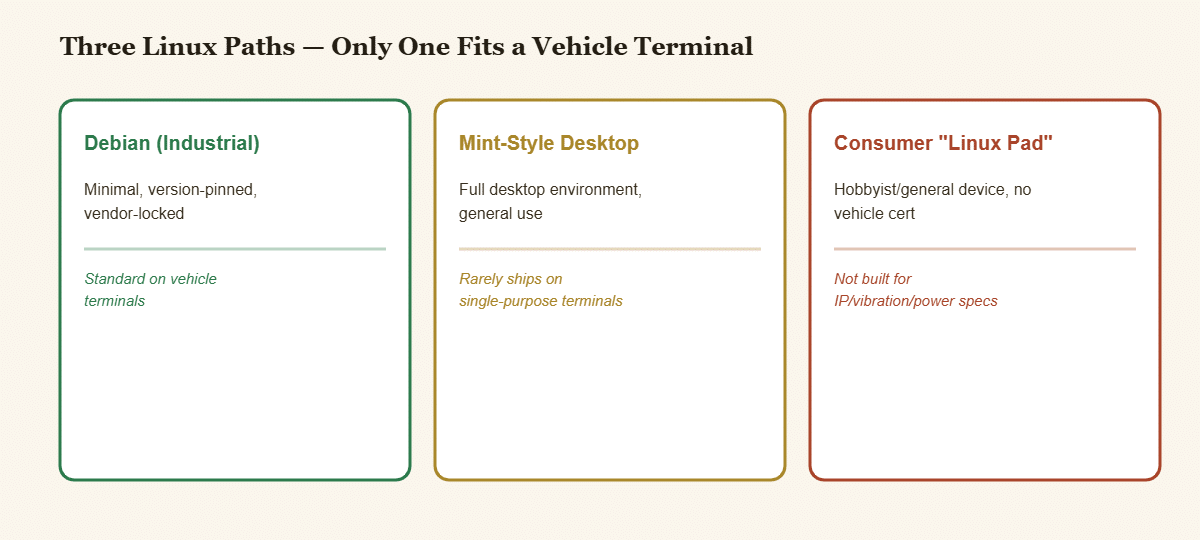
- Lighter desktop-style distros (Mint and similar) rarely ship on vehicle terminals; industrial builds typically strip the desktop layer
- What actually ships is a minimal, version-pinned build tied to the terminal’s control software, not a general-purpose distro
Best Linux Tablet OS: Why Debian Leads in Industrial Deployment
Debian’s release model, with long support windows, conservative package updates and a stable core that does not shift under a deployed application, is what an OEM needs when a terminal has to run unchanged machine-control software for years. This is the same reasoning covered in our Linux tablet for vehicles guide: the OS choice is a lifecycle decision, not a preference.
Linux Pad and the Consumer/Industrial Split
Searches for a linux pad frequently land on lightweight consumer or hobbyist devices: small tablets running a desktop-style Linux build for general use. These are not built for vehicle deployment, with no IP-rated sealing, no wide-voltage input and no CAN bus. An industrial Debian Linux tablet solves a different problem entirely; the distro family is the same in name only, and the hardware and build purpose are unrelated.
Best Linux Tablet 2026: What Buyers Are Actually Comparing
Searches for the best linux tablet 2026 or a linux tablet 2026 option typically compare three things: how long the kernel and distribution are supported, which toolchains are available (Qt is standard for industrial UI development), and whether the vendor ships a locked, auditable build or a general-purpose install. Industrial buyers should weight long-term support and toolchain fit far above raw distro popularity.
Best Linux OS for a Tablet in a Vehicle
People asking for the best Linux for tablets or the best Linux OS for tablet hardware usually mean one of two things. For a personal device, whichever distribution has the best touch support. For a vehicle terminal, the answer is the one the hardware maker builds and maintains for that exact board, because a distribution that boots on a consumer tablet will not necessarily carry drivers for the CAN controller, the GNSS module or the camera interfaces. The Linux version each CF-Device model ships is set out in Linux tablet for vehicles, and confirm the exact Debian release for your model with CF-Device before specifying it.
Why Desktop-Style Distros Rarely Ship on Vehicle Terminals
A Mint-style build brings a full desktop environment: file managers, app menus, background services, none of which a single-purpose vehicle terminal needs. Running Linux Mint on tablet hardware makes sense for a general-use device; it adds unnecessary overhead and attack surface on a terminal that boots straight into one locked application. Industrial builds typically strip this layer out, which is part of why “vehicle-grade Linux” is not just Debian with a different wallpaper.
What Actually Ships: A Minimal, Version-Pinned Build
Most industrial vehicle tablets running Linux ship a minimal Debian-based build, version-pinned at deployment and not auto-updated unless the OEM chooses to push a change, a deliberate contrast to any general Linux tablet distribution built for frequent updates. This is a large part of why dual Android/Linux terminals keep the Linux side locked down while the Android side handles app-driven, frequently updated fleet software. On CF-Device terminals the operating system is chosen for each deployment, and the V10 PRO is Android only.
How This Fits Into a Fleet’s Software Stack
A version-pinned Linux terminal running machine-control software still needs to report status and receive updates on the OEM’s schedule. That is the role of MDM device management, which pushes controlled updates to a locked build rather than letting the OS update itself. In the field, that same terminal typically runs alongside the applications covered in our precision agriculture and fleet tracking hub; the distro choice is invisible to the operator, but it keeps the control software running unchanged season after season.
Where This Fits in the Hardware Decision
Distro selection is one part of the OS decision covered at the top level in our 10-inch rugged Android and Debian Linux hardware guide. Check which VCM models offer a Linux build before planning around it.
Which Linux Guide Should I Read Next?
Pick the next guide by the question you still have open:
| If your question is… | Read |
|---|---|
| What does “Linux tablet” mean in an industrial setting? | Linux tablet for industrial vehicles |
| What does “tablet debian” mean? | Tablet Debian: Debian-based rugged vehicle tablets |
| What about a Debian tablet PC and x86 vs ARM? | Debian tablet PC: industrial vs consumer |
| How do both operating systems share one platform? | Dual Android/Linux architecture |
| Which 10-inch model? | Best 10-inch rugged Android tablets |
Common Questions
Is Debian the only distro used in industrial vehicle tablets?
It is the dominant choice because of its long-term-support model and toolchain maturity, but the underlying principle (a vendor-supported, version-pinned build) matters more than the specific distro name.
Can I run Linux Mint on an industrial tablet instead of Debian?
Technically possible, but Mint’s desktop-environment overhead adds no value on a single-purpose terminal and increases attack surface. Industrial builds intentionally strip this layer, which a general-purpose distro does not.
Does a linux pad meet the same durability standard as a Debian Linux tablet built for vehicles?
No. The distro name is unrelated to hardware durability; a consumer linux pad lacks IP-rated sealing, wide-voltage input and vibration certification regardless of which Linux build it runs.
Why do industrial terminals not auto-update their Linux distro like a consumer device?
An unexpected OS update can break control software that has not been re-validated against it. Version-pinning lets the OEM control exactly when and whether an update happens, on their own schedule.
For fleets that have already settled on Debian specifically, the hardware-side considerations (kernel support, driver availability, and which models ship with it) are covered in choosing a Debian-based rugged vehicle tablet PC.
Interested in specs or a quote? Contact our team to discuss Linux distribution options for your deployment.