
Running Samsara, Geotab, or any third-party fleet management platform still leaves a layer of problems that platform doesn’t touch, and it is where Samsara MDM and Geotab MDM questions come from: keeping the tablet’s OS patched, locking it to the platform app so a driver can’t wander into settings, and diagnosing a unit that’s gone dark without sending someone to the vehicle. That’s device management (MDM), and it sits underneath the fleet platform, not inside it.
TL;DR
- Fleet platforms (Samsara, Geotab, Verizon Connect) manage vehicle and driver data; MDM manages the physical tablet — OS updates, app whitelisting, remote diagnostics
- These are two separate software layers running on the same terminal, from two different vendors, doing two different jobs
- Without MDM, a fleet running third-party hardware has no way to push a security patch or lock the device to the fleet app without physically collecting every unit
- CF-Device’s MDM platform supports kiosk-mode app whitelisting and remote enrollment for its VCM terminals, independent of which fleet platform runs on top; the scope is agreed per project
- The two layers should be checked separately when specifying hardware — a tablet compatible with a fleet platform’s app isn’t automatically compatible with a given MDM’s enrollment method
I. Two Layers, One Screen
It’s easy to assume the fleet platform “manages” the tablet because it’s the only app the driver sees. In practice, most platforms manage the vehicle and driver side — location, diagnostics data, driver behaviour, dispatch — and treat the tablet itself as a fixed appliance they don’t touch below the app layer. Whoever deployed the hardware still owns OS updates, device enrollment, remote lock/wipe, and the question of what happens when a unit stops responding at 2am on a truck three states away.
In short: the fleet platform is the application; MDM is the operating layer underneath it. A fleet needs both, from potentially two different vendors, working together on the same device. If the term itself is new, start with our plain-language guide to mobile device management.
II. What Samsara MDM Covers That the Fleet Platform Doesn’t
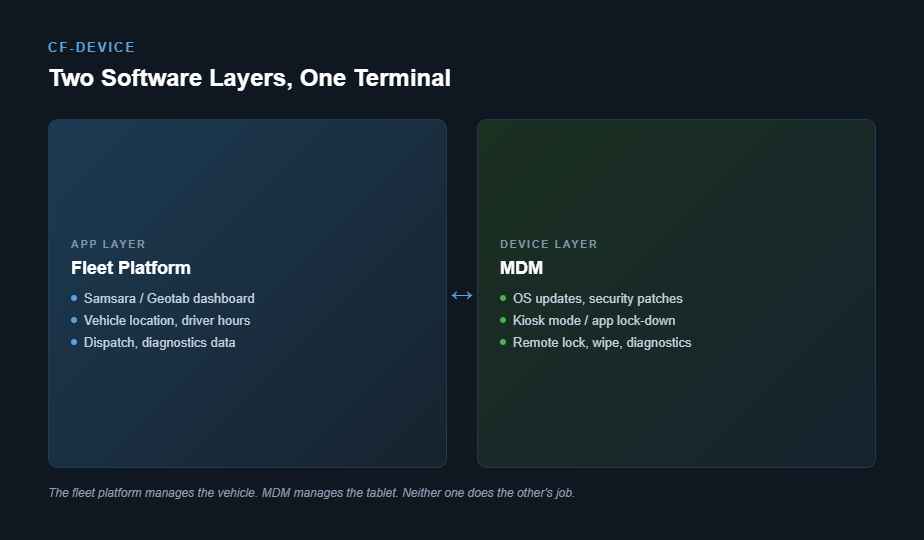
| Function | Fleet platform (Samsara/Geotab) | MDM |
|---|---|---|
| Vehicle location, driver hours, diagnostics | Yes | No |
| OS updates / security patches | No | Yes |
| Kiosk mode / app whitelisting | No | Yes |
| Remote lock / wipe on a lost or stolen unit | No | Yes |
| Bulk device enrollment for new hardware | No | Yes |
| Battery / connectivity health monitoring | Partial (vehicle-level) | Yes (device-level) |
A fleet that skips MDM and relies only on the platform app usually finds out why the two layers are separate the first time a tablet needs a factory reset in the field, or when a driver figures out how to exit the app and use the tablet for something else during a shift. This is especially visible in MDM for truck fleets, where units are spread across long routes and a depot visit per tablet is rarely practical.
III. Checking Compatibility at Both Layers
Specifying hardware for a fleet already running a management platform means checking compatibility twice, not once. The first check — whether the tablet runs the platform’s app and exposes the CAN data it needs — is covered in our guide to rugged tablets compatible with fleet management platforms. The second, separate check is whether the tablet’s MDM enrollment method (Android Enterprise, a dedicated agent, or a manufacturer’s own console) fits what the fleet’s IT team already manages. A tablet can pass the first check and still be awkward to manage at scale if it doesn’t support the fleet’s existing MDM approach. That is the whole of MDM Samsara Geotab integration at the hardware level: two checks, made separately.
It also explains why MDM hardware is a different question from fleet-platform hardware: the tablet itself has to support the enrollment method, the lock-down and the update path. What an MDM platform actually manages on the hardware side is set out in MDM devices: what fleet hardware an MDM platform actually manages, and how the software side is chosen in device management software: what to look for in a fleet platform.
IV. What CF-Device Provides at the Device Layer
CF-Device’s MDM platform supports kiosk-mode app whitelisting for its VCM terminals — covered in our kiosk mode and app whitelisting guide — so a unit can be locked to the fleet platform’s app before it ever leaves the warehouse. Device-level remote diagnostics reads signals such as battery, connectivity and storage independently of whatever the fleet platform reports about the vehicle, which matters when a unit fails in a way the platform’s own dashboard never surfaces, since the platform is reading vehicle data, not device health. The wider picture of how MDM is chosen and scoped for vehicle fleets is in the software hub for fleet MDM.
MDM for Truck Fleets: Four Questions to Ask About the Hardware
MDM for truck fleets is judged less by the console than by what the tablet in the cab allows. A truck spends its day away from the depot, on coverage that comes and goes, so the Samsara MDM or Geotab MDM question quickly becomes a question about MDM hardware. Four checks settle it before any quote is compared:
- Enrollment — can a new unit be enrolled in bulk and locked to the platform app before it ships, or does each tablet need hands-on setup in the depot?
- Update path — can the OS and the platform app be updated remotely, in stages, with a record of which units took the update? How that works is covered in OTA firmware updates and fleet downtime
- Lock-down — can the driver be kept inside the fleet app, with settings and other apps unavailable for the whole shift?
- Remote diagnosis — can the office see device health when a unit stops reporting, instead of sending someone to the vehicle? That is the case made in remote diagnostics and truck rolls
If the answer to any of the four is “the platform vendor handles that”, check it in writing: most fleet platforms handle the vehicle and driver data, not the tablet underneath.
V. An Illustrative Deployment Example
Picture a fleet running an open telematics platform across 60 vehicles that assumed the platform vendor would flag any tablet running low on storage or stuck on an outdated OS build, because that was the assumption baked into the original deployment plan. It didn’t — the platform only reported what the app itself sent it, and a tablet that stopped updating silently kept reporting stale location data for weeks before anyone noticed the pattern. Adding MDM alongside the existing platform closes that gap: the fleet can now see device-level health across all 60 units from one console, separate from the vehicle data the platform was already tracking well.
Frequently Asked Questions
Does Samsara include MDM, or is Samsara MDM a separate layer?
Both focus on vehicle and driver data; device-level management (OS patching, app lock-down, remote diagnostics) is typically a separate MDM layer, whether that’s the platform vendor’s own limited device tools or a dedicated third-party MDM.
Can one MDM console manage tablets running different fleet platforms?
Yes — since MDM operates at the device layer, not the app layer, a single MDM console can typically manage a mixed fleet running different platform apps on different vehicles, provided all the hardware supports the same MDM enrollment method.
What happens if a tablet loses connectivity — does MDM or the fleet platform catch it first?
Usually MDM, since it monitors device-level connectivity directly rather than inferring it from vehicle data updates, which can lag or go silent for reasons unrelated to the tablet itself.
Which CF-Device terminals can be managed with kiosk-mode MDM?
CF-Device’s VCM series and TANK V2 can be enrolled in its MDM platform, independent of screen size or which fleet platform app is installed. The scope of kiosk-mode lock-down and remote enrollment, and the MDM licensing, are agreed per project, so confirm them when you request a quote.
Interested in specs or a quote for hardware that fits both your fleet platform and your MDM console? Contact our team to confirm compatibility at both layers.