
CF-Device evaluates mobile device management software as both a builder and a user of it. Mobile device management software is the platform that lets IT and fleet teams remotely configure, update, and monitor every device in a deployment — but “MDM” ranges from consumer phone-management apps to fleet-grade platforms built for vehicle-mount hardware, and the two are not interchangeable.
TL;DR
- Mobile device management software ranges from consumer BYOD tools to fleet-grade vehicle terminal platforms — the category label doesn’t guarantee fit
- Enterprise mobile device management software adds compliance, bulk enrollment, and role-based access most small-fleet tools lack
- Mobile device management best practices center on staged rollouts, configuration profiles, and health monitoring — not just remote wipe
- A useful mobile device management comparison weighs vehicle-hardware compatibility as heavily as feature checklists
- Real-world mobile device management examples in fleets center on OTA updates, remote diagnostics, and kiosk-mode lockdown
What Mobile Device Management Software Actually Does
At its core, mobile device management software gives IT one console to enroll, configure, update, and monitor devices remotely rather than physically touching each one. For a vehicle fleet, that means pushing firmware updates, locking a terminal to approved apps, and flagging a failing device before it strands a vehicle in the field — the same functions covered in more depth in our mobile device management hub.
Why “Enterprise” Changes the Requirements
Enterprise mobile device management software adds capabilities most small-deployment tools skip entirely: role-based admin access, bulk enrollment for hundreds of devices at once, audit logging for compliance reviews, and integration with existing IT identity systems. A five-vehicle pilot fleet can often run on a lighter tool; a 200-vehicle enterprise rollout generally can’t without these features.
Mobile Device Management Best Practices for Vehicle Fleets
The most common mistake in fleet MDM rollouts is deploying the same configuration profile fleet-wide on day one. Better practice:
- Stage the rollout — enroll a small pilot group first, confirm configuration profiles behave as expected, then expand
- Separate profiles by vehicle role — a dispatch tablet and an implement-control terminal don’t need identical app whitelists
- Monitor device health, not just location — battery degradation and connectivity drops predict failures before they strand a vehicle
- Schedule OTA updates during idle windows — overnight or depot downtime, not mid-route
This staged approach is the same discipline behind OTA firmware updates without fleet downtime.
What a Useful Mobile Device Management Comparison Actually Weighs
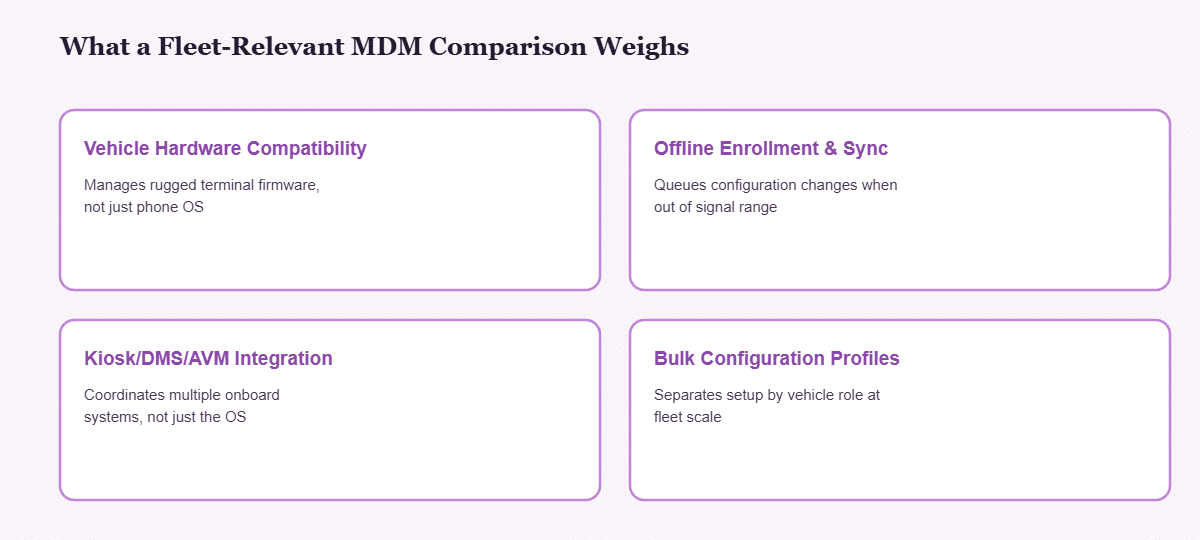
Most public MDM comparison lists rank platforms by office-device feature checklists — app catalogs, BYOD policy templates, help-desk integrations. None of that tells you whether a platform can manage a rugged vehicle-mount terminal running CAN-bus diagnostics and driver monitoring alongside standard apps. A fleet-relevant comparison should weigh:
| Comparison Factor | Why It Matters for Fleets |
|---|---|
| Vehicle hardware compatibility | Confirms the platform can actually manage rugged terminal firmware, not just phone OS versions |
| Offline enrollment/sync | Vehicles operate outside signal range; configuration must queue and sync later |
| Integration with kiosk/DMS/AVM | A fleet terminal runs multiple systems — MDM should coordinate them, not just manage the OS |
| Bulk configuration profiles | Separating profiles by vehicle role at scale, without per-device manual setup |
Real-World Mobile Device Management Examples in Fleet Deployment
Three patterns show up repeatedly in fleet MDM deployments: remote diagnostics that cut truck rolls by resolving device issues without a technician visit, kiosk mode locking terminals to a single approved application to reduce misuse, and scheduled OTA updates that keep a fleet’s software current without taking vehicles offline mid-shift. These aren’t hypothetical features — they’re the day-to-day reason fleet-grade MDM exists separately from consumer device management tools.
Where MDM Fits in the Broader Fleet Stack
MDM software doesn’t run in isolation on a CF-Device terminal — it’s the coordination layer that other systems report through, an architecture covered fully in One Tablet, Four Systems. In the field, this same MDM-managed hardware is what runs the deployments detailed in our top use cases for rugged vehicle tablets — from precision agriculture to mining fleets, the management layer is what keeps hundreds of terminals current without a truck roll per device. On the hardware side, terminal compatibility with any given MDM platform starts with the specifications covered in the rugged vehicle tablet buyer’s guide. For a deeper look at platform architecture, enterprise scaling, and hosted vs. self-managed deployment, see MDM Management Software for Vehicle Fleets.
Other Names for the Same Question
Searches for mdm software solutions, the best mdm solution all lead to the same choice described above: a platform that manages vehicle-mount hardware, not just phones.
Which MDM Guide Should I Read Next?
This guide belongs to the mobile device management hub. Pick the next one by the question you still have open:
| If your question is… | Read |
|---|---|
| I am new to device management | What is mobile device management?, Device management software |
| Which deployment model: cloud, on-premise or bundled? | MDM solutions for vehicle fleets |
| How do I enrol and track a fleet? | MDM solution: enrolment and inventory |
| What hardware does a platform manage? | MDM devices |
| Full device control or app-level only? | MDM vs MAM |
| How do terminals run day to day? | MDM for fleet tablets |
Common Questions
Is consumer mobile device management software usable for a small vehicle fleet?
Sometimes for a handful of standard tablets, but it typically lacks CAN-bus/hardware diagnostics integration and offline enrollment that vehicle deployments need once the fleet grows past a pilot stage.
What’s the biggest mistake in mobile device management best practices for fleets?
Deploying one identical configuration profile across every vehicle role instead of staging by vehicle type and rollout phase — this creates unnecessary app access and update conflicts.
How is enterprise mobile device management software different from small-business MDM tools?
Enterprise tools add role-based admin access, bulk enrollment at scale, audit logging, and identity-system integration that most small-business MDM tools don’t include.
Does MDM work if a vehicle is out of cellular range?
Yes — configuration changes and updates queue locally and sync once connectivity returns; MDM doesn’t require a constant live connection to function.
Interested in specs or a quote? Contact our team to discuss fleet device management for your terminals.