

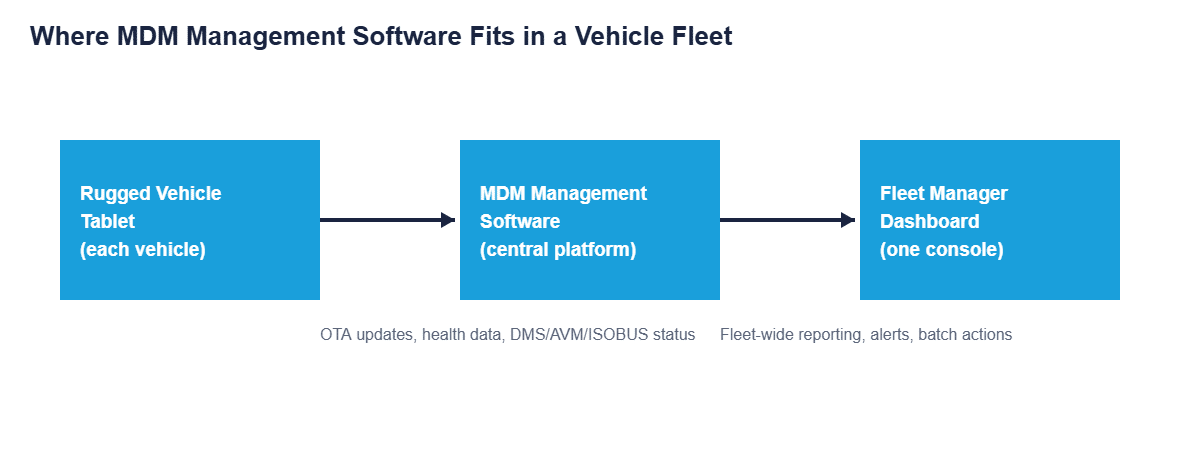
CF-Device builds both the terminals and the platform, which makes it a useful vantage point on MDM management software. MDM management software is the platform that lets a fleet operator remotely configure, monitor, and update every rugged vehicle tablet from one console, instead of a technician physically touching each vehicle to push a change.
TL;DR
- MDM management software centralizes device configuration, updates, and health monitoring for an entire fleet
- A true MDM platform does more than a point tool: it coordinates OTA updates, security, and diagnostics together
- Enterprise-scale fleets need software built for hundreds of devices, not dozens
- Remote device management software is the core capability everything else depends on
- MDM as a service (vendor-hosted) removes the server-maintenance burden most fleets do not want to own
What MDM Management Software Actually Does
At its core, MDM management software gives a fleet manager or IT admin one console to see every enrolled tablet’s status, push configuration changes, deploy software updates, and lock down or wipe a device that is lost or decommissioned, without a truck roll to physically reach it. For a fleet running a handful of vehicles this sounds like overkill; for a fleet running dozens or hundreds, it is the only practical way to keep every device consistent.
The MDM Platform: Not a Point Tool
A genuine MDM platform is different from a single-purpose app-pushing tool. A platform coordinates several functions that overlap and depend on each other: enrollment, OTA updates, security policy, and health monitoring all working off the same device inventory rather than four separate systems that each need their own device list kept in sync. Buying a narrow point tool for updates and a separate one for security monitoring usually costs more in integration headaches than one platform that does both from the start.
Enterprise MDM: What Changes at Scale
Software that works comfortably for 20 tablets does not always hold up at 500. Enterprise MDM needs to support staged rollouts (updating a subset first, confirming no issues, then expanding), role-based admin access (so a regional manager sees only their vehicles, not the whole company’s), and reporting that groups devices by fleet, region, or vehicle type rather than one flat list. This is the same operational-visibility principle covered in Fleet Management: One Terminal, Full Operational Visibility: the software has to organize data the way the fleet is actually structured, not just collect it.
Remote Device Management Software: The Core Capability
Underneath every feature an MDM platform advertises, remote device management software is the mechanism doing the work: the connection that lets an admin reach a specific tablet in a specific vehicle and check its status, push a fix, or pull a diagnostic log without anyone touching that vehicle. This is what turns a fleet’s remote diagnostics from theory into something that actually cuts scheduled service visits; the diagnostic feature is only as good as the remote connection underneath it.
MDM as a Service: Hosted vs. Self-Managed
Most fleets today choose MDM as a service, a vendor-hosted platform reached through a web console and paid as a subscription, over running their own MDM server. The trade-off is straightforward: self-hosting gives more control over where data lives, but it also means the fleet’s own IT team owns server maintenance, security patching, and uptime. For fleets without a dedicated server-ops team, the hosted model removes a maintenance burden most operators did not want to take on in the first place.
Fleet MDM for Truck Fleets: What Differs From Office Use
A fleet MDM deployment looks different from an office one, and MDM for truck fleets shows the differences most clearly. A parked truck with the ignition off looks identical to a dead terminal unless the platform knows the difference. Long routes cross coverage gaps, so commands have to queue and apply when the connection returns. And a driver-facing terminal is usually locked to a few approved apps, covered in kiosk mode and app whitelisting. A platform built only for phones tends to flag every overnight-parked truck as a fault, and the dashboard stops being trusted.
Choosing MDM Management Software for a Vehicle Fleet
Office-oriented MDM tools generally miss vehicle-specific realities. They do not distinguish a tablet that is offline because the vehicle’s ignition is off from one that is actually malfunctioning, and they do not read CAN-bus or GNSS data alongside standard device health. Software that plans for these differences from the start avoids the false-alert noise that makes IT teams stop trusting the dashboard. It is also worth confirming compatibility with the underlying hardware early: an MDM platform’s remote wipe and lockdown features only matter if the terminal is built to survive the vehicle environment long enough to need them, the same durability standard covered in our rugged vehicle tablet hardware buyer's guide. For how mobile device management software for fleets is compared and bought, see our mobile device management software buyer's guide.
A Deployment Example
Consider a regional field-service company that starts with a basic MDM point tool for pushing app updates across 15 vehicles. As the fleet grows past 60 vehicles, the same tool cannot stage rollouts or separate devices by region, so every update goes to every vehicle at once; when one update introduces a bug, the entire fleet is affected simultaneously instead of a small test group. With a full MDM management platform that supports staged rollouts, the company could catch a similar issue on 5 test vehicles before it reached the other 55. This is an illustrative scenario rather than a customer case study.
Which MDM Guide Should I Read Next?
This guide belongs to the mobile device management hub. Pick the next one by the question you still have open:
| If your question is… | Read |
|---|---|
| I am new to device management | What is mobile device management?, Device management software |
| How do I compare and buy a platform? | Mobile device management software: a fleet buyer's guide |
| Which deployment model: cloud, on-premise or bundled? | MDM solutions for vehicle fleets |
| How do I enrol and track a fleet? | MDM solution: enrolment and inventory |
| What hardware does a platform manage? | MDM devices |
| Full device control or app-level only? | MDM vs MAM |
| How do terminals run day to day? | MDM for fleet tablets |
Common Questions
Is MDM management software only worth it for large fleets?
Even fleets of 10-20 vehicles benefit from remote updates and lockdown. The value scales up with fleet size, but it is not zero at small scale.
What is the difference between an MDM platform and MDM as a service?
“Platform” describes the software’s scope (multiple coordinated functions); “as a service” describes how it is delivered (vendor-hosted subscription versus self-hosted server). Most modern MDM platforms are also offered as a service.
Can enterprise MDM software integrate with existing fleet-management systems?
Most platforms support standard data export or API integration, but compatibility with a specific existing system should be confirmed before purchase.
Does switching MDM platforms require re-enrolling every device?
Generally yes. This is why evaluating vehicle-specific capability and scalability upfront matters more than initial price, since migration is disruptive.
Interested in specs or a quote? Contact our team to discuss MDM deployment for your fleet.