

CF-Device manages its own VCM terminals in the field, and the gap is obvious from that side: most “MDM solution” comparisons are written for office IT departments managing employee phones — a completely different deployment than a rugged tablet bolted into a truck, tractor, or forklift running the same app for years without a user ever touching device settings.
TL;DR
- An MDM solution for a fleet needs bulk enrollment, inventory tracking, OTA updates, kiosk lockdown, and remote diagnostics — not just one or two of these
- Manual per-device setup only works for a handful of units; fleets need pre-enrollment or zero-touch provisioning
- Device inventory tracking is often skipped in generic MDM writeups but is essential once a fleet passes a dozen units
- Small fleets benefit from an MDM solution just as much as large ones — the break-even point is much lower than most buyers assume
What “MDM Solution” Needs to Cover for a Vehicle Fleet
A generic MDM feature list usually stops at app deployment and remote wipe. For a fleet, that’s the starting point, not the finish line. The capability that separates a workable solution from an incomplete one is device inventory tracking — a single view of every unit’s status, location, and health, so a fleet manager can answer “how many terminals do we actually have deployed, and which ones need attention” without physically counting vehicles.
Enrollment: The Step Most Comparisons Skip Entirely
How new devices get onto the platform in the first place rarely makes it into MDM buying guides, but it’s the difference between a fleet rollout that takes an afternoon and one that takes weeks.
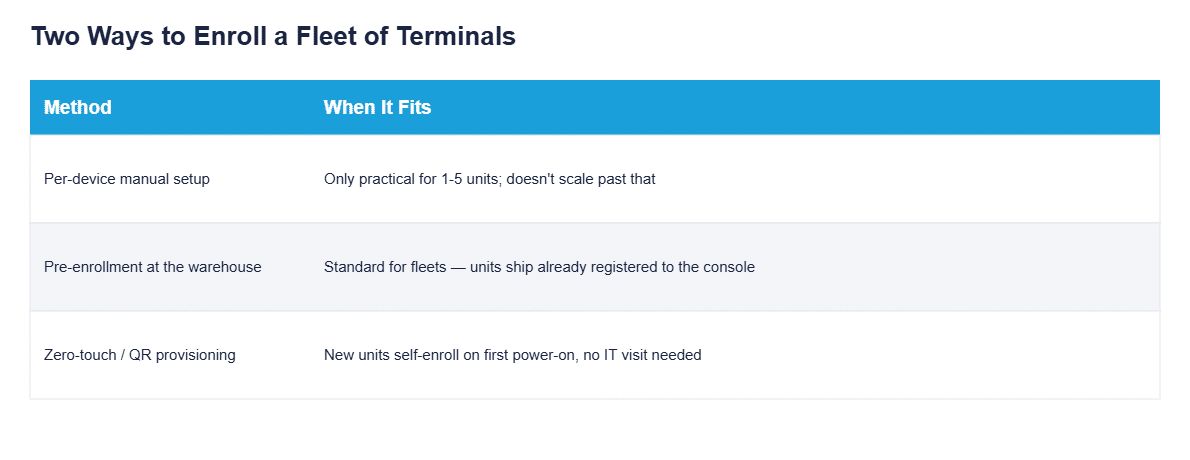
Manual setup — configuring each tablet by hand — is fine for a pilot of a few units. It stops being fine the moment a fleet reaches double digits, which is faster than most buyers expect. Pre-enrollment (units arrive from the manufacturer already registered to the management console) or zero-touch provisioning (a new unit self-enrolls the first time it powers on) are what make a 50 or 200-unit rollout realistic without a technician visiting every vehicle. Having units arrive pre-imaged with your application and policy already applied is a manufacturer-side service — the software-image tier described in our industrial tablet OEM and ODM guide.
Why Inventory Tracking Matters More Than It Sounds
Device inventory tracking sounds like an administrative afterthought until a fleet manager needs to answer a specific question under time pressure: which terminal is in which vehicle, is it still enrolled and reporting in, and has it been swapped or replaced without anyone updating the record. Without a live inventory view, this turns into a manual audit — checking vehicles one at a time — every time hardware needs to be accounted for, whether for an insurance audit, a warranty claim, or simply confirming a new hire’s assigned vehicle actually has a working terminal. Which hardware classes belong in that inventory in the first place — mounted tablets, screenless controllers, shared handhelds — is covered in MDM Devices: What Fleet Hardware an MDM Platform Actually Manages.
Setting Up MDM for a Small Fleet
A common assumption is that MDM solutions only pay off once a fleet reaches hundreds of vehicles. In practice, the break-even point is much lower. A fleet running just 10-15 tablets already spends meaningful time on manual configuration, tracking which unit is which, and physically visiting vehicles for updates — all of which a basic MDM setup eliminates. Getting set up at this scale means the same enrollment and inventory tools, just with fewer devices to onboard, not a stripped-down version of the platform.
How This Connects to the Rest of the Software Stack
An MDM solution rarely runs in isolation — it’s the coordination layer that OTA updates, kiosk lockdown, and remote diagnostics all report through, the architecture covered in our MDM remote device management guide. Choosing between deployment models (cloud, on-premise, OEM-bundled) is covered separately in our mobile device management solutions guide, and for fleets weighing MDM against the narrower MAM approach, see MDM vs MAM.
Common Questions
How many devices does a fleet need before an MDM solution becomes worthwhile?
Even 10-15 units justify it — manual configuration and tracking become a real time cost well before a fleet reaches 100 vehicles.
What’s the fastest way to enroll a large batch of new terminals?
Zero-touch or pre-enrollment at the manufacturer — units arrive already registered, eliminating manual per-device setup entirely.
Does device inventory tracking require separate software from the MDM platform?
No — inventory tracking should be a native feature of the MDM console itself, not a separate spreadsheet or tool bolted on afterward.
Can a small business use the same MDM setup as a large fleet?
Yes — the same enrollment, inventory, and update tools apply at any scale; smaller fleets just have fewer devices to manage through them.
Ready to see how this works for your fleet? Contact our team to discuss MDM setup for your terminal deployment.