
ISOBUS VT, the Virtual Terminal defined in ISO 11783-6, lets a single in-cab display run the control interface of any compliant implement — sprayer, seeder, baler — regardless of manufacturer. CF-Device’s VCM models support CF ISOBUS VT or are compatible with it, so one terminal can serve a mixed-brand machinery fleet. This article explains what ISOBUS VT is, what to check before buying an ISOBUS virtual terminal, and when a standard display is enough.
TL;DR
- ISOBUS VT (ISO 11783-6) lets one certified terminal run the control interface of any compliant implement, regardless of brand
- Fleets running 3+ implement brands typically consolidate to one cab display, cutting hardware cost and cab wiring complexity
- Not every “smart” display is a true VT client — confirm ISO 11783-6 certification and simultaneous-connection limits before buying
- CF-Device’s VCM models support CF ISOBUS VT or are compatible with it
What Is ISOBUS VT, the ISOBUS Virtual Terminal?
ISOBUS VT is part of ISO 11783 — in plain terms, the international standard that lets tractors and implements from different manufacturers talk to each other over a shared electrical and data protocol — specifically Part 6, the Virtual Terminal. A VT-compatible display doesn’t run one manufacturer’s software; it runs a universal interface that any compliant implement can plug into and control through. The implement itself sends its own screen layout and controls to the terminal — the terminal’s job is just to display and relay them.
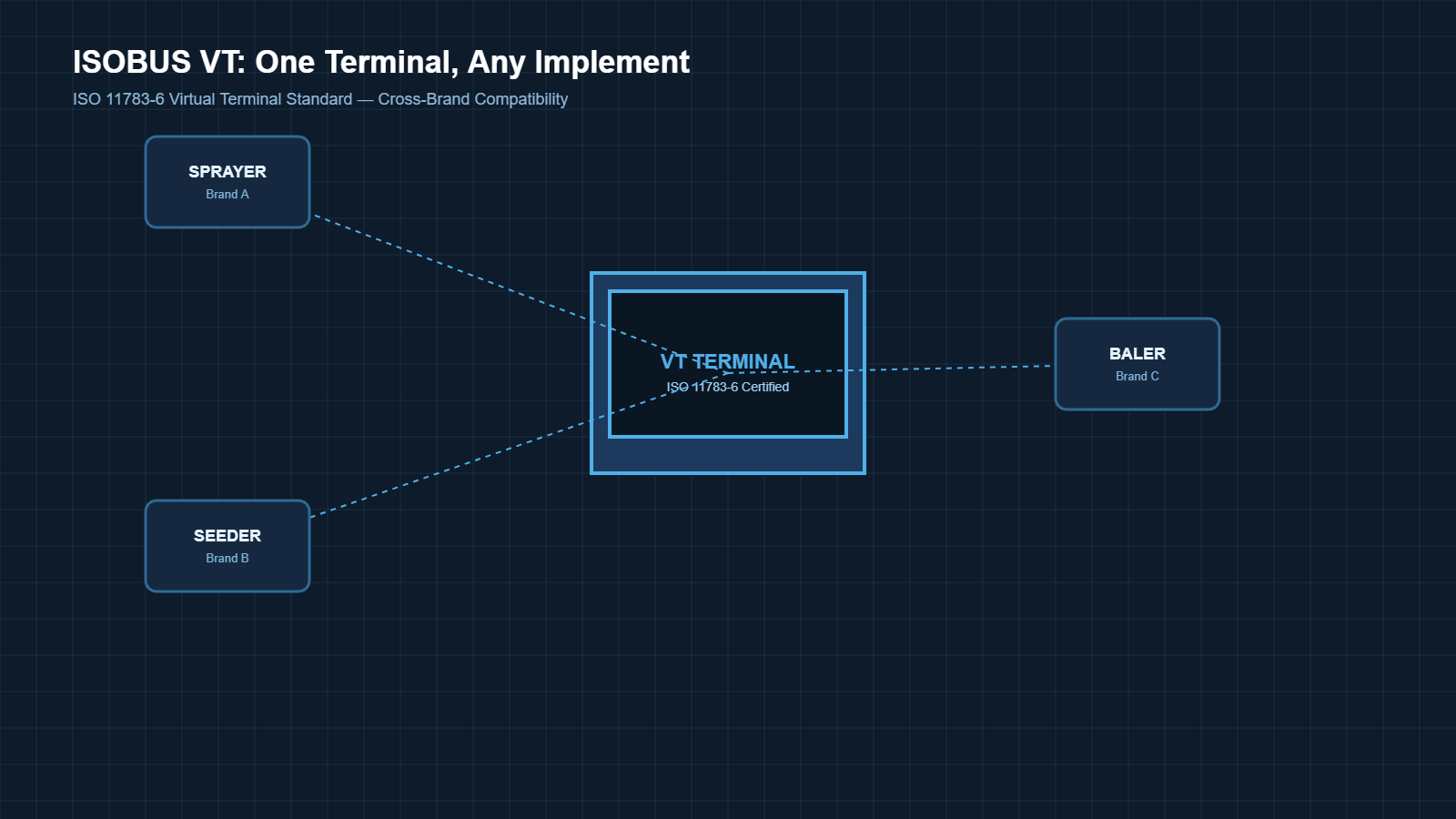
In short: ISOBUS VT lets one certified terminal display and control any ISO 11783-6 compliant implement, replacing the need for a separate screen per machine brand.
Picture a contractor running a sprayer from one manufacturer, a seeder from another, and a baler from a third — before ISOBUS VT, that’s three dedicated in-cab screens, three sets of controls to relearn, and three points of failure wired into one cab.
Why Does ISOBUS VT Matter for a Mixed-Brand Fleet?
Does a fleet running only one implement brand still need ISOBUS VT? Not necessarily — the value compounds specifically once equipment comes from multiple manufacturers. For a mixed-brand operation, this changes cab economics directly:
- One terminal typically replaces three or four dedicated screens — the single biggest hardware cost reduction
- New implements from any ISOBUS-compliant brand work immediately, with no custom integration
- Operators learn one interface instead of relearning controls machine to machine
- Less clutter and wiring in the cab means fewer points of failure in the field
How Much Does an ISOBUS VT Terminal Cost to Run?
The upfront cost of a certified VT terminal is usually comparable to a single mid-tier dedicated display. The savings show up on the next implement purchase: instead of budgeting for another proprietary screen, a mixed-brand operation reuses the existing VT terminal. Over a 3-4 year equipment cycle, avoiding 2-3 dedicated screen purchases is typically where the payback shows up — not in the initial terminal price itself.
Do I Need an ISOBUS VT Terminal?
- Single-brand fleet with no plans to diversify → a dedicated display may still be sufficient
- Mixed-brand fleet with 2+ implement manufacturers → ISOBUS VT consolidation typically pays back within one season of avoided screen purchases
- Growing fleet adding new implement types yearly → prioritize VT certification now to avoid re-purchasing displays later
What Should I Check Before Buying an ISOBUS Terminal?
Not every “smart” display supports ISOBUS VT out of the box. When evaluating a terminal, confirm two things: it’s certified against ISO 11783-6, and how many implements it can address simultaneously — some terminals only support one active VT connection at a time, which matters for combination implements running multiple systems at once.
See the full rugged vehicle tablet hardware lineup
Which ISOBUS VT Software Does CF-Device Use?
CF-Device’s ISO 11783 compliant Virtual Terminal application is called CF ISOBUS VT. It runs on the VCM series of vehicle-mount terminals and turns the terminal into a Universal Terminal, loading and controlling implement interfaces from any ISOBUS-compliant manufacturer on a single screen. Where prescription maps, section control and as-applied logging are needed, CF ISOBUS TC — the Task Controller application — runs alongside it; the two are supplied together as the CF ISOBUS VT/TC Suite for machinery builders.
Development against the platform uses the CF-Device Communication SDK, supplied in both C++ and Java versions for the Android and Debian-based Linux platforms (operating-system versions vary by model). It handles CAN (classic and CAN FD), SocketCAN, Modbus RTU and the serial interfaces, abstracting the MCU-to-SoC transport so application code does not change between hardware models. Library filenames, package names and class names in the SDK retain their original code-level identifiers and should be used exactly as they appear in the documentation.
When Is a Manufacturer Display Still the Better Choice?
If every implement in the fleet comes from a single manufacturer and there’s no near-term plan to diversify, a dedicated manufacturer display can still do the job. ISOBUS VT’s advantage is specifically brand interoperability, not raw display quality — a single-brand operation may not see the payback described above.
Is ISOBUS VT the Same as a Universal Terminal (UT)?
Yes — they are two names for the same thing, and the inconsistency causes real confusion in procurement. ISO 11783-6 defines it as the Virtual Terminal (VT); AEF certification and most manufacturer marketing call it the Universal Terminal (UT), because “universal” communicates the benefit more clearly to equipment owners than “virtual” does.
CF-Device’s practical advice: when a quotation says UT and a specification says VT, they are not describing different capabilities — but do ask which specific AEF functionalities are certified, because UT is only one of several (TC-BAS, TC-SC, TC-GEO and AUX-N are separate certifications that a terminal may or may not hold).
What Is the Difference Between ISOBUS VT and a Task Controller?
This is the distinction most buyers miss until a prescription-map job fails, so it is worth being precise. VT (Part 6) is the display and control layer — it shows the implement’s own interface and passes operator input back. TC (Task Controller, Part 10) is the data layer — it reads prescription maps, drives automatic section control, and writes as-applied records.
| ISOBUS VT (Part 6) | Task Controller (Part 10) | |
|---|---|---|
| Job | Display & control the implement | Manage field data & jobs |
| Handles | Screens, buttons, operator input | Prescription maps, section control, logging |
| Needed for | Any implement operation | Variable-rate & documented application |
| AEF certification | UT | TC-BAS / TC-SC / TC-GEO |
| CF-Device application | CF ISOBUS VT | CF ISOBUS TC |
A terminal certified for UT alone will run a sprayer’s interface perfectly but cannot execute a variable-rate prescription. CF-Device supplies both applications together as the CF ISOBUS VT/TC Suite for exactly this reason — buying UT-only and discovering the gap mid-season is a common and expensive surprise. How rate control works on the sprayer itself is covered in variable-rate spraying with rugged vehicle tablets.
Can I Retrofit an ISOBUS VT Terminal to an Older Tractor?
Usually yes, and this is one of the more common CF-Device deployments — but it depends on the tractor having an ISOBUS-capable bus, not just a CAN bus. Three things have to be present:
- An ISOBUS implement connector (the 9-pin breakaway) or the ability to fit one — a bare CAN bus is not the same thing
- Terminating resistors correctly placed on the bus, which retrofits frequently get wrong and which produces intermittent faults that look like a terminal problem
- Adequate power — CF-Device’s VCM terminals accept wide-voltage DC with ignition sense (5–36V or 9–36V by model), which covers 12V and 24V tractor systems without a converter
The implement side matters more than the tractor side: a modern ISOBUS-certified implement will work through a retrofitted terminal on an older tractor, but a pre-ISOBUS implement will not become ISOBUS-compatible no matter what terminal is fitted. The underlying bus and protocol layer is covered in our CAN bus and J1939 integration guide, and field deployment patterns in smart agriculture: precision in the field.
Other Names for the Same Question
Buyers shopping for isobus virtual terminals usually compare certification, the number of simultaneous implement connections and screen size. The checklist earlier in this guide covers all three.
Mixed fleet compatibility is the practical reason to buy a virtual terminal: implements from different brands run from one screen.
Which Guide Should I Read Next?
This guide belongs to the Precision Agriculture, Fleet Tracking and Business Vehicles hub. Confirm the CF ISOBUS VT version for your model and your implement’s compatibility before ordering.
| If your question is… | Read |
|---|---|
| What actually goes on the tractor? | Precision agriculture equipment: what goes on the tractor |
| Which terminal for farming? | Best tablets for farming and tractor terminals |
| How ISOBUS fits with MDM, DMS and AVM | One Tablet, Four Systems |
| Digital agriculture and the terminal | Digital agriculture equipment: why the terminal decides |
| Agriculture hardware in one view | Smart agriculture terminals, applications hub |
| Which hardware to specify | Rugged vehicle tablet buyer’s guide |
Common Questions
Does ISOBUS VT work with implements from any brand?
Yes, as long as the implement itself is certified to ISO 11783-6. The terminal doesn’t need brand-specific software — it just renders what the implement sends.
Can one terminal run multiple ISOBUS implements at once?
It depends on the terminal’s simultaneous-connection capacity — confirm this spec before buying if the fleet runs combination implements.
Is ISOBUS VT the same as ISOBUS in general?
No — ISOBUS VT (Part 6) is specifically the display/control layer. Full ISOBUS (ISO 11783) covers the entire tractor-implement communication standard across 14 parts (per ISO 11783 documentation).
Do compatibility and connection limits vary by terminal model?
Compatibility and simultaneous-connection specs vary by terminal model and firmware version — always confirm against the specific implement and terminal combination before deployment.
Which CF-Device models support ISOBUS VT?
The VCM V12 (12.1″) is the largest-screen option for ISOBUS VT, and every VCM model supports CF ISOBUS VT or is compatible with it. The 12.1″ size is the usual choice for implement control specifically because the implement’s own interface plus a guidance view needs the screen area — a 7″ unit can run VT but leaves little room for anything alongside it.
Can an ISOBUS VT terminal also run auto-steer and guidance?
On CF-Device hardware, yes — the same terminal can run CF ISOBUS VT for implement control alongside a guidance application, with centimetre-level RTK GNSS available as an option. How much accuracy a given field actually needs is covered in GPS for agricultural tractors. This is the main argument for consolidating onto one terminal rather than fitting a separate guidance display: one mount, one power feed, one screen for the operator to look at.
CF-Device’s rugged vehicle terminals support CF ISOBUS VT or are compatible with it — one screen, ready for whatever’s hooked up next. See the CFDevice rugged vehicle tablet hardware buyer’s guide. Learn how MDM, DMS, 360° AVM and ISOBUS VT work together on one tablet. For how implement control fits within the wider fleet software stack — configuration, OTA updates, and device health across every terminal — see our mobile device management solutions hub.
Interested in specs or a quote? Contact our team to discuss ISOBUS VT terminals for your fleet.