

An embedded computer is a computer built into a larger machine to do one defined job, rather than sold as a general-purpose device you install programs on. The easiest way to understand the category is by example — and the examples below run from a washing machine to a tractor cab. CF-Device builds the vehicle end of that range, so the last four examples are the ones we can speak about from production experience.
TL;DR
- An embedded computer is defined by its job, not its size: it is built into a machine and runs one fixed function
- The ten examples below span everyday appliances, industrial control and vehicles
- Vehicle examples differ from the rest in three ways: wide-voltage power, vibration, and a vehicle bus
- CF-Device builds two of the ten: integrated vehicle-mount terminals (VCM range) and screenless vehicle computers (TANK V2)
- The form you need is decided by one question — does anyone need to look at it?
What Is an Embedded Computer?
An embedded computer is a computing unit built into a machine or product so that it controls part of that machine’s behaviour. The word “embedded” is literal: the computer is inside the thing it runs. Unlike a laptop, it has one job defined at design time, and the person using the machine usually never knows a computer is there. Definitions that stop at “a small computer in a device” miss the useful part, which is that an embedded computer is specified by what it must survive and what it must connect to, not by how fast its processor is.
In short: an embedded computer is a computer chosen for its job and its environment, not for its benchmark score.
What Are Examples of Embedded Computers?
Ten examples, grouped by where they sit. The first three are the everyday cases most definitions use; the next three are industrial; the last four are vehicle-grade.
| # | Example | Where it sits | What it does |
|---|---|---|---|
| 1 | Appliance controller | Washing machine, microwave, thermostat | Runs a fixed program cycle |
| 2 | Network router | Home or office | Moves traffic, runs one firmware |
| 3 | Payment or ticket terminal | Retail, transit, kiosk | Reads cards, processes a transaction |
| 4 | Programmable logic controller | Factory control cabinet | Switches machinery on defined logic |
| 5 | Fanless industrial box PC | Production line, inspection station | Runs vision or data collection |
| 6 | Single-board computer | Prototype, small instrument | Runs a custom application |
| 7 | Engine control unit (ECU) | Inside the vehicle | Controls one subsystem, no display |
| 8 | Telematics gateway / tracker | Hidden in the vehicle | Reports position and signals |
| 9 | Integrated vehicle-mount terminal | Cab, in the operator’s sightline | Display, dispatch, implement control |
| 10 | Screenless vehicle computer | Behind a dash or in an equipment bay | Compute, CAN and cameras, display remote |
What Are Everyday Embedded Computer Examples?
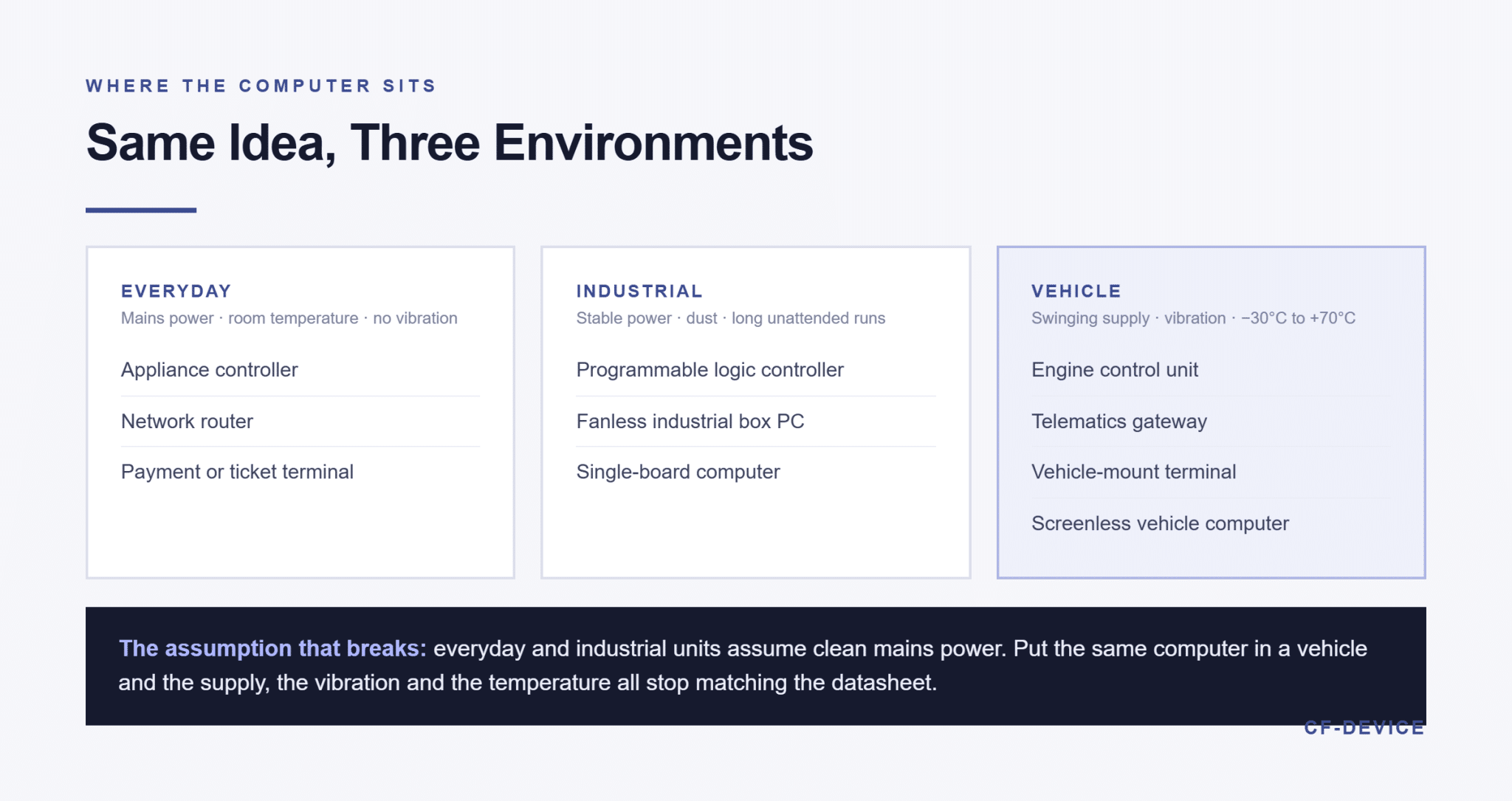
Examples one to three are the ones most people already own. A washing machine’s controller steps through wash, rinse and spin from a stored program; a router moves packets under one firmware image; a card terminal reads a payment card and talks to a bank. None is chosen for processing power. All three live in a protected, room-temperature, mains-powered environment, which is exactly the assumption that stops being true once the same computer is put in a vehicle.
What Are Industrial Embedded System Examples?
A programmable logic controller (PLC) is the classic industrial case: a ruggedised unit in a control cabinet that switches machinery on defined logic and is built to run for years without attention. A fanless industrial box PC does a heavier job in the same setting — vision inspection, data collection, protocol conversion — and is sealed against dust with no moving parts. A single-board computer sits at the cheap end: common in prototypes and small instruments, and a poor fit for anything that must be certified, because the board is only one part of what a certification covers.
Which physical form to buy is a supplier decision as much as a technical one: a bare module leaves the enclosure, certification and firmware with you, while a finished unit leaves them with the maker. The four forms are compared in the four forms of embedded computer.
What Are Vehicle Embedded Computer Examples?
The last four examples are where the environment changes the specification. A vehicle does not offer a stable power supply, constant temperature, or a quiet mechanical environment — and it adds something the other categories do not have: a vehicle bus. That is the common thread across the vehicle examples, and the reason a factory box PC bolted into a tractor tends to fail within a season.
- Engine control unit (ECU) — a sealed controller for one subsystem, with no display and safety-certified firmware. It is not something a fleet or machinery builder specifies; it is already in the vehicle
- Telematics gateway or tracker — a hidden box that reports position and a handful of vehicle signals. Correct where nobody sits inside the asset; the split is set out in fleet tracking hardware: GPS trackers vs vehicle terminals
- Integrated vehicle-mount terminal — compute and touchscreen in one housing, mounted where the operator can see it
- Screenless vehicle computer — the same computing with the display separated, used where the cab has no room for a panel
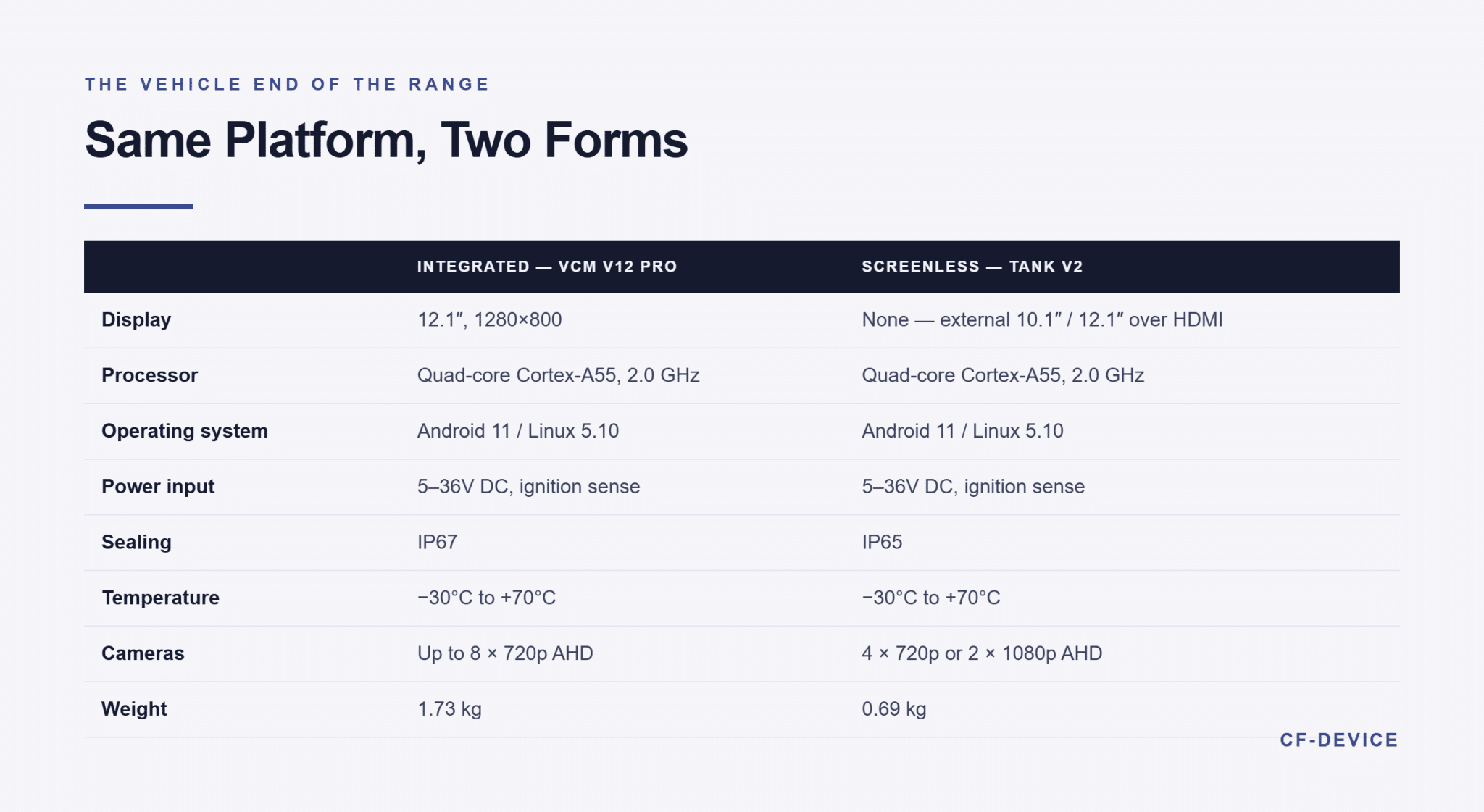
The two CF-Device examples show how far the same platform stretches. The VCM V12 PRO is the integrated case: a 12.1″ 1280×800 display, quad-core Cortex-A55 at 2.0 GHz, up to four CAN channels that can run alongside Gigabit Ethernet, IP67 sealing and 5–36V DC input, operating from −30°C to +70°C. TANK V2 is the screenless case: the same Cortex-A55 platform and Android 11 / Linux 5.10 stack in a 203.5×126.6×55.5 mm housing weighing 0.69 kg, driving an external 10.1″ or 12.1″ touchscreen over HDMI, with 5G, Gigabit Ethernet, a USB 3.0 Type-C port and AHD camera inputs (four at 720p or two at 1080p). It is IP65 rated, accepts 5–36V DC with ignition sense, and operates from −30°C to +70°C.
What Makes a Vehicle Embedded Computer Different?
Three specifications separate the vehicle examples from the other six, and a buyer coming from IT procurement tends to check none of them:
- Power input — a vehicle supply swings during cranking and load changes. CF-Device specifies 5–36V DC with ignition detection and reverse-polarity protection for this reason; the design is covered in wide-voltage input for vehicle terminals
- Vibration and temperature — continuous vibration and a −30°C to +70°C range, tested to MIL-STD-810 rather than assumed
- Vehicle bus access — native CAN and J1939 so the computer reads the machine itself, covered in our CAN bus and J1939 integration guide
A computer that passes on all three is an onboard computer in the strict sense; how that term maps onto the examples above is set out in what is an onboard computer.
Which Example Do I Actually Need?
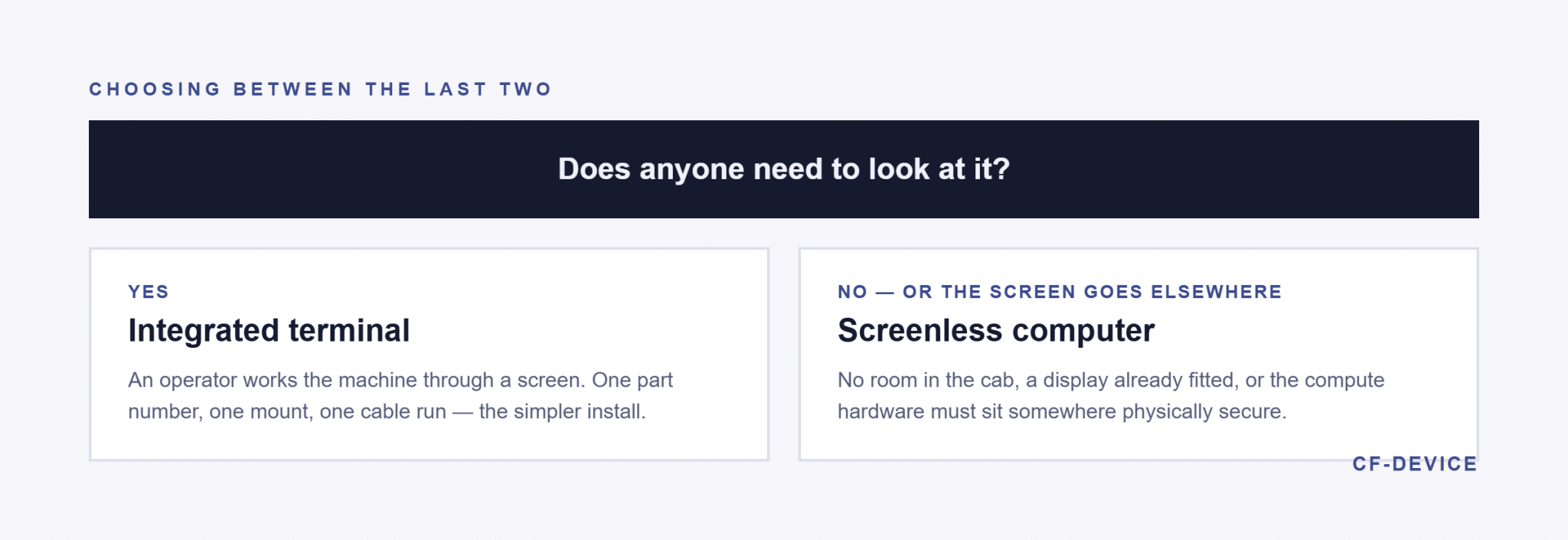
The decision between the last two examples comes down to one question: does anyone need to look at it? If an operator works the machine through a screen, an integrated terminal is the simpler install — one part number, one mount, one cable run. If the cab has no room, or the display is already fitted, or the compute hardware has to sit somewhere physically secure, the screenless form is the correct answer. The full specification sequence is in our rugged vehicle tablet hardware buyer’s guide, and the in-cab form factor specifically in the truck computer in-cab terminal guide.
Frequently Asked Questions
Is a Raspberry Pi-class single-board computer an embedded computer?
Yes, in the sense that it can be built into a product, and it is a common starting point for prototypes. It is rarely the right answer for a vehicle, because the board alone has no wide-voltage input, no sealed enclosure and no vibration rating — each of which would have to be added and then certified as a complete unit.
Is an ECU an embedded computer?
Yes. An ECU is the textbook vehicle example: a sealed controller running one closed subsystem with safety-certified firmware. An onboard computer sits alongside it, reading and sending messages over the bus rather than replacing that function.
What is the difference between an embedded computer and an industrial PC?
The terms overlap heavily. In practice an industrial PC is built for a fixed installation with stable power, while a vehicle embedded computer must accept a vehicle’s electrical supply and vibration. Both are built to run for years rather than a consumer refresh cycle.
Can an embedded computer run Android or Linux?
Both are common. CF-Device’s VCM range and TANK V2 ship a dual Android and Linux platform, so one hardware qualification covers an app-driven fleet or a custom machine-control stack.
Interested in specs or a quote? Contact our team to discuss embedded vehicle computers for your machines.