

Rugged tablets for buses are specified differently from agriculture or construction hardware, because public transit fleets run vehicle terminals for a different reason: passenger safety monitoring, route and schedule adherence, and driver accountability across long daily duty cycles. CF-Device builds the VCM terminal range for this work, with sealing from IP65 to IP67 and wide-voltage input with ignition sense.
TL;DR
- DMS driver monitoring flags fatigue and distraction across long, repetitive transit shifts (listed on the VCM M10; confirm other models)
- AVM 360° surround view addresses pedestrian and boarding-area blind spots at stops
- Real-time GPS/GNSS and 4G/5G connectivity feed route adherence and schedule data to dispatch
- IP65 to IP67 sealing and wide-voltage input handle continuous multi-shift operation
- Retrofitting a running fleet needs standard mounting and pushed configuration, not per-bus customisation
Rugged Tablets for Buses: Why Transit Fleets Have Distinct Requirements
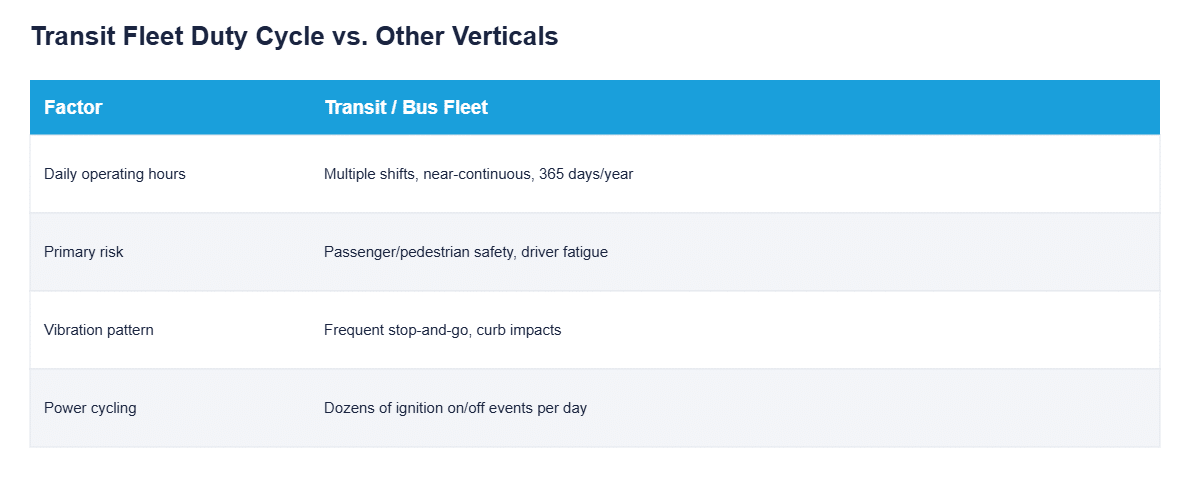
For bus fleet management the starting point is the duty cycle: unlike agricultural or construction equipment used seasonally, transit vehicles often run multiple shifts a day, every day, for years. The terminal hardware has to tolerate continuous vibration and heat cycling without the maintenance windows other industries get, while the software stack prioritises passenger and pedestrian safety over implement control or precision guidance.
Where a Terminal Fits in a Transit Vehicle
- Driver monitoring — DMS tracks fatigue, distraction and phone use in real time, which matters more on repetitive multi-hour transit routes than in almost any other vehicle category
- Pedestrian and boarding safety — AVM 360° surround view reduces blind spots around doors and low-visibility zones near stops, where pedestrian proximity incidents are most likely
- Route and schedule tracking — GPS/GNSS positioning combined with 4G/5G connectivity reports real-time location and adherence back to a dispatch platform
- Passenger information display — where hardware and software support it, the same terminal can drive next-stop or route information; some operators prefer separate driver-facing and passenger-facing screens
- For the terminal category underpinning this, see what is a mobile data terminal (MDT).
Bus Mobile Data Terminal and Bus Tablet: What the Names Mean
Searches for a bus mobile data terminal, a bus tablet and a public transit tablet describe the same fixed, vehicle-powered unit: the screen at the driver’s position that carries dispatch, route and safety functions. What differs by sector, and how a bus terminal compares with fire and utility fleet requirements, is in mobile data terminals by sector. The safety-systems side is covered in smart transportation with DMS and AVM 360° for passenger safety.
Hardware Requirements for Transit Duty Cycles
Continuous multi-shift operation means the terminal has to handle heat build-up from extended idling, constant vibration from stop-and-go city driving, and power cycling that occurs dozens of times a day as buses start and stop routes. IP65 to IP67 sealing and wide-voltage DC input (5–36V or 9–36V depending on the model) with ignition sense are the baseline for this use case, not optional upgrades.
Why Retrofitting a Transit Fleet Differs From a New Deployment
Most transit operators are not buying terminals for a brand-new fleet; they are retrofitting vehicles already in service, often on a rolling schedule that cannot take buses out of rotation all at once. That changes the requirements: mounting has to work within an existing dash layout without custom fabrication per vehicle, and the software configuration needs to be push-deployed identically across each bus as it comes through for retrofit, rather than configured one at a time. A terminal that depends on vehicle-specific wiring changes or manual per-unit setup turns a retrofit into a multi-month bottleneck; one built for standard ignition-sense wiring and MDM-pushed configuration lets an authority retrofit in the normal maintenance cycle. Managing those units afterwards is the job of the device layer, covered in MDM for fleet platforms.
Transit Device Management: Keeping Every Bus Terminal Consistent
A transit authority running hundreds of buses cannot visit each one to change a setting. Transit device management software means the same thing as for any fleet, remote configuration, updates and health monitoring from one console, with one transit-specific point: a bus parked at the depot overnight looks identical to a failed terminal unless the platform reads ignition state. The general case is in MDM for fleet tablets, and locking the driver screen to approved apps is covered in kiosk mode and app whitelisting.
A Deployment Example
Consider a municipal bus operator running split-shift routes across a city centre. It first deploys terminals with GPS tracking alone. After a series of near-miss boarding incidents at busy stops, it adds AVM 360° surround view and DMS driver monitoring on the same terminal platform, with no separate device installation, because both functions run on the terminal already mounted in the cab (on models that support them). Dispatch then sees both vehicle location and driver alertness from one platform, the consolidated approach covered in our fleet management guide. This is an illustrative scenario rather than a customer case study.
Which Transit Guide Should I Read Next?
Pick the next guide by the question you still have open:
| If your question is… | Read |
|---|---|
| What does a bus MDT need compared with fire and utility? | Mobile data terminals by sector |
| How do DMS and AVM work together for passengers? | Smart transportation: DMS and AVM 360° |
| What does driver monitoring actually detect? | DMS driver monitoring |
| How do I manage the terminals at scale? | MDM for fleet tablets |
| What about public works fleets? | Municipal fleet route tracking |
Common Questions
Is DMS driver monitoring necessary for transit, given drivers are professionally licensed?
Yes. Fatigue and distraction risk increases with shift length and route repetition regardless of licensing, and DMS provides an objective, continuous safety layer that spot-checks and training alone cannot replicate. Confirm which models list DMS.
Does AVM 360° surround view work at low speeds around bus stops?
Yes. Surround-view systems are most valuable at low speed and when stationary at boarding points, exactly where pedestrian proximity risk around doors and kerbs is highest.
Can one terminal handle both driver safety monitoring and passenger information display?
It depends on configuration. A single terminal can run both where hardware and software support multi-application deployment, though some operators prefer separate driver-facing and passenger-facing displays on the same terminal platform.
Can a rolling retrofit be done without taking buses out of service all at once?
Yes. Standard mounting and MDM-pushed configuration let each bus be retrofitted during its normal maintenance window rather than requiring a fleet-wide shutdown.
Interested in specs or a quote? Contact our team to discuss a transit fleet deployment, or see the VCM V10-2 for a dual-SIM, AVM-capable model.