

A Debian tablet PC, in an industrial context, is a purpose-built vehicle terminal that ships with embedded Debian from the factory — CF-Device builds them on Linux 5.10, rated IP65–IP67 and 5–36V DC. It is not a hobbyist project of flashing a custom OS onto a consumer device, but a terminal that ships with embedded Debian Linux as its native operating system, chosen specifically for real-time hardware communication that consumer tablets were never designed to handle.
TL;DR
- An industrial Debian tablet PC ships with the OS natively installed — it isn’t a DIY install onto consumer hardware
- x86 offers broader driver maturity; ARM offers lower power draw and better fit for sealed rugged housings
- Real-time CAN bus and J1939 communication is the core reason vehicle terminals need Debian, not a general-purpose Android layer alone
- Consumer Debian installation guides never address vehicle power input, IP-rated housings, or fleet-wide device management
What “Debian Tablet PC” Actually Means in This Context
Search “Debian tablet PC” and most results assume you’re trying to install Debian yourself onto a Surface Pro or an old Android slate — a weekend project for a hobbyist, not an industrial procurement decision. In a vehicle-terminal context, a Debian tablet PC is a fundamentally different product: hardware engineered from the ground up to run embedded Debian as its factory operating system, because the workload it’s built for — direct, low-latency communication with vehicle and machinery control systems — depends on it.
x86 vs ARM: The Architecture Decision That Actually Matters Here
Consumer Debian guides treat x86 vs ARM as a performance-vs-battery-life tradeoff. In an industrial deployment, the calculus is different. x86 platforms carry the most mature driver ecosystem and the widest range of pre-validated industrial I/O modules, which shortens integration time when a terminal needs to talk to unusual third-party peripherals. ARM platforms draw less power and generate less heat, which matters directly for sealed IP-rated housings where there’s no fan and limited passive cooling surface area — the same rugged-housing constraint covered in our IP65 vs IP67 rating guide. Neither architecture is universally “better” — the right choice depends on whether the deployment prioritizes peripheral flexibility or thermal/power efficiency inside a fully sealed enclosure.
Why Real-Time CAN Bus Communication Is the Actual Reason Debian Matters
The deeper reason vehicle terminals run embedded Debian isn’t philosophical preference for open-source software — it’s that industrial protocols like CAN bus and J1939 depend on message latency low enough that a general-purpose consumer OS scheduling model isn’t built to guarantee. Debian’s kernel-level access to CAN interfaces (SocketCAN) gives direct, low-overhead communication with tractor ECUs, construction equipment controllers, and telematics hardware, without routing through layers designed for touchscreen app responsiveness rather than deterministic timing. This is the same real-time requirement covered in our CAN bus and J1939 integration guide and in how the dual Android/Linux architecture splits driver-facing UI from machine-communication duties on the same terminal.
What Consumer Installation Guides Never Address
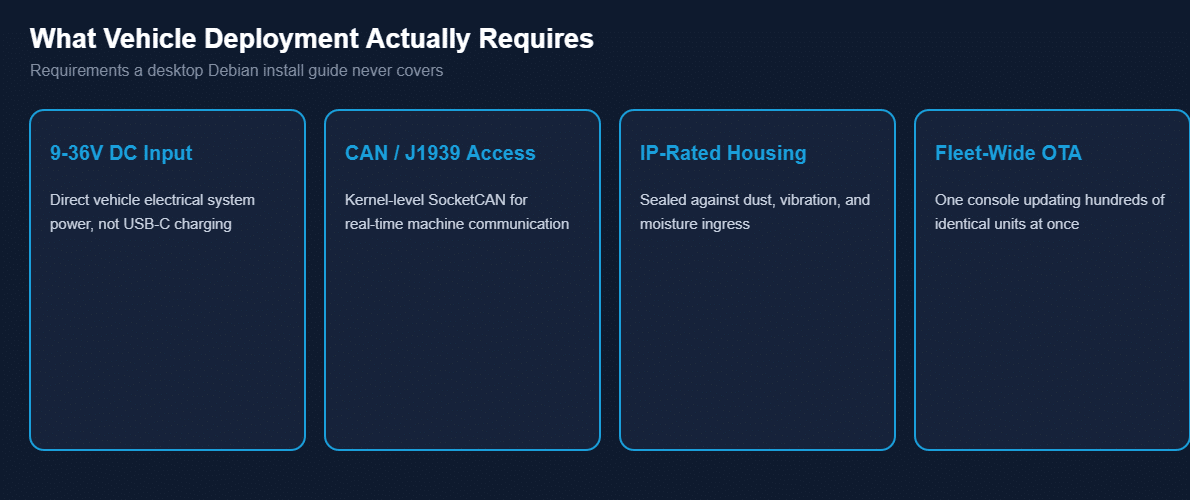
A DIY Debian install walkthrough for a Surface Pro or ThinkPad assumes a device that charges over USB-C and sits on a desk. None of that applies to a vehicle terminal, which needs to accept raw 9-36V DC directly from a vehicle’s electrical system, survive continuous vibration and dust exposure inside a sealed housing, and — critically — be manageable as one of dozens or hundreds of identical units across a fleet, not a single machine someone configured by hand over a weekend.
Why “Factory-Installed” Beats “Self-Installed” for Fleet Hardware
Installing Debian yourself onto a device means you also own every subsequent driver conflict, kernel update, and hardware compatibility question that comes up — manageable for one device, unworkable across a fleet of 50 or 200 terminals that all need identical, predictable behavior. A factory-installed embedded Debian platform, built and validated by the hardware manufacturer against the exact CAN controllers, GNSS modules, and camera interfaces the terminal ships with, removes that ownership burden entirely. Firmware updates, driver compatibility, and kernel patches are handled as part of the OTA update pipeline covered in our MDM remote device management guide, rather than falling to whoever set up each individual unit.
Who Actually Needs a Debian Tablet PC
Fleet operators and OEM integrators building on top of agricultural, construction, or logistics vehicle platforms — where the terminal needs to speak directly to machinery over CAN/J1939, not just display a dashboard app — are the actual audience for this hardware category. This is the same integration profile behind excavator slope grading systems and mixed-implement ISOBUS VT deployments, where the terminal’s OS-level access to machine communication protocols is the actual point of the purchase, not a secondary detail.
Common Questions
Do I need to install Debian myself on an industrial tablet PC?
No — industrial Debian tablet PCs ship with the OS factory-installed and validated against the specific hardware, unlike a DIY consumer install.
Is x86 or ARM better for a vehicle-mount Debian tablet?
Neither is universally better — x86 offers broader driver/peripheral maturity, ARM offers lower power draw better suited to sealed rugged housings.
Why can’t a standard Android tablet handle the same CAN bus tasks?
General-purpose consumer OS scheduling isn’t built to guarantee the low-latency timing that real-time industrial protocols like CAN and J1939 require.
Can a Debian tablet PC be managed across a large fleet the same way as Android devices?
Yes — OTA updates, remote diagnostics, and fleet-wide monitoring apply the same regardless of which OS the terminal runs.
Interested in specs or a quote? Contact our team to discuss Debian-based terminal options for your fleet.