

MDM devices, in a fleet context, are the vehicle-mounted terminals and embedded controllers an MDM platform enrols and manages remotely — not employee phones. CF-Device ships every VCM unit ready to enrol. The distinction matters because the device type dictates what the management platform has to be capable of.
TL;DR
- Fleet MDM devices are dedicated devices — one function, permanently installed, no personal use
- A device management system built for BYOD phones mishandles the “parked vs. faulted” distinction
- Bulk provisioning before installation matters more than per-user enrollment flows
- Screenless compute boxes are MDM devices too, and need management without a local display
What Counts as an MDM Device in a Fleet
Search “MDM devices” and most results assume the answer is phones and laptops. In a vehicle fleet, the managed device population looks different: rugged tablets bolted into cabs, screenless controllers mounted inside equipment bays, and occasionally a handheld shared across shifts. These are dedicated devices — hardware assigned to a function rather than a person, running one approved workload for its entire service life. For a plain-language primer on what device management does in the first place, see what is mobile device management.
In short: a fleet MDM device is assigned to a vehicle, not to an employee — which changes how it gets enrolled, monitored, and retired.
Device Types and What Each Demands
| Device Type | Management Requirement |
|---|---|
| Cab-mounted rugged tablet | Kiosk lockdown, OTA updates, offline-tolerant check-in |
| Screenless compute box | Full remote management with no local UI to fall back on |
| Shift-shared handheld | Session handling across multiple operators per day |
| Personal phone (BYOD) | Not a fleet device — belongs in a separate policy scope |
The screenless case is the one most generic platforms handle badly. A terminal with no display can’t show an enrollment prompt or an error dialog, so every management action has to work headlessly — the reason this hardware class is covered separately in our rugged vehicle tablet hardware buyer’s guide.
Device States a Fleet Platform Must Distinguish
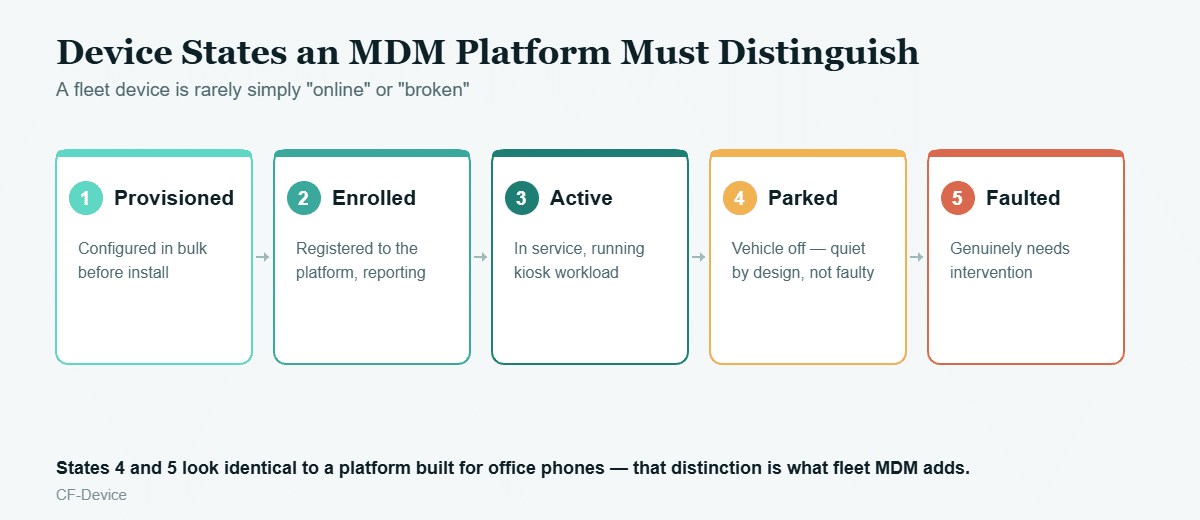
An office-oriented device management system typically reports two states: reachable or not. A fleet needs five, because a vehicle that finished its shift and powered down looks identical to a dead terminal unless the platform knows the difference. Getting that wrong generates false alerts that operations teams quickly learn to ignore — at which point genuine faults get ignored too.
Provisioning Devices at Fleet Scale
Per-device manual setup works when a company onboards a handful of phones a month. It doesn’t work when 200 terminals arrive on a pallet and need identical configuration before installers touch a single vehicle. Fleet-appropriate platforms provision in bulk — image, policy, and kiosk profile applied before shipment, so the installer’s job is mechanical mounting and wiring, not software configuration. This enrollment-and-inventory side is covered in depth in MDM Solution: What a Fleet Actually Needs.
MDM Applications Running on the Device
The device side of an mdm platform is not just an agent reporting battery level. On a vehicle terminal, MDM applications typically coexist with the dispatch app, driver monitoring, and camera stitching — all drawing from the same processor budget. A management agent that behaves like a desktop background service can starve safety-relevant workloads, which is why device-side MDM on this hardware is designed to run as one coordinated layer alongside them rather than competing for resources. That architecture is detailed in One Tablet, Four Systems.
A Deployment Example
A utility fleet managing 180 devices across three regions ran into a specific problem: their platform flagged roughly 40 terminals as unreachable every evening. All 40 were simply parked vehicles with ignition off. After moving to a platform that reads ignition state alongside connectivity, the nightly alert list dropped to the two or three devices with genuine faults — the difference between an alert queue people act on and one they filter to a folder. The same operational visibility principle applies fleet-wide, as covered in our fleet management terminal guide.
What to Verify Before Committing
- Can the platform manage a device with no display attached?
- Does it treat dedicated devices as vehicle assets rather than requiring a named user per device?
- Does device state distinguish parked, out-of-coverage, and faulted?
- Can a batch of devices be provisioned before installation rather than one at a time in the field?
For the broader platform-capability comparison behind these questions, see Device Management Software: What to Look For in a Fleet Platform, and for deployment-model options (cloud, on-premise, OEM-bundled) see our mobile device management solutions hub.
Common Questions
Are vehicle tablets and employee phones managed on the same MDM platform?
They can be, but the policies differ substantially — dedicated devices need kiosk lockdown and asset-based assignment, while personal phones need user-based enrollment and privacy separation.
Can a screenless device really be fully managed remotely?
Yes, provided the platform and firmware were designed for it — status LEDs and remote logs replace the on-screen prompts a display-equipped device would use.
How many devices before a fleet needs a formal device management system?
Around 10-20 units, where manual per-device configuration and troubleshooting visits start costing more time than the platform itself.
Do MDM devices need constant connectivity to stay managed?
No — commands queue and apply on the next check-in, which is why offline-tolerant behavior is a core requirement rather than an edge case for vehicle deployments.
Choosing hardware that runs your existing fleet management software — rather than one bundled with it — is covered in our guide to rugged tablets compatible with fleet management platforms.
Interested in specs or a quote? Contact our team to discuss managing fleet devices at scale.