

CF-Device ships RS232×2 plus RS485 as standard across the VCM range, and both standards appear on the same rugged vehicle tablet spec sheet, and integrators routinely wire the wrong one. The distinction isn’t about speed or age — it’s about how many devices are on the line and how far the cable has to run.
TL;DR
- RS232 is point-to-point: one device, short run, no addressing needed
- RS485 is a multidrop bus: up to 32 devices on one differential pair, runs to roughly 1200 m
- The practical dividing line is around 15 m of cable, or the moment a second device joins
- RS485’s differential signalling is what makes it survive electrical noise near motors and hydraulics
- Neither replaces CAN bus — CAN carries vehicle data, these carry peripherals
The Actual Difference: Single-Ended vs Differential
RS232 transmits each signal as a voltage measured against a shared ground. That works fine over a short cable in a quiet electrical environment. RS485 instead transmits over a twisted pair and reads the difference between the two wires — so any electrical interference that hits the cable hits both wires roughly equally, and cancels out when the receiver subtracts one from the other.
In short: RS232 measures a voltage against ground; RS485 measures two wires against each other, which is why it survives noise and distance that RS232 cannot.
That single design difference is the root of every other distinction between them — distance, device count, and noise immunity all follow from it.
Specification Comparison
| RS232 | RS485 | |
|---|---|---|
| Signalling | Single-ended (vs ground) | Differential (twisted pair) |
| Topology | Point-to-point | Multidrop bus |
| Devices per port | 1 | Up to 32 (more with repeaters) |
| Practical cable run | ~15 m | ~1200 m |
| Noise immunity | Low | High |
| Termination required | No | Yes — 120Ω at both bus ends |
| Addressing | Not needed | Required (each node needs an ID) |
| Typical use | In-cab peripheral | Sensor chain, remote instrument |
Which One for Which Peripheral
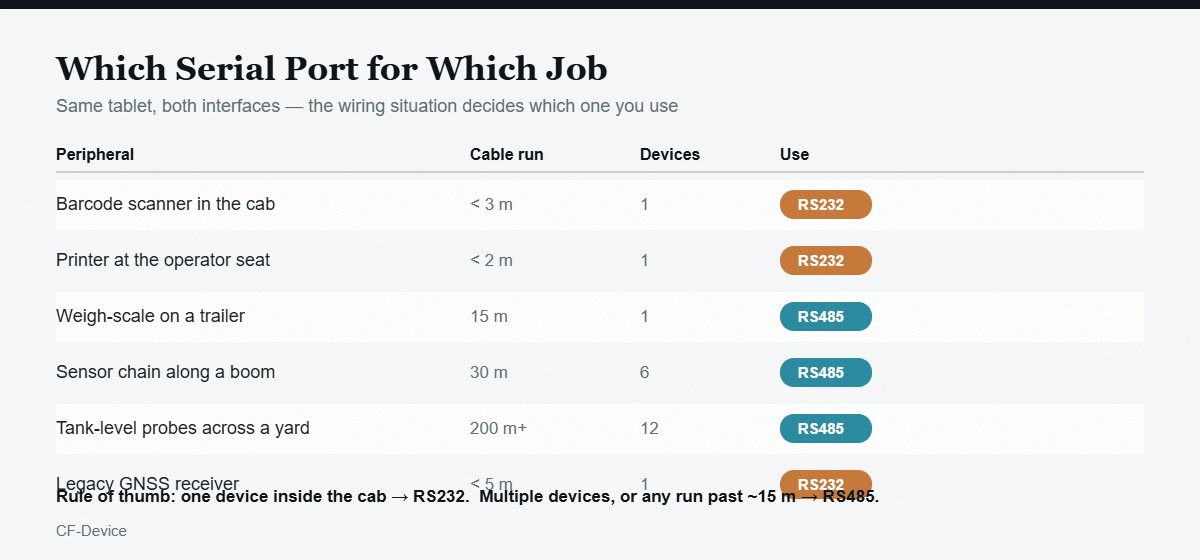
The pattern is consistent: anything mounted within arm’s reach of the operator and connecting to exactly one port goes on RS232. Anything that leaves the cab — down a boom, along a trailer, across a yard — goes on RS485, whether or not it’s the only device on that line, because the distance alone rules RS232 out.
Where RS232 Fails Quietly
The failure mode that catches integrators out isn’t a dead link — it’s an intermittent one. An RS232 run of 20-30 m will often work on a bench and work on the machine while it’s parked, then start dropping characters once hydraulics engage or a motor starts nearby. Because the fault only appears under load, it typically gets misdiagnosed as a software or peripheral problem for weeks before anyone re-examines the cable.
This is the specific scenario RS485’s differential pair was designed to survive. If a serial link is behaving inconsistently on a working machine but reliably in the workshop, cable length and signalling type are the first things to check.
RS485 Wiring Requirements People Skip
- Termination — a 120Ω resistor at each end of the bus, not at every node. Missing termination causes signal reflections that look identical to random data corruption.
- Daisy-chain, not star — RS485 is a linear bus. Branching it into a star topology from a central point causes reflections even with correct termination.
- Unique node addresses — two devices sharing an address will both answer and corrupt each other’s replies.
- Twisted pair, not any two conductors — the noise cancellation depends on both wires running the same physical path.
Neither One Replaces CAN Bus
A common misunderstanding is treating RS485 and CAN bus as competing options. They serve different layers of the installation: CAN bus reads the vehicle’s own network — engine data, fault codes, implement messages under J1939 or ISOBUS — while serial ports connect peripherals the vehicle manufacturer never installed: scanners, printers, weigh scales, third-party sensors.
A typical deployment uses all three simultaneously. That’s why interface count, not just interface type, decides whether a terminal fits a job — the same specification logic covered in our CAN bus and J1939 integration guide and in what is an onboard computer.
A Deployment Example
An agricultural contractor fitting terminals to self-propelled sprayers needed three peripherals per machine: a cab-mounted barcode scanner for chemical batch logging, a legacy GNSS receiver, and four tank-level probes distributed along a 28 m boom. The first installation put everything on RS232 with extended cables. The scanner and receiver worked; the boom probes dropped readings whenever the pump ran. Rewiring the four probes as a single RS485 bus with 120Ω termination at both ends resolved it — the scanner and receiver stayed on RS232, where their short runs were never the problem.
One terminal, both interface types, each used for what it was designed for. This mixed-peripheral pattern is standard across the field deployments in our smart agriculture terminal guide.
What to Confirm on a Spec Sheet
“Serial port” on a datasheet is not specific enough to plan an installation against. Confirm the count and type separately — how many RS232 ports, how many RS485, and whether any port is software-switchable between the two. CF-Device’s VCM range carries RS232×2 plus RS485 as standard across models, alongside dual CAN channels, so a single terminal covers in-cab peripherals and remote sensor buses without an external converter.
Where a machine needs more serial channels than any standard configuration provides, interface count is one of the more straightforward things to change — the customisation tiers are set out in our industrial tablet OEM and ODM guide. For the full specification sequence across durability, power, positioning, and interfaces, see the rugged tablet hardware hub.
Serial ports are also the clearest illustration of why the physical form of the computer matters before the processor does: a bare module gives you the silicon and leaves the port count to whatever carrier board you design, while a finished box PC or panel terminal arrives with the ports already routed, sealed and certified. The four forms and what each leaves you to build are compared in the four forms of embedded computer.
Common Questions
Can I convert RS232 to RS485 with an adapter instead of specifying the right port?
Yes, converters work — but each one adds a powered component and a connection point that can fail in a vibrating vehicle. A native port avoids both.
Is RS485 faster than RS232?
Not inherently at short distances — the real advantage is that RS485 holds its data rate over long cable runs where RS232 degrades. Speed isn’t the reason to choose it.
Do I need termination resistors on a short RS485 bus?
Under a few metres it often works without them, but termination costs nothing to add and eliminates an intermittent fault that is genuinely difficult to diagnose later.
Can RS485 and RS232 devices share the same port?
No — they use different electrical signalling. A port is one or the other, unless the terminal specifically documents software-switchable operation.
How many RS485 devices can realistically share one bus?
The standard allows 32 nodes; in practice, polling time becomes the limit before the electrical limit does, since the terminal queries each address in turn.
RS232 or RS485 — which should I specify on a new build?
Default to RS485 unless you have a specific reason not to. The RS485 vs RS232 decision comes down to two questions CF-Device asks on every integration call: how many devices share the line, and how far is the longest run? One device under 15 m can use either. More than one device, or any run past 15 m, and RS485 is the only one of the two that works reliably in a vehicle — its differential signalling rejects the electrical noise an engine bay produces, and it addresses up to 32 nodes on a single pair.
Interested in specs or a quote? Contact our team to discuss serial interface requirements for your fleet.