
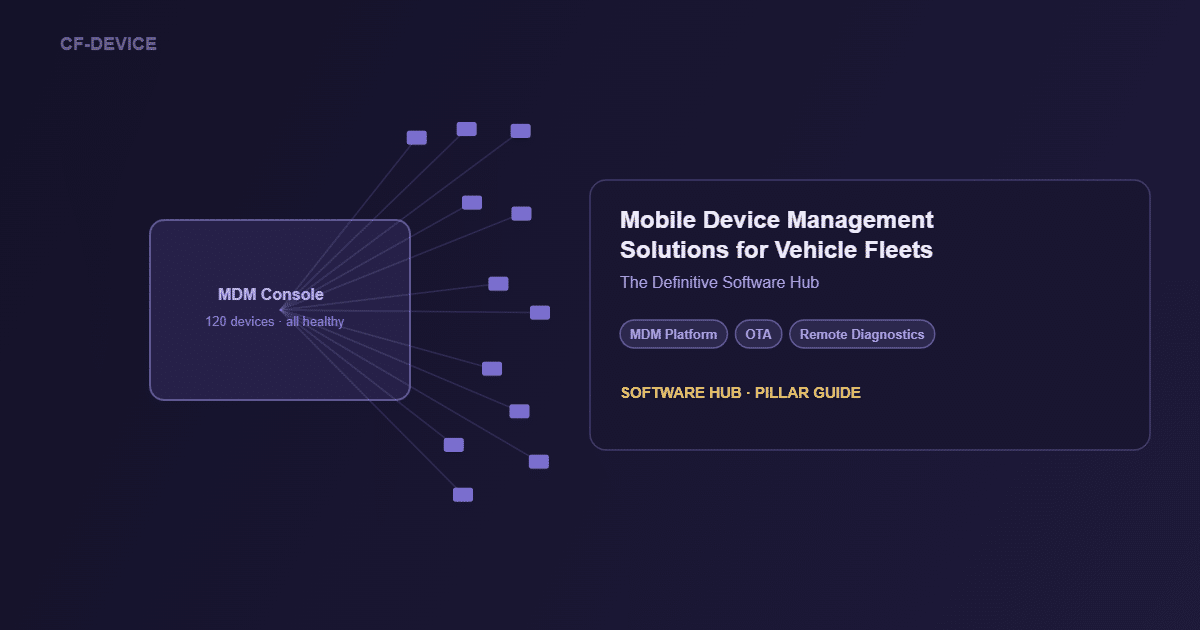
Mobile device management solutions are the control layer of a connected fleet: the software through which hundreds of vehicle terminals are configured, updated, secured and monitored from one console. For vehicles, the requirements differ from office MDM — terminals power-cycle with ignition, drive through cellular dead zones and cannot be walked back to IT. CF-Device builds its MDM platform alongside the VCM hardware, so the platform is designed around those constraints and the other onboard systems (driver monitoring, surround view, implement control) report through it.
TL;DR
- In fleet terms, MDM is remote control of every terminal’s software, configuration and health
- Fleet MDM differs structurally from enterprise MDM: ignition-linked power, intermittent coverage, CAN and GNSS integration, remote-only fixes
- The MDM layer is what turns individual onboard systems into one managed fleet
- Judge a platform on OTA resilience in weak signal, ignition awareness and remote diagnostics depth
- CF-Device builds its MDM platform in-house with the VCM hardware, so licensing, features and supported models are agreed per project
- Software and support decisions drive fleet operating cost more than hardware price differences do
What Is Mobile Device Management, in Fleet Terms?
For an office IT team, mobile device management is app deployment and security policy on phones. For a fleet, device management software faces a harder environment: terminals that switch on and off with the ignition, operate through coverage gaps, read the vehicle’s CAN network, and cannot be reached physically when something fails. A fleet MDM solution is defined by how it handles those four constraints; everything else is table stakes. A plain-language explanation is in what is mobile device management, and the wider software category is covered in device management software: what to look for in a fleet platform.
What Do Mobile Device Management Solutions Manage? The Fleet Software Stack
| Layer | What it does | Managed through |
|---|---|---|
| MDM platform | Configuration, OTA updates, health, security | Central console |
| Driver safety (DMS) | Fatigue and distraction detection and alerts | Reports via the MDM-connected terminal |
| Perimeter vision (AVM 360°) | Multi-camera blind-spot elimination | Calibrated and updated remotely |
| Implement control (ISOBUS VT) | Universal implement interface | Version-managed over the air |
| Custom fleet apps | Dispatch, ticketing, WMS clients | Deployed and whitelisted through MDM |
Only the top layer talks to the fleet office; the other systems’ updates, health and configuration flow through the MDM platform, which is why MDM selection is the highest-leverage software decision a fleet makes. How the four systems share one terminal is covered in One Tablet, Four Systems. Which systems a given terminal supports depends on the model.
Enterprise MDM vs. Fleet MDM
| Enterprise MDM | Fleet MDM | |
|---|---|---|
| Power model | Always-on devices | Ignition-linked power states |
| Connectivity assumption | Office Wi-Fi or stable LTE | Intermittent coverage; dual-SIM failover on models that have it |
| Hardware integration | None needed | CAN bus, GNSS, camera inputs |
| Failure response | User brings the device to IT | Remote diagnostics, no physical access |
| Update windows | Overnight, on charger | Between shifts, resilient mid-route |
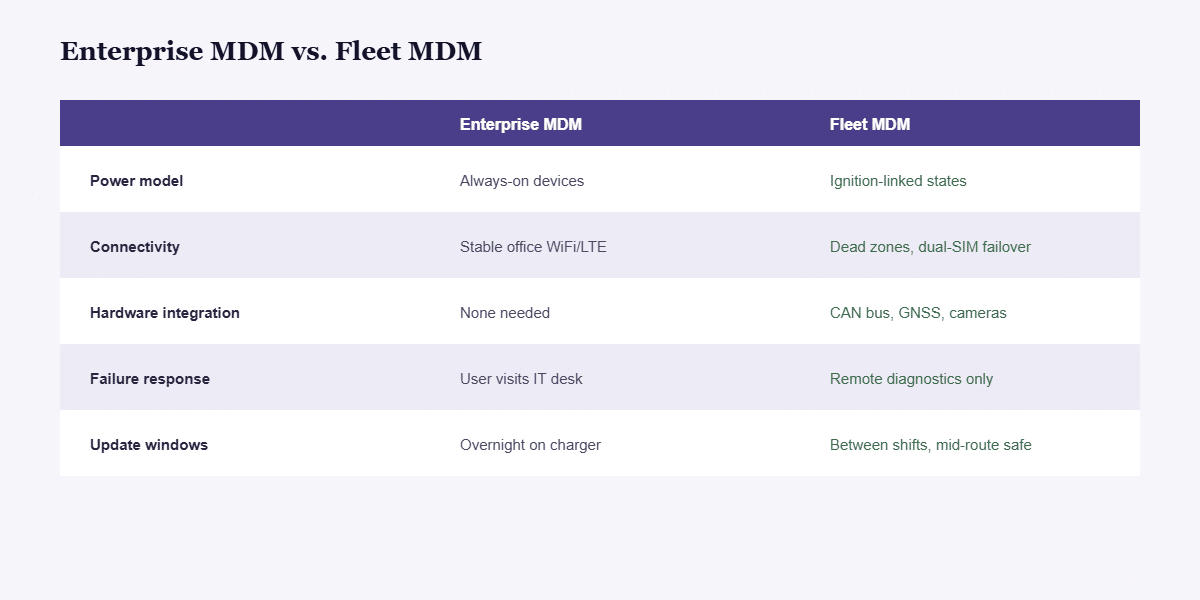
Office-grade MDM on vehicle terminals fails at these five rows, because the platform assumes conditions a vehicle never provides. The hardware side — which terminal specifications make CAN integration, ignition sensing and dual-SIM failover possible — is set out in the 10-inch rugged Android and Linux tablet hub and the rugged vehicle tablet buyer’s guide.
How Do I Choose an MDM Solution? Evaluation Checklist
- OTA resilience — do interrupted updates roll back safely when a vehicle drives out of coverage mid-download? See OTA firmware updates
- Ignition awareness — does the platform tell “device off with the vehicle” from “device failed”?
- Remote diagnostics depth — can support staff read logs and device state without a visit? See remote diagnostics and truck rolls
- Whitelisting and kiosk enforcement — can terminals be locked to approved applications? See kiosk mode and app whitelisting
- Scale behaviour — does batch deployment to 200 terminals work as reliably as to 5? See enrolment and inventory at fleet scale
- Data pipeline — does the platform expose device and vehicle data to your fleet-management system, or trap it? See MDM behind Samsara and Geotab
Can One MDM Solution Manage Mixed Android and Linux Terminals?
Yes, when the terminal family is dual-OS and the MDM platform comes from the same vendor. Most CF-Device VCM models run both Android and Linux on the same hardware, with the versions set per model: for example Android 14 and Linux 6.1 on the VCM M10, and Android 11 and Linux 5.10 on the V10-2, S10-2 PLUS and S10-2 PRO. A fleet mixing Android dispatch terminals and Linux machine-control terminals can then be managed in one device list rather than two systems. Third-party MDM platforms typically support one stack well and the other partially, so confirm both before mixing operating systems across a fleet. The architecture is explained in dual Android and Linux on vehicle tablets.
What Does a Fleet MDM Deployment Look Like?
Consider a logistics operator running 120 vehicles across three regions. A firmware update rolls out region by region between shifts. Two terminals reporting abnormal reboots are diagnosed remotely: one needs a configuration fix, one is flagged for swap. A new dispatch app version deploys to all 120 overnight, with the kiosk whitelist updated in the same push. Technician dispatches for the quarter: one. That operating profile, more than hardware price, is where fleet cost is decided. This is an illustrative scenario rather than a customer case study.
MDM, Fleet Management and Telematics: How Do They Fit Together?
MDM manages the devices themselves; telematics and fleet-management software consume the data those devices produce. A complete fleet runs both, connected, and they can draw on the same terminal: the GNSS position and CAN data that describe vehicle state can feed the fleet platform while device health reports to the MDM console. The fleet-management side is covered in fleet management: one terminal, full operational visibility and GPS tracking for fleet vehicles; third-party platform compatibility is in rugged tablets compatible with fleet management platforms.
Where Should I Start Reading?
This page is the hub for CF-Device’s MDM and device-management articles. Pick the one that matches your question:
| If your question is… | Read |
|---|---|
| What is MDM, in plain language? | What is mobile device management |
| How is MDM different from MAM? | MDM vs MAM |
| What should a platform do, and how do I compare? | Device management software, MDM software buyer’s guide, MDM management software platform guide |
| How do I enrol and track a fleet? | MDM solution: enrolment and inventory |
| Which hardware does MDM manage? | MDM devices |
| How do remote control and updates work? | Remote device management and OTA, OTA and fleet downtime |
| How do I cut site visits? | Remote diagnostics |
| How do I lock a terminal to one job? | Kiosk mode and app whitelisting |
| How does MDM fit with Samsara or Geotab? | MDM for fleet platforms |
| MDM for fleet tablets specifically | MDM for fleet tablets, MDM solutions for vehicle fleets |
To see how MDM sits beside driver monitoring, surround view and implement control, read One Tablet, Four Systems, DMS driver monitoring and AVM 360° surround view. For the whole picture, see the Rugged Vehicle Tablet Complete Guide. For how these systems map to each industry, see the applications hub and the field-by-field use cases guide.
Other Names for the Same Question
Operators also describe this layer as mobile device fleet management or fleet device management: the same job of enrolling, updating and monitoring every vehicle terminal from one console, which the guides below take step by step.
Common Questions
What is mobile device management in one sentence?
Software that lets an administrator configure, update, secure and monitor many devices remotely from a central console; for fleets, with vehicle-specific power, connectivity and hardware integration.
Is an MDM platform necessary for a small fleet of 10 vehicles?
Smaller fleets feel it less urgently, but remote diagnostics and OTA updates start to pay back the first time a terminal issue is resolved without a site visit.
Does kiosk mode replace MDM security policy?
No. Kiosk mode is one enforcement mechanism inside a broader MDM security posture that also covers encryption, remote wipe and update management.
Is CF-Device’s MDM platform included with the terminal or licensed separately?
This is agreed per project. Because CF-Device builds the platform in-house alongside the VCM hardware, bundling and licensing terms are set in the quote; ask for them in writing, together with the supported models and operating-system versions.
Which CF-Device terminals can the MDM platform manage?
The platform is designed for the VCM series. Operating-system versions, camera inputs and which onboard systems are available differ by model, so confirm the combination you need on the model page or with our team before specifying.
Interested in specs or a quote? Contact our team to discuss MDM deployment for your fleet.