

Rugged tablets compatible with fleet management platforms are the hardware answer for a fleet that has already standardised on Samsara, Geotab, Verizon Connect or another platform and does not want a new software subscription just to add vehicle-mount hardware. CF-Device builds the tablet hardware; the fleet keeps its existing platform. This article covers what “compatible” actually means in that arrangement, where hardware and software meet, and what to confirm before buying them separately.
TL;DR
- CF-Device sells vehicle-mount hardware, not fleet management software — VCM terminals run Android or Debian-based Linux (version varies by model) and install whatever platform app the fleet already uses
- “Compatible with Samsara” or “compatible with Geotab” means the tablet can run that platform’s Android app and expose the CAN and GPS data it expects — not that CF-Device has a formal partnership with every platform
- The real compatibility check is at three points: OS version, CAN protocol support (J1939/OBD-II), and whether the platform needs a specific certified device or accepts any Android tablet
- Some platforms (Samsara, Verizon Connect) sell certified hardware bundles and resist third-party tablets; others (Geotab, most open telematics platforms) are hardware-agnostic by design
- CF-Device’s VCM terminals carry wide-voltage DC input (5–36V or 9–36V by model), CAN bus and IP65–IP67 sealing (by model) regardless of which platform runs on top
I. Rugged Tablets Compatible With Fleet Management Platforms: Two Separate Purchases
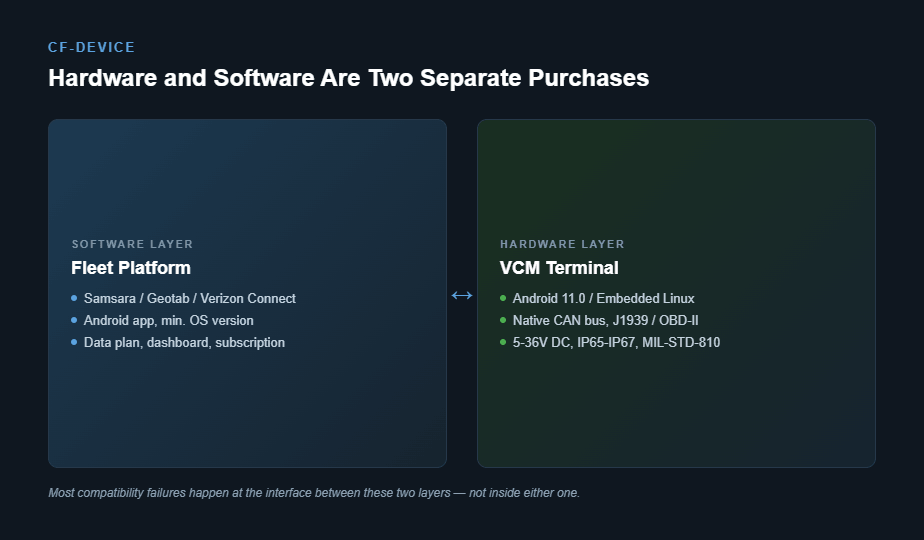
Fleet management is sold as a bundle often enough that buyers assume hardware and software have to come from the same vendor. They don’t. The platform — Samsara, Geotab, Verizon Connect, Motive, Webfleet, and dozens of others — is a subscription that runs an app and a backend. The tablet is the physical device mounted in the vehicle. A fleet can change one without touching the other, provided the hardware meets what the software expects.
In short: the platform is the software subscription; CF-Device supplies the terminal it runs on. Compatibility is a hardware spec question, not a vendor-lock question.
II. Where Hardware and Software Actually Meet
Three points decide whether a rugged tablet works with a given fleet platform, and none of them are about brand:
- OS version and API level — the platform’s Android app declares a minimum SDK version; a terminal running an outdated Android build simply can’t install it.
- Vehicle data access — platforms that read engine diagnostics need the tablet’s CAN interface to expose J1939 or OBD-II data in a format their app can parse, which is a native CAN bus and J1939 integration question, not a software one.
- Certification policy — some platforms only officially support hardware they’ve tested and certified themselves, and will provide limited support for anything else even if it technically runs.
CF-Device’s VCM terminals run Android or Debian-based Linux, with the operating-system version varying by model, and carry CAN bus support. That is the starting point for the first two points; the exact version still has to be checked against the platform’s minimum before ordering. The third point — certification policy — varies by vendor and is covered next.
III. Closed Platforms vs. Open Platforms
Fleet platforms split roughly into two camps. Closed platforms — Samsara and Verizon Connect are the most common examples — bundle their own certified gateway or tablet hardware and discourage bringing your own device; official support for third-party tablets is limited even when the app technically installs. Open platforms — Geotab is the clearest example, along with most telematics middleware built for integrators — are explicitly designed to run on hardware from any manufacturer, since their business model is the software and data layer, not the device.
Before specifying a tablet for a platform in the closed category, confirm directly with that platform’s support team whether third-party Android hardware is accepted for the specific app features the fleet needs — dash cam integration and driver ID hardware are the features most likely to require the vendor’s own certified device even on an otherwise open platform.
IV. What CF-Device Hardware Brings Regardless of Platform
Whichever platform ends up running on top, the terminal underneath it still has to survive the vehicle. CF-Device’s VCM series carries wide-voltage DC input (5–36V or 9–36V by model) with ignition detection, IP65–IP67 sealing by model, and MIL-STD-810-tested shock and vibration tolerance — the same durability baseline covered in our rugged vehicle tablet hardware buyer’s guide, independent of which fleet management app is installed on top.
Fleets running multiple vehicle types with different data needs — a mix of buses, utility trucks and fire apparatus, for instance — face the same hardware-selection logic covered in our mobile data terminal by sector guide: the platform layer stays constant, but interface requirements shift by vehicle type.
V. Managing Hardware Once It’s Deployed Across Platforms
A fleet running third-party hardware still needs to manage the devices themselves — pushing OS updates, locking the tablet to the platform’s app, and remotely diagnosing a unit that’s gone offline — separately from whatever the fleet platform’s own dashboard covers, since most fleet platforms manage vehicle and driver data, not device firmware. That device-layer management is covered in our MDM devices: what fleet hardware a platform actually manages guide.
VI. A Procurement Example
A regional logistics fleet standardized on an open telematics platform three years into deployment and needed to replace 40 aging Android tablets that had reached end-of-life. Buying the platform vendor’s own hardware bundle would have meant re-licensing and a mandatory software migration; instead, the fleet specified rugged Android tablets meeting the platform’s minimum OS and CAN requirements, kept the existing software contract unchanged, and replaced only the physical hardware. The platform vendor’s support team confirmed compatibility in a single email exchange before the order was placed — the kind of check that costs nothing and avoids the alternative of discovering a device limitation after 40 units are already mounted.
Can a Rugged Tablet Run Samsara or Geotab?
A rugged Android tablet can usually run a platform’s driver app, but whether the platform will support it is a separate question. Platforms that sell their own certified hardware may limit support for third-party tablets, while more open platforms are hardware-agnostic. CF-Device does not claim certification or partnership with any platform here: confirm directly with the platform’s support team, and confirm the tablet’s operating-system version, before ordering.
Other Names for the Same Question
Buyers ask for a samsara tablet, a tablet for fleet management software they already run, vehicle mount tablet third party software support, or hardware for existing fleet management system contracts. The check is the same each time: operating-system version, CAN access, and the platform's own support policy.
Which Guide Should I Read Next?
This article sits with the MDM behind Samsara and Geotab guide. Pick the next one by the question you still have open:
| If your question is… | Read |
|---|---|
| Does the platform itself manage the device? | MDM for fleet tablets, mobile device management hub |
| I want logging requirements on top of tracking | Best tablet for ELD logs |
| Tracker or terminal? | Fleet tracking hardware: GPS trackers vs vehicle terminals |
| How software and hardware work together | Automated fleet management: software and hardware |
| Choosing a device management platform | Device management software: what to look for |
| Hardware specification sequence | Rugged vehicle tablet buyer’s guide |
Frequently Asked Questions
Does CF-Device have official partnerships with Samsara, Geotab, or Verizon Connect?
CF-Device supplies rugged Android and Linux hardware that runs these platforms’ apps; confirm current certification or partnership status directly with each platform, since that status can change independently of the hardware itself.
Can I switch fleet management software without replacing my tablets?
Usually yes, provided the new platform’s minimum OS version and CAN data requirements match what the existing tablets support — this is the same compatibility check run in reverse.
What’s the biggest risk in mixing hardware and software vendors?
Losing vendor support for edge-case features — dash cam AI, driver ID hardware — that a closed platform may only fully support on its own certified device, even when the core app runs fine on third-party hardware.
Which CF-Device model is the standard choice for platform-agnostic deployments?
Start from the platform’s minimum Android version, not from the model. CF-Device’s models differ in operating-system version, so ask for the version of the specific model and check it against that minimum before ordering. The VCM S10-2 is the most widely deployed standard configuration, but it is not automatically the right match for every platform.
Platform compatibility assumes the terminal itself is specified correctly for road transport in the first place; the hardware side of that decision is set out in our truck computer in-cab terminal guide.
Which specific terminals trucking fleets run on those platforms — and how the mounted and handheld classes differ — is compared in the best tablets for truck drivers.
Interested in specs or a quote for hardware that runs on your existing fleet platform? Contact our team to confirm compatibility for your specific software.