
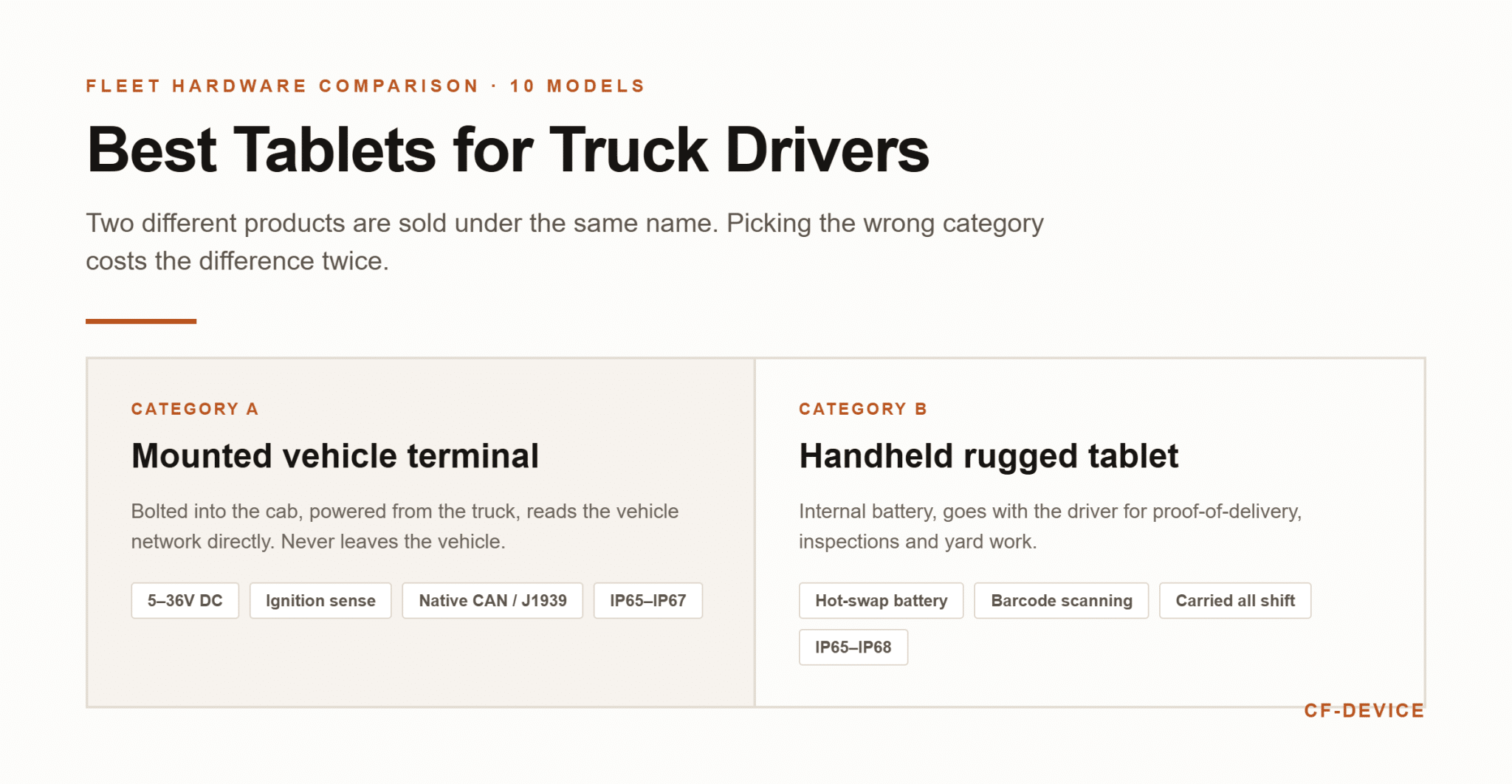
The best tablets for truck drivers fall into two product classes that are not substitutes: permanently mounted vehicle terminals and handheld rugged tablets. CF-Device manufactures the mounted kind for commercial fleets, and the question trucking operators ask us most is not which brand is best in the abstract but which tablet survives being bolted into a cab for five years. This list covers ten units genuinely used in trucking today, what each one does well and where each one fits. Specifications are taken from published manufacturer datasheets.
TL;DR
- Two different products are sold as “tablets for truck drivers” — permanently mounted vehicle terminals and handheld rugged tablets. They are not substitutes
- CF-Device’s VCM range covers the mounted category: IP65–IP67 depending on model, third-party vibration and shock tested, wide-voltage DC input (5–36V or 9–36V by model) with ignition sense, −30°C to +70°C
- Panasonic, Getac and Zebra lead the handheld rugged category and have stronger service networks in North America and Europe
- Samsung and Lenovo offer the lowest entry cost, with real trade-offs in power handling and vibration rating
- The deciding question is whether the device stays in the truck or leaves with the driver — everything else follows from that
Which Are the Best Tablets for Truck Drivers on This List?
- CF-Device VCM S10-2
- Panasonic Toughbook A3
- Getac ZX10
- Zebra ET45
- Samsung Galaxy Tab Active5
- CF-Device VCM V10-2
- Durabook R11
- Lenovo Tab M10 HD
- Winmate M101 Series
- CF-Device VCM V7-2
The Ten Tablets for Truck Drivers at a Glance
| Tablet | Category | Display | Power | Sealing |
|---|---|---|---|---|
| CF-Device VCM S10-2 | Mounted terminal | 10.1″, 750 cd/m² | 5–36V DC, ignition control | IP65 |
| Panasonic Toughbook A3 | Handheld | 10.1″ | Battery, hot-swappable | IP65 |
| Getac ZX10 | Handheld | 10.1″, 1000 cd/m² | Battery, hot-swappable | IP66 |
| Zebra ET45 | Handheld | 10.1″ | Battery | IP65 |
| Samsung Galaxy Tab Active5 | Semi-rugged handheld | 8″ | Battery, USB-C | IP68 |
| CF-Device VCM V10-2 | Mounted terminal | 10.1″, 750 cd/m² | 9–36V DC, ignition detection | IP67 |
| Durabook R11 | Handheld | 11.6″ | Battery, optional vehicle dock | IP65 |
| Lenovo Tab M10 HD | Consumer tablet | 10.1″ | Battery, USB charging | None stated |
| Winmate M101 Series | Rugged tablet with dock | 10.1″ | Battery, vehicle adapters | IP65 |
| CF-Device VCM V7-2 | Mounted terminal | 7″, 750 cd/m² | 5–36V DC, ignition detection | IP65 standard |
What Kind of Tablet for Truck Drivers Fits the Job?
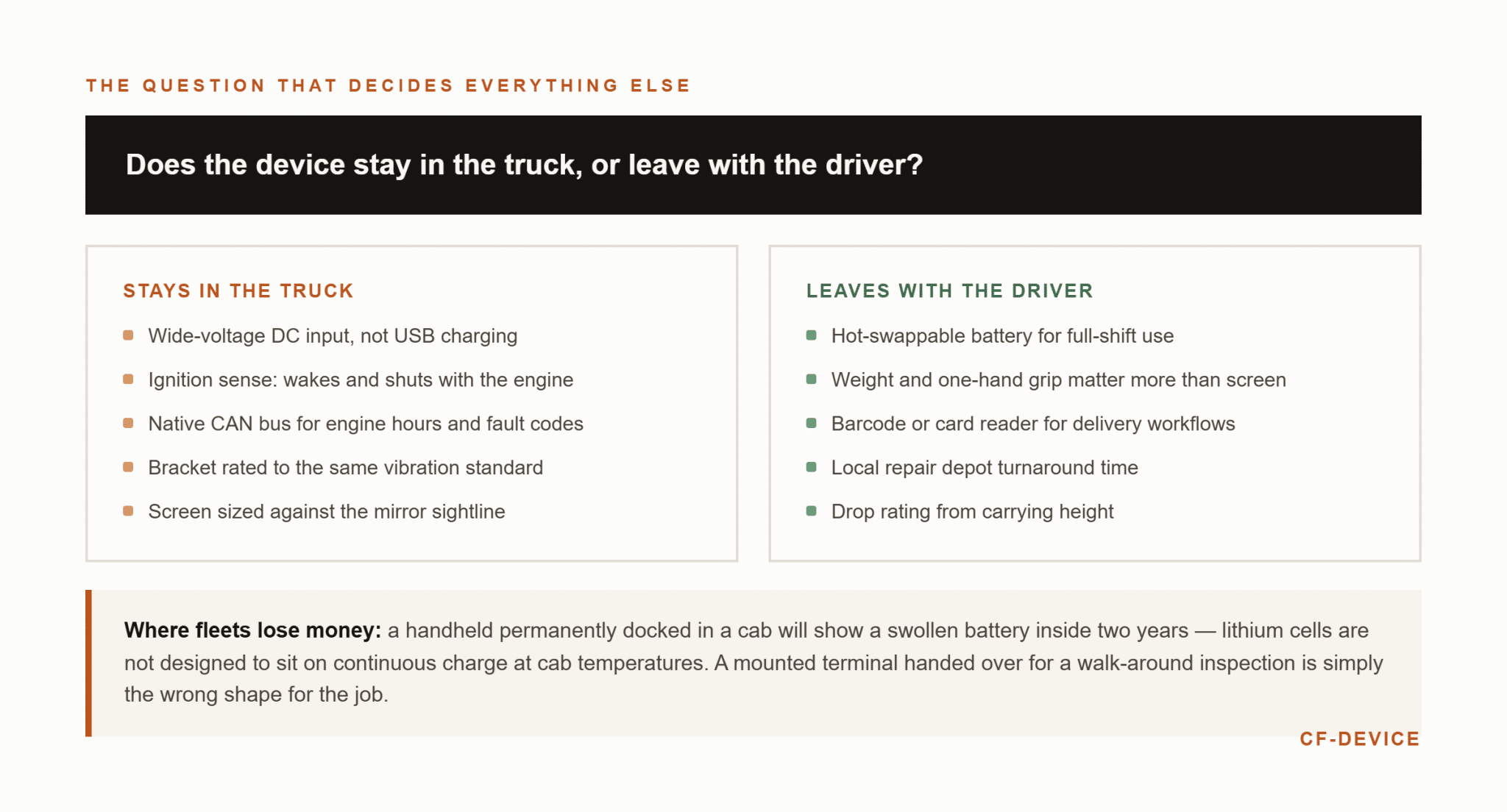
CF-Device’s position, after supplying both categories of buyer, is that this is the only question that matters before comparing brands. A mounted vehicle terminal is fixed to the cab, powered from the truck’s electrical system, and reads the vehicle network directly — it never leaves the truck. A handheld rugged tablet runs on an internal battery and goes with the driver for proof-of-delivery, inspections and yard work.
Fleets that buy the wrong category spend the difference twice. A handheld unit permanently docked in a cab will have a swollen battery inside two years because lithium cells are not designed to sit on continuous charge at cab temperatures. A mounted terminal handed to a driver for a walk-around inspection is simply the wrong shape for the job. Some operations genuinely need both.
1. CF-Device VCM S10-2
Category: Mounted vehicle terminal · Display: 10.1″, 750 cd/m²
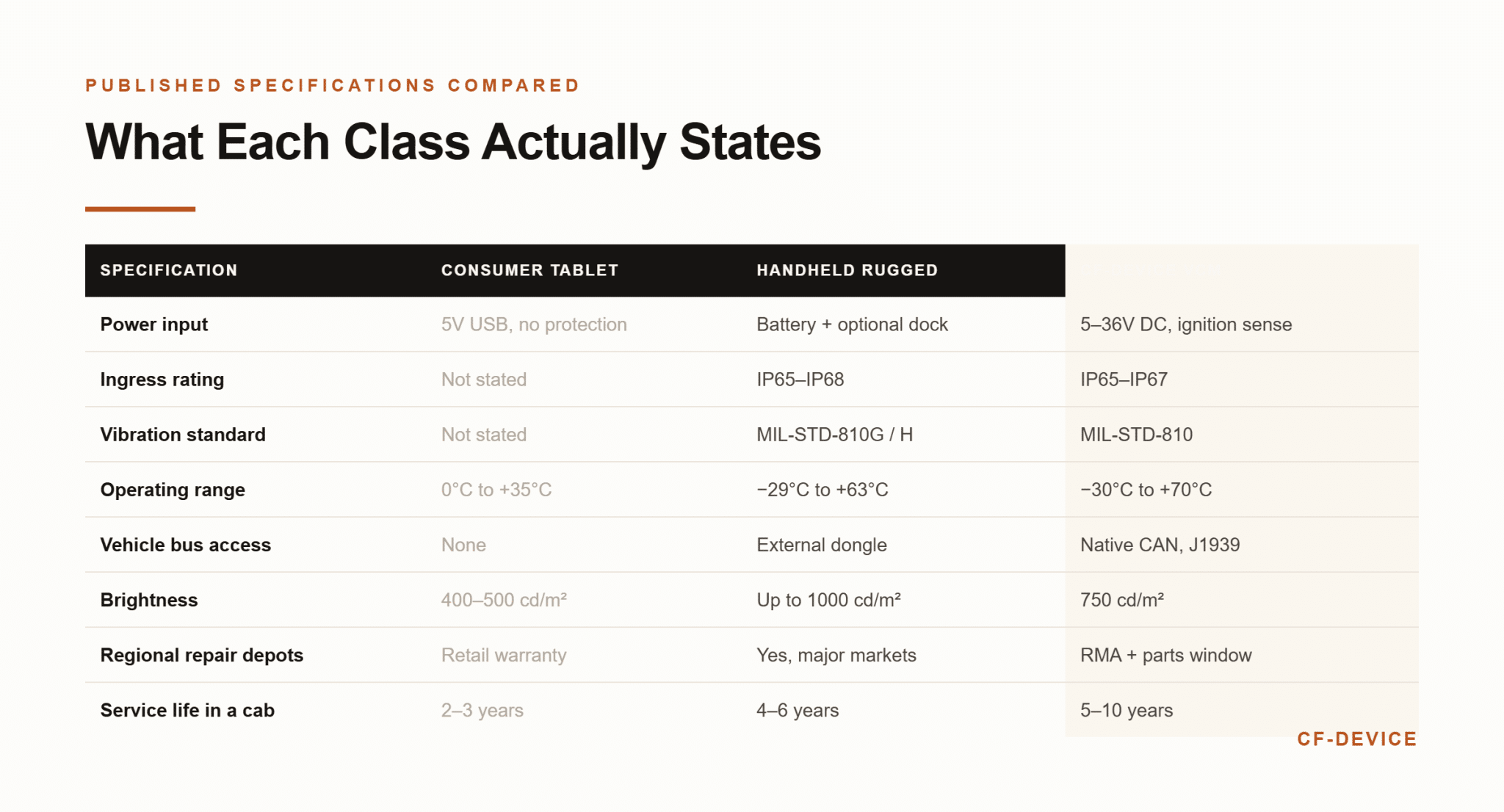
This is CF-Device’s most widely deployed configuration in trucking, and it is built around the power problem rather than the screen. Input is 5–36V DC with ignition control and a configurable delayed power-off, so the unit wakes with the engine, shuts down cleanly after it, and never presents a driver with a dead device at shift start. Native CAN bus with J1939 (see CAN bus and J1939 integration) lets it read engine hours, fuel data and fault codes from the truck rather than through an external dongle.
Sealing on the S10-2 is IP65, with third-party measured vibration and shock results listed on the datasheet (what certification covers is explained in IP67 vs MIL-STD-810), and the operating range is −30°C to +70°C. Where it fits: a fleet standardising on the S10-2 platform — it shares harness group C with the S10-2 PRO, S10-2 PLUS, V10-2 and V7A-2, so moving between those models does not mean rewiring the cab. Where it does not: anything the driver needs to carry.
2. Panasonic Toughbook A3
Category: Handheld rugged tablet · Display: 10.1″
Panasonic has the longest track record in this category and the strongest service infrastructure of anyone on this list. The A3 is an Android tablet rated IP65 and tested to MIL-STD-810H, with a hot-swappable battery — genuinely useful on a long shift, because a depleted pack can be changed without powering the device down. Optional barcode reader and smart card reader configurations suit driver check-in and delivery workflows.
What the Panasonic Toughbook A3 does well: multi-year warranty options and regional repair depots in most markets, which matters more than any single specification when a unit fails mid-route. Where CF-Device differs from the Panasonic Toughbook A3: the A3 is a battery-powered handheld, so a fleet wanting a permanently wired terminal with ignition-sense behaviour and native CAN access is comparing it against the wrong product class.
3. Getac ZX10
Category: Handheld rugged tablet · Display: 10.1″, 1000 cd/m²
Getac’s published brightness figure of 1000 cd/m² is the highest on this list and the ZX10 is rated IP66 with MIL-STD-810H testing — a stronger ingress figure than most handhelds, which typically stop at IP65. Operating range is −29°C to +63°C. Hot-swappable batteries and a sunlight-readable panel make it well suited to drivers working outside the cab in bright conditions.
What the Getac ZX10 does well: display legibility and ingress protection at the top of the handheld class. Where CF-Device differs from the Getac ZX10: CF-Device specifies 750 cd/m² on the VCM units on this list, which is calibrated for reading through a windscreen in a mounted position rather than under open sky; the trade-off buys lower power draw on a continuously powered unit. For fleets needing a permanently mounted terminal with 5–36V DC input, the ZX10 would require a separate vehicle dock and still would not provide native CAN.
4. Zebra ET45
Category: Handheld rugged tablet · Display: 10.1″
Zebra’s strength is the surrounding ecosystem rather than the tablet in isolation. The ET45 is rated IP65 with MIL-STD-810H testing, runs Android, and integrates natively with Zebra’s scanning hardware and device management tooling — which is decisive if a fleet already runs Zebra scanners in its warehouses and wants one management console across both.
What the Zebra ET45 does well: warehouse-to-road continuity and mature enterprise scanning integration. Where CF-Device differs from the Zebra ET45: the ET45 targets the mobile worker; CF-Device’s VCM units target the fixed cab position, with vehicle power protection and CAN access built in rather than added through accessories. Fleets whose drivers scan in the yard and also need an in-cab terminal often end up running both classes.
5. Samsung Galaxy Tab Active5
Category: Semi-rugged handheld · Display: 8″
The Active5 is the most accessible entry point into rugged Android: IP68 rated, MIL-STD-810H tested, with a replaceable battery and a no-battery mode that lets the unit run on external power with the pack removed — a genuinely thoughtful feature for semi-permanent installations, and the reason this model appears in vehicle deployments more often than its price suggests.
What the Samsung Galaxy Tab Active5 does well: lowest cost per unit of anything on this list that still carries a MIL-STD-810H claim, plus Samsung Knox for fleet device management. Where CF-Device differs from the Samsung Galaxy Tab Active5: input power. The Active5 charges over USB-C and has no ignition-sense logic or wide-voltage protection, so a truck’s voltage swings during cranking reach the charging circuit directly. CF-Device’s wide-voltage DC design with ignition control exists specifically for that condition, and the difference shows up over months rather than immediately.
6. CF-Device VCM V10-2
Category: Mounted vehicle terminal · Display: 10.1″, 750 cd/m²
Same family as the S10-2 with dual-SIM capability added (IP67 sealing, 9–36V DC input), which is the configuration CF-Device recommends for long-haul routes. On a run crossing several carrier coverage areas, a single-SIM terminal accumulates upload gaps — and for a fleet running electronic logging on the same device, a record that cannot upload is a compliance exposure rather than an inconvenience. The second SIM closes those gaps without driver intervention.
GPS/BDS/GLONASS positioning is standard, with centimetre-level GNSS available. AVM 360° surround-view support handles multi-camera installations. Where it fits: interstate and cross-border trucking where connectivity continuity matters more than unit price. Where it does not: short-radius urban delivery on a single carrier, where the S10-2 covers the same job for less.
7. Durabook R11
Category: Handheld rugged tablet · Display: 11.6″
Durabook occupies the middle ground between the premium handhelds and the consumer-derived options. The R11 is rated IP65, tested to MIL-STD-810H, runs Windows, and offers vehicle docking as a documented option — useful for fleets that need Windows software compatibility in the cab and are prepared to add a dock.
What the Durabook R11 does well: a fully rugged Windows platform at noticeably lower cost than Panasonic or Getac equivalents. Where CF-Device differs from the Durabook R11: CF-Device’s VCM range runs Android and Linux rather than Windows, and integrates vehicle power and CAN natively instead of through a dock. Where the application genuinely requires Windows, the R11 is a reasonable answer and CF-Device is not.
8. Lenovo Tab M10 HD
Category: Consumer tablet · Display: 10.1″
Included because it appears in real trucking deployments, usually at the start of a fleet’s digitisation. It is a well-built consumer Android tablet with good battery life and a low purchase price, and for a single owner-operator running navigation and a logging app it can work.
What the Lenovo Tab M10 HD does well: price, familiarity, and no procurement process required. Where CF-Device differs from the Lenovo Tab M10 HD: the M10 states no IP rating, no vibration standard and no DC input range — the four numbers CF-Device publishes on every unit. In CF-Device’s experience the failure is not immediate: a consumer tablet in a cab typically shows a swollen battery or charging failure at six to twelve months. At one truck that is an annoyance; across forty it becomes the largest line item in the deployment.
9. Winmate M101 Series
Category: Rugged tablet with vehicle dock · Display: 10.1″
Winmate is one of the few manufacturers on this list that builds both handheld rugged tablets and dedicated vehicle-mount computers, and the M101 sits between the two: rated IP65, MIL-STD-810G tested, with documented vehicle docking and wide-voltage vehicle adapters available. Windows and Android configurations are both offered.
What the Winmate M101 Series does well: genuine flexibility between carried and docked use, backed by a real vehicle-mount product line rather than an accessory afterthought. Where CF-Device differs from the Winmate M101 Series: CF-Device builds only for the fixed vehicle position, which is a narrower range but means wide-voltage input, ignition sense and CAN are in the base unit rather than the dock — one part number, one cable run, one spare to stock.
10. CF-Device VCM V7-2
Category: Mounted vehicle terminal · Display: 7″, 750 cd/m²
The smallest unit in the VCM range, and the correct answer more often than buyers expect. In a day cab or a compact layout, a 10.1″ terminal can sit in the mirror sightline — a safety problem that outweighs any readability gain. The V7-2 measures 200×134×32.5 mm at 0.685 kg and clears mounting positions the larger units cannot, while carrying 5–36V DC input, three CAN channels (two CAN and one CAN FD) and Gigabit Ethernet over an M12 X-code connector. Sealing is IP65 as standard, with IP67 available as a custom option.
Where it fits: day cabs, compact chassis, and any position where a bigger screen would block a mirror. Where it does not: multi-camera surround-view work, where the screen area genuinely limits what can be shown.
Tablet Computer on a Truck: What It Actually Has to Do
A tablet computer on a truck does four jobs, and which of them matters most decides the class you buy. It navigates and takes dispatch jobs; it records hours of service on the same screen; it reads engine and fault data from the vehicle bus; and, for cargo work, it captures proof of delivery, scans and photos. The first three belong to a truck tablet that stays in the cab and runs from the truck’s supply. The last belongs to a handheld that goes to the loading dock with the driver. A cargo tablet used only at the dock needs a good scanner and a swappable battery, not wide-voltage input; a tablet for truck drivers that must run all day in the cab needs the opposite. How the in-cab unit fits a wider dispatch setup is in what is a mobile data terminal.
How Should a Fleet Choose Between These?
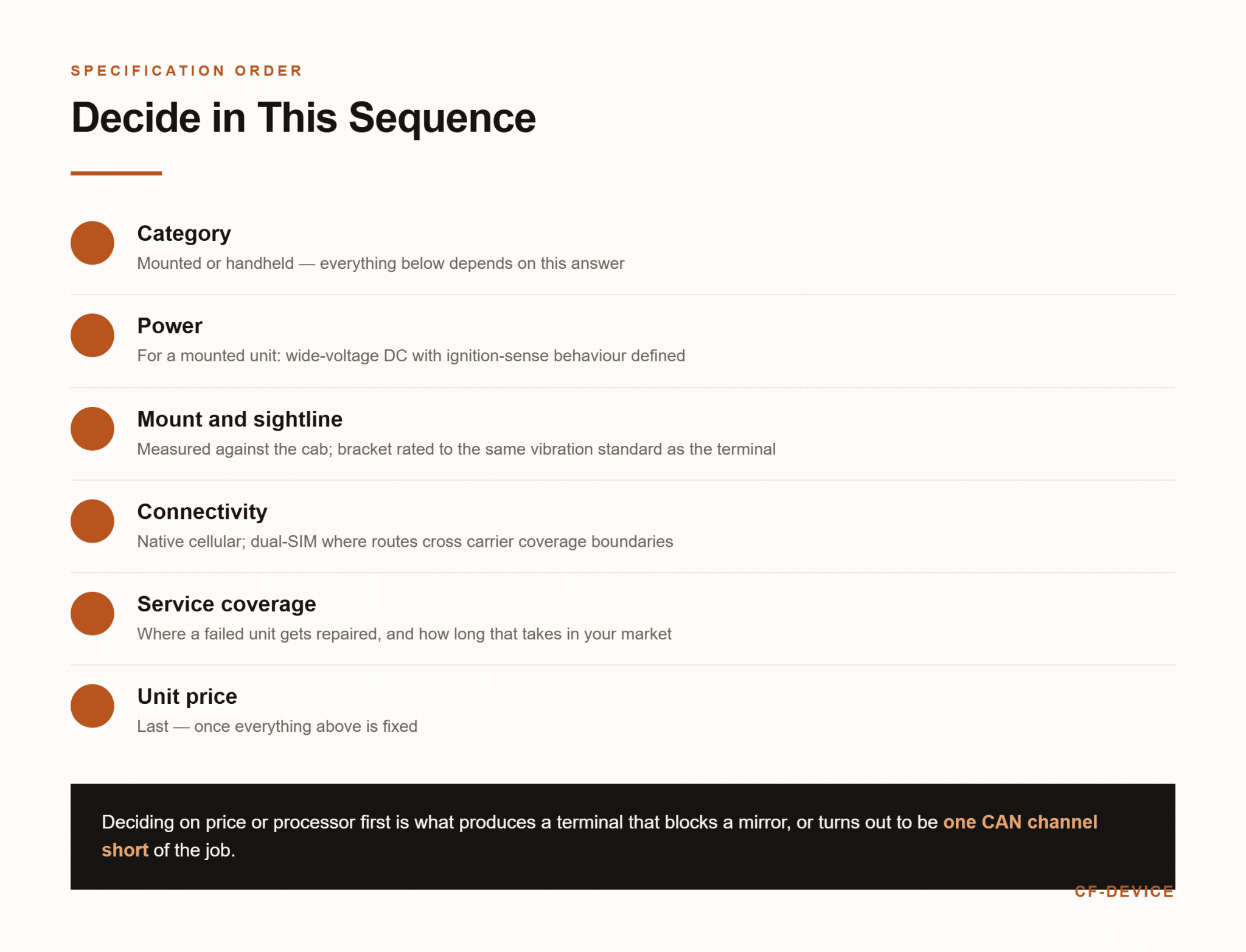
CF-Device works through this in a fixed order, because deciding on price or processor first is what produces a unit that will not clear a mirror or is one CAN channel short:
- Category — does the device stay in the truck or leave with the driver? Everything below depends on this
- Power — for a mounted unit, wide-voltage DC input with ignition-sense behaviour defined
- Mount and sightline — measured against the cab, with the bracket rated to the same vibration standard as the terminal
- Connectivity — native cellular, dual-SIM where routes cross carrier boundaries
- Service coverage — where a failed unit gets repaired, and how long that takes in your market
- Unit price — last, once the above are fixed
Item five is where the established handheld brands have a real advantage worth paying for in some markets: Panasonic, Getac and Zebra operate regional repair depots in North America and Europe that a Shenzhen manufacturer handles through RMA logistics instead. CF-Device’s answer is a defined parts-support window per platform so a unit failing in year six is repairable rather than triggering a fleet-wide replacement, but it is honest to say a local depot turns a unit around faster.
The full specification sequence for the mounted category is set out in our guide to the truck computer as an in-cab terminal, and the sizing method in how to choose the right tablet screen size for your vehicle. Trucking is only one of the sectors running these terminals; a wider comparison that adds docked tablets and navigation-class units for bus, fire and utility fleets is in the best mobile data terminals for fleets.
What Does a Trucking Deployment Look Like in Practice?
A common pattern across CF-Device’s fleet customers is a split rather than a single choice: mounted VCM terminals in every cab for navigation, dispatch, engine data and electronic logging, plus a smaller number of handheld rugged units shared between drivers for proof-of-delivery and inspections. The mounted units are specified once and left; the handhelds are a consumable pool that gets replaced on a shorter cycle.
Fleets that try to cover both jobs with one device usually end up dissatisfied with it in both roles. Where logging is the primary driver of the purchase, the requirements are worked through in what to specify in a tablet for ELD logs; where the terminal is part of a wider dispatch and tracking operation, see our logistics and transportation fleet terminal guide. A fleet already on a telematics platform should also confirm which hardware that platform accepts, covered in rugged tablets compatible with fleet management platforms.
Once deployed, forty or eighty terminals cannot be updated by visiting each truck — the management layer that handles firmware, configuration and device health remotely is covered in MDM for fleet tablets. The full hardware framework sits in the complete guide to rugged vehicle tablets.
Other Names for the Same Question
A truck tablet (also searched as a trucking tablet, tablet for truck or tablets for trucks) in this list means a unit that stays in the cab. A cargo tablet is its handheld counterpart, used at the dock and the delivery point. The choice between a truck tablet and a handheld rugged tablet is the category question at the top of this guide.
Which Guide Should a Trucking Fleet Read Next?
This list belongs to the rugged vehicle hardware hub. Pick the next guide by the question you still have open:
| If your question is… | Read |
|---|---|
| I need the logging requirements | Best tablet for ELD logs |
| I am choosing the in-cab terminal itself | Truck computer: choosing an in-cab terminal, rugged vehicle tablet hardware buyer’s guide |
| I need to decide between a tracker and a terminal | Fleet tracking hardware: GPS trackers vs vehicle terminals |
| I also run bus, fire or utility vehicles | 10 best mobile data terminals for fleets |
| I want to check who actually builds the hardware | Rugged tablet manufacturers: real maker or reseller |
| I want the wider fleet picture | Fleet management: one terminal, full visibility, top use cases for rugged vehicle tablets |
Frequently Asked Questions
What is the best tablet mount for truckers?
Whichever one is rated to the same vibration standard as the tablet on it and fixed to cab structure rather than trim plastics. CF-Device ships VCM units with standard RAM-style mounting holes for this reason — a terminal that passed its own vibration testing on an unrated bracket still shakes loose, and the resulting intermittent connection reads to the driver as a faulty tablet.
Can a truck driver just use a consumer tablet?
For one truck, often yes. Across a fleet the failure rate becomes the cost: no IP rating, no vibration standard and a 5V USB charging circuit exposed to a truck’s voltage swings typically produce battery or charging failures at six to twelve months.
Do I need a GPS tablet for truckers, or is the phone enough?
A phone covers navigation. It does not cover a fleet-owned record of where the vehicle was, engine data read from the bus, or connectivity that does not disappear when the driver’s personal device leaves the cab. Positioning tiers are compared in our GPS tracking device guide.
What is the difference between a truck tablet and a cargo tablet?
A truck tablet stays in the cab, runs from the truck’s supply and reads vehicle data. A cargo tablet is a handheld used at the dock and delivery point for scanning and proof of delivery. Some fleets run both.
Which CF-Device model should a truck fleet start with?
The VCM S10-2 for most mixed fleets, the VCM V10-2 where routes cross carrier coverage boundaries, and the VCM V7-2 for day cabs with limited dash space. All three list vibration and shock test results, detect ignition, and operate from −30°C to +70°C. Sealing and input differ by model: the S10-2 is IP65 on 5–36V DC, the V10-2 is IP67 on 9–36V DC, and the V7-2 is IP65 as standard on 5–36V DC.
Interested in specs or a quote? Contact our team to discuss in-cab terminals for your truck fleet.