
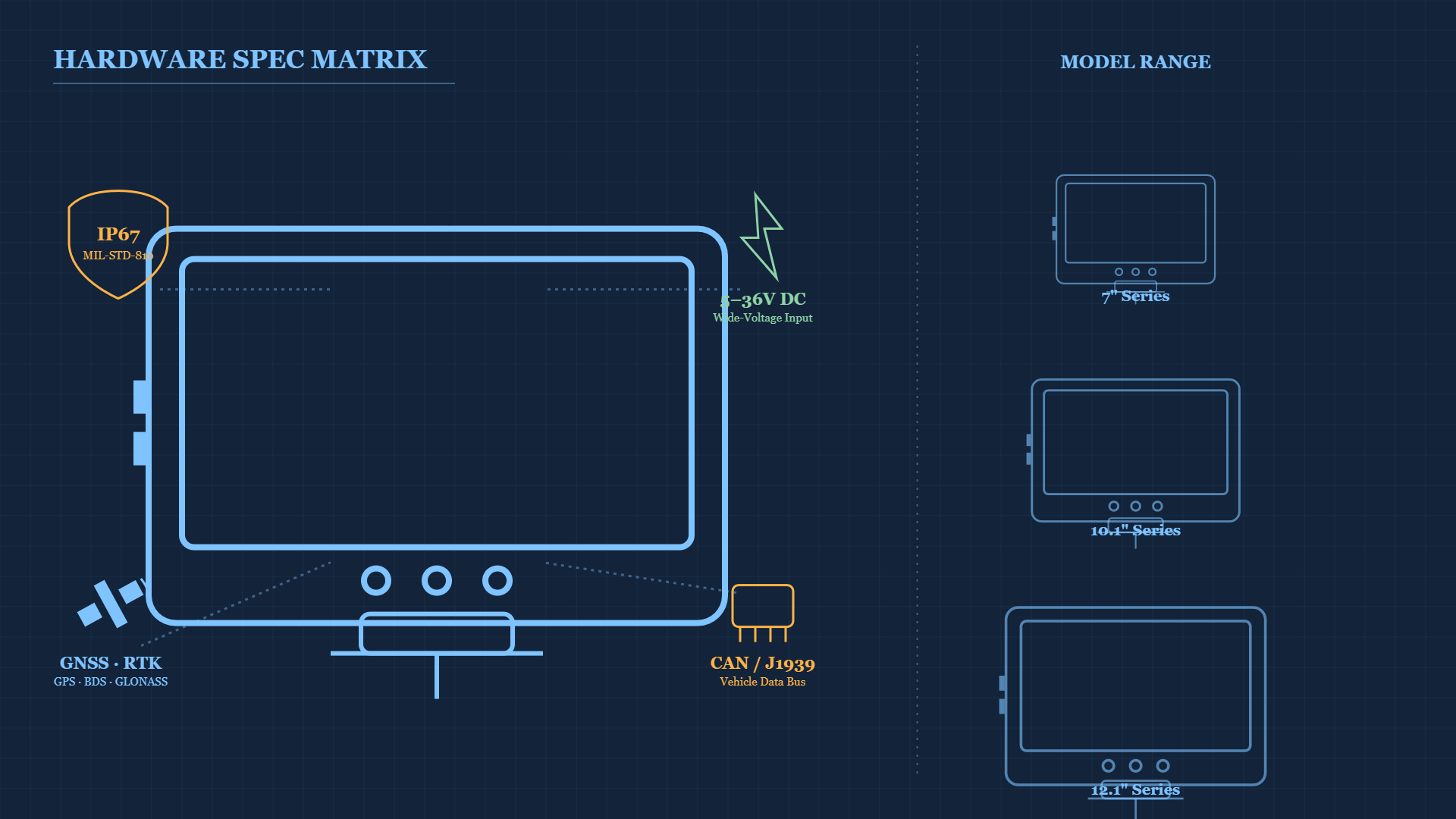
Choosing rugged vehicle tablet hardware comes down to five dimensions at once — durability, power, positioning, data integration and computing — and only then on model number. CF-Device builds the VCM series (7″ to 12.1″) and the screenless TANK V2 to those five dimensions: IP65 to IP67 sealing, MIL-STD-810 testing, a wide-voltage DC input with ignition sense, native CAN bus and a sunlight-readable display. Supply voltage, operating temperature and interfaces differ by model, so this guide shows how to work through them and links to the detailed breakdown of each.
TL;DR
- Five independent dimensions decide a rugged tablet: durability, power, positioning, data integration, computing
- Fix the environment and the software requirements first; screen size is the last decision
- IP65 covers dust and water jets (road, field); IP67 covers washdown and temporary immersion; MIL-STD-810 covers shock and vibration
- Wide-voltage DC input lets one platform serve 12V and 24V vehicles, but the range differs by model (5–36V on some, 9–36V on others)
- The VCM range covers 7″, 8″, 10.1″ and 12.1″ displays, and the TANK V2 covers screenless installs
How Do I Choose Rugged Vehicle Tablet Hardware?
Most buyers start by comparing model numbers. That is backwards: the model falls out once the five dimensions are fixed against the operating conditions. Work through durability, power, positioning, data integration and computing first, and the shortlist is short. Before comparing models at all, confirm that whoever is quoting them builds them — the checks are in rugged tablet manufacturers: how to tell a real maker from a reseller.
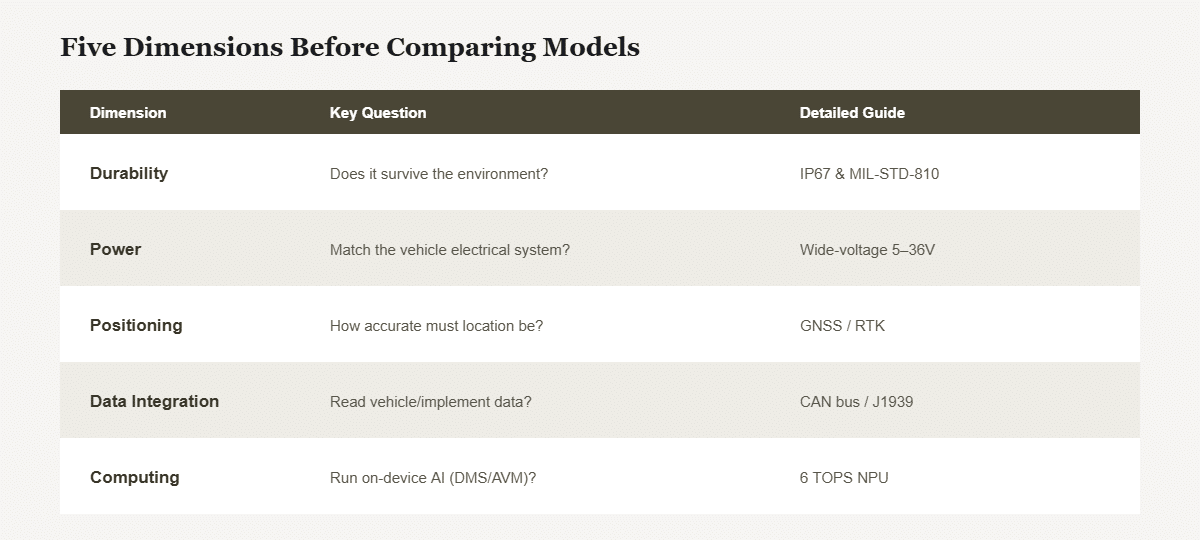
| Dimension | Key question | Detailed guide |
|---|---|---|
| Durability | Does it survive the environment? | IP67 and MIL-STD-810 |
| Power | Does it match the vehicle’s electrical system? | Wide-voltage DC input |
| Positioning | How accurate must location be? | GNSS and RTK |
| Data integration | Must it read vehicle or implement data? | CAN bus and J1939 |
| Computing | Does it run on-device AI (DMS, AVM)? | NPU and TOPS |
What Certifications Does a Rugged Vehicle Tablet Need?
Durability is whether the unit survives where it sits. IP67 and MIL-STD-810 explains dust and water sealing, and shock and vibration testing. If you are choosing between sealing tiers, IP65 vs IP67 covers which is enough for road and field use and which is needed for washdown or submersion. CF-Device VCM units are sealed to IP65 to IP67 and tested to MIL-STD-810; the operating temperature range is specified per model.
What Power Input Does a Vehicle-Mount Tablet Require?
Vehicle-mount tablets draw power from the vehicle, which varies between light vehicles and heavy equipment. Wide-voltage power design and the wide-voltage DC input range explain how one tablet copes with cranking dips and load spikes without a custom supply per vehicle type. The range differs by model: for example 5–36V on the VCM M10, S10-2 PLUS and S10-2 PRO, and 9–36V on the V10-2, V10 PRO, V12-2 and V12. Always confirm the rated input against your vehicle’s system. For fleets running around the clock, power design for 24/7 operation covers ignition control and delayed power-down.
How Accurate Does GPS Need to Be on a Fleet Tablet?
Positioning underpins fleet tracking, guidance and telematics. GNSS positioning with GPS, BeiDou, GLONASS and centimetre-level RTK sets out the accuracy tiers, and RTK is optional on selected models rather than standard. For fleets weighing an integrated terminal against a standalone tracker, the fleet GPS tracking hardware guide covers the trade-off.
Can a Rugged Tablet Read Engine and Implement Data?
Yes, through CAN bus. CAN bus and J1939 integration covers how a tablet reads engine, hydraulic and sensor data, and RS232 vs RS485 and automotive Ethernet cover the serial and network layers beside it. Interface count is usually the specification that decides whether a unit fits a machine. Where no standard configuration offers the interface set a machine needs, the customisation levels are set out in the industrial tablet OEM and ODM guide.
Does a Rugged Vehicle Tablet Need an NPU for AI?
Only for vision-based features such as driver monitoring or pedestrian detection. 6 TOPS NPU computing and edge AI vision explains why on-device processing decides whether those features run in real time; in CF-Device’s range the 6 TOPS NPU is on the VCM M10. How that computing power is used by the software is covered in One Tablet, Four Systems: MDM, DMS, AVM 360° and ISOBUS VT.
What Screen Size Should I Choose for My Cab?
| Screen | Best for | Trade-off |
|---|---|---|
| 7″ (V7 series, S7) | Compact cabs, cost-sensitive and retrofit jobs | Less on-screen data area |
| 8″ (V8 PRO) | Physical-button and blind operation | Mid-range footprint |
| 10.1″ (V10, S10, M10) | Fleet standard, AVM, dispatch | Balanced default |
| 12.1″ (V12 series) | ISOBUS control, multi-camera surround view | Needs cab space |
| Screenless (TANK V2) | Custom or hidden display installs | Needs an external screen |
The sizing method, including how to read diagonal against body dimensions, is in how to choose the right tablet screen size for your vehicle.
What Does a Mixed-Fleet Deployment Look Like?
A mixed-fleet buyer specifies to the harshest case first: open-cab excavators (IP67 and MIL-STD-810, 12.1″ for surround view). The same platform family then serves road trucks (10.1″, dual-SIM, meter-level GPS) and compact service vehicles (7″). One qualification round, one mounting approach and one MDM console keep a varied fleet on a single coherent platform; check the power input and temperature range per model as you go.
Which CF-Device Models Are Available?
The range spans screen sizes and feature sets to match different vehicles and duty cycles:
| Model | Screen | Pick it for |
|---|---|---|
| VCM M10 | 10.1″ | On-device AI vision (6 TOPS NPU), up to eight AHD cameras, newest Android and Linux |
| VCM V12 PRO | 12.1″ | Four CAN channels with Gigabit Ethernet on an M12 connector |
| VCM V12 | 12.1″ | ISOBUS VT farming and heavy equipment |
| VCM V12-2 | 12.1″ | 5G and 1T computing power (0.8T NPU support) |
| VCM V10 PRO | 10.1″ | Everyday fleets; Android only |
| VCM V10-2 | 10.1″ | Dual-SIM connectivity, IP67, AVM 360° |
| VCM V8 PRO | 8″ | Nine physical buttons for blind and gloved operation |
| VCM S10-2 PRO | 10.1″ | Up to four CAN channels and radio support |
| VCM S10-2 PLUS | 10.1″ | AVM 360° with up to eight AHD cameras, SocketCAN |
| VCM S10-2 | 10.1″ | Entry-level standard configuration |
| VCM V7-2 | 7″ | Compact cabs with 5G and 1T computing power (0.8T NPU support) |
| VCM V7A-2 | 7″ | Anti-glare full screen for direct sun |
| VCM V7 PRO | 7″ | Entry-level 7″ unit |
| VCM S7 | 7″ | Vehicle-grade 7″ unit with a long deployment record |
| TANK V2 | Screenless | External display over HDMI, four CAN channels |
Operating system versions, supply voltage, temperature range and interfaces differ across these models, so confirm them on the model page before specifying. For all fifteen models side by side, see the VCM model comparison chart. The platform-level decision above all of them — Android or Debian-based Linux, and the full specification sequence — is in the 10-inch rugged Android and Linux tablet hub. If the question is a form factor rather than a tablet, what is an onboard computer and embedded computer: the four forms compare the options, with ten real systems in embedded computer examples.
Where Should I Start Reading?
This guide is the hub for CF-Device’s buying and hardware-specification articles. Each group below goes deeper on one decision.
Buying and Suppliers
Rugged industrial tablet: the four types sorts vehicle-mount, handheld, washdown and screenless units. Rugged tablet manufacturers, industrial PC manufacturers: five kinds of supplier and distributor, vendor or manufacturer cover who to buy from. Industrial tablet OEM and ODM covers the five customisation levels. For a brand comparison, see the Zebra rugged tablet alternative for permanent vehicle mounting; for owners buying across several uses, best tablet for business owners.
Hardware Specifications
IP67 and MIL-STD-810 and IP65 vs IP67 cover durability; wide-voltage power design, the wide-voltage DC input and 24/7 power design cover power; GNSS and RTK covers positioning; and CAN bus and J1939, RS232 vs RS485 and automotive Ethernet cover data interfaces.
Wider Context
For the full picture across hardware, software and industries, see the Rugged Vehicle Tablet Complete Guide, the mobile device management hub and the applications hub, or start from the CF-Device homepage.
How Long Should a Rugged Vehicle Tablet Last?
Five to ten years in service is a realistic planning figure for a vehicle-grade unit, against two to three for consumer hardware in the same conditions. The figure that decides total cost is parts availability: a unit that fails in year six is either repaired or forces a fleet-wide replacement of terminals that were all bought together. Ask any supplier for the parts and OS support window in writing, and prefer a platform you can keep buying in year four with the same mount, connector and OS image as the units already installed.
What Is the Difference Between a Rugged Tablet and an Industrial Tablet?
Nothing consistent. The terms are used interchangeably across the market, along with rugged tablet computer, industrial grade tablet and mobile rugged computers. Because the naming carries no information, judge a unit on four published numbers instead: IP rating, MIL-STD-810 test method, operating temperature range and DC input voltage. A vendor that cannot give all four without being asked is describing a consumer device with industrial marketing. What separates the genuine categories is in the four types of rugged industrial tablet.
Other Names for the Same Question
This page doubles as a rugged tablet hardware guide for anyone comparing in vehicle tablets. A vehicle mounted rugged tablet is judged on the five dimensions above, and a vehicle mounted rugged tablet supplier should be able to give the figures for each model without being asked.
Common Questions
Which certification matters most for outdoor agricultural or construction use?
Both: IP67 for dust and water, and MIL-STD-810 for vibration, shock and temperature. A tablet needs sealing and mechanical testing together to survive open-cab equipment; IP65 is enough where there is no washdown or immersion.
Do all models support the same power input range?
No. Some models take 5–36V and others 9–36V, so confirm the specific model’s rated input against your vehicle’s electrical system.
How do I choose between screen sizes?
Smaller screens (7″) suit compact cabs and cost-sensitive deployments; larger screens (10.1″ to 12.1″) suit applications that need more on-screen data, such as ISOBUS implement control or multi-camera surround view.
What is the difference between a vehicle-mount tablet and a handheld rugged tablet?
A vehicle-mount unit is fixed in the cab, powered from the vehicle with ignition sense and reads the machine bus directly. A handheld runs on an internal battery and travels with the operator. Leaving a handheld permanently on a charging dock keeps its battery on continuous charge at cab temperatures, which shortens battery life, so a docked handheld is a poor substitute for a vehicle-mount unit.
Which CF-Device model should a first-time buyer start with?
Start from the 10.1″ class, which suits the widest range of cabs. The VCM S10-2 is the entry-level 10.1″ unit on an older platform; where a current Android version, more cameras or on-device AI matter, look at the VCM S10-2 PLUS or the VCM M10. Confirm the specifications for your model before ordering.
Should I match one model to my whole mixed fleet, or use several?
Specify to the harshest environment and most demanding software combination in the fleet. One platform family qualified for the worst case usually serves the lighter cases too, which keeps mounting, power and management standardised.
Interested in specs or a quote? Contact our team to discuss the right configuration for your fleet.